
Featured Blog
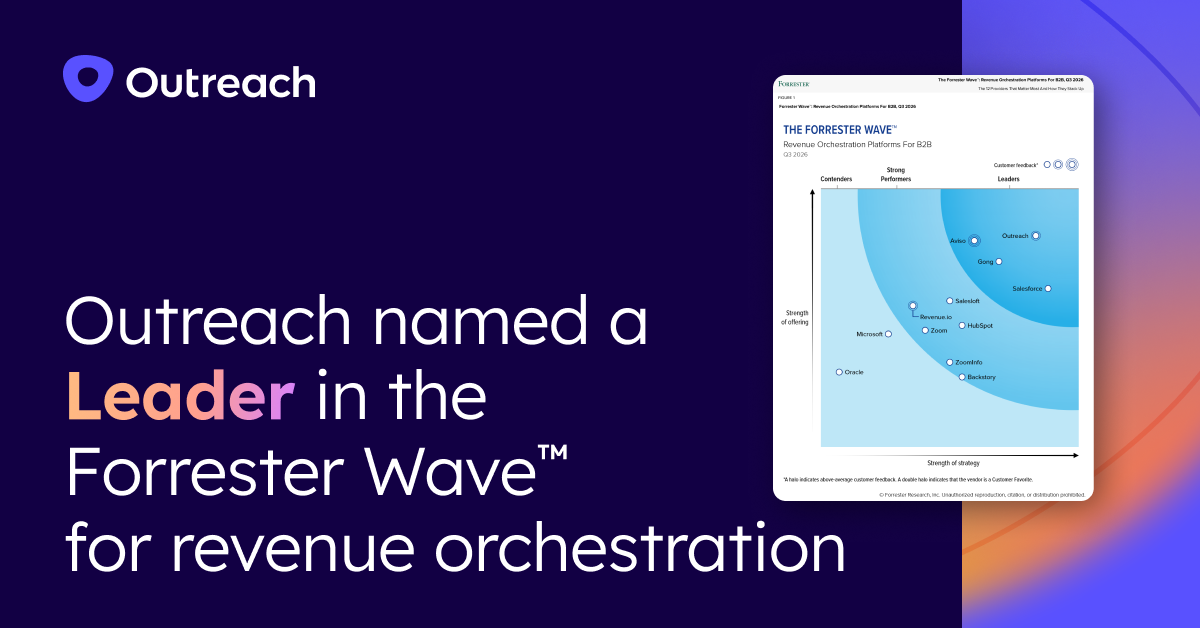
Outreach named a Leader in the Forrester Wave™ for revenue orchestration
September 24, 2026
Learn more
Get tips, tricks, and best practices from top sales leaders
Outreach named a Leader in the Forrester Wave™ for revenue orchestration
September 24, 2026
Meet Kaia: The complete guide to Outreach's conversation intelligence
September 16, 2026
Account planning workflow benchmarks: what 148 real sales sessions reveal
July 28, 2026
AI Adoption for Revenue Teams: Leading Without Change Fatigue
July 24, 2026
Average cost per lead by industry in 2026: A complete guide
November 6, 2026
TL;DR: Cost per lead varies widely by industry, so cross-industry averages mislead. Check your range against an industry benchmark, then judge spend by cost per qualified lead and apply the cost per qualified lead optimization strategies below to lower it.
Acquisition costs and budget pressure are both rising. The 2025 CMO Survey found that 63% of CMOs now report increased pressure from CFOs, up from 52% the prior year. Benchmark data also show higher customer acquisition and selling costs across B2B.
For revenue and finance leadership, defensible numbers are essential for planning spend, justifying decisions to the board, and identifying where the funnel is leaking value.
The problem is that most cost per lead (CPL) benchmarks floating around are either outdated, channel-specific, or cross-industry averages that tell you nothing about whether your numbers are competitive in your market.
This article covers what cost per lead and cost per qualified lead (CPQL) are, why they matter beyond a marketing dashboard, 2026 industry benchmarks, and how to lower CPQL by improving what happens after a lead arrives.
Average cost per lead is the total marketing and sales spend required to generate one lead over a given period, calculated by dividing total spend by total leads acquired.
It is one of the most widely used efficiency metrics in demand generation because it allows revenue and finance teams to compare the cost-effectiveness of different channels, campaigns, and markets on a consistent basis.
One distinction worth keeping clear: channel-level CPL measures the cost of leads from a single source such as paid search, organic content, or events. Blended CPL averages costs across all channels.
Blended CPL is most useful for planning and benchmarking because it reflects the full cost of your demand generation program, not just one slice.
Average cost per lead (CPL) measures what one lead costs a team over a given period.
Cost per lead = total lead generation spend ÷ number of leads
A team that spends $50,000 in a quarter and generates 200 leads has a cost per lead of 250(50,000 ÷ 200). The formula also works at two levels:
Cost per qualified lead (CPQL) measures what one lead that meets your qualification standard costs.
Cost per qualified lead = total lead generation spend ÷ number of qualified leads
If 50 of the 200 leads in the example above qualify, the cost per qualified lead is 1,000(50,000 ÷ 50, four times the cost per lead on the same spend.
Cost per lead started as a marketing metric, but planning decisions outside marketing depend on it.
Industry context determines whether a lead cost signals strong performance or warrants closer review. The table shows 2026 figures for ten B2B industries. Cost per qualified lead runs higher in every industry because only a share of leads qualify.
Sources: Data compiled from First Page Sage, Sopro, and HubSpot
Two companies in the same industry can pay different prices per lead, and four factors explain most of the difference.
Industries with larger average contract values and longer sales cycles tend to carry higher CPLs because the market expects more sophisticated, trust-building content before a buyer engages. Financial services, legal, and higher education all fit this pattern. When deal sizes justify it, a higher CPL can represent sound economics rather than waste.
First Page Sage found that paid leads cost more than organic leads in 28 of 30 industries. The widest premium sits in B2B SaaS, where paid leads cost 71% more ($318 versus $186), while staffing and recruiting is one of the two exceptions.
A program weighted toward paid channels pays that premium on more leads, so assign each segment a primary motion, inbound and outbound, by deal size and sales cycle.
Organizations that over-index on expensive paid channels without balancing the mix tend to run CPLs well above the industry average. Competitive density in the ad auction directly affects each lead's cost.
Geography can change the math materially within the same industry. A financial services firm targeting enterprise accounts in New York will face meaningfully different acquisition costs than one targeting mid-market accounts in the Midwest, even with an identical channel mix.
Organizations with stronger thought leadership and category visibility can create demand more efficiently. Edelman and LinkedIn research found that 75% of decision-makers and C-suite executives said a piece of thought leadership led them to research a product they hadn't previously considered.
Offer design matters too: a high-value content asset or clearly differentiated free trial generates more conversions per dollar than a generic "book a demo" page in a saturated market.
These cost-per-qualified-lead optimization strategies work in two ways: they lower the cost per lead, or they qualify more of the leads a team already has, and the strongest programs do both. They all start with one shared definition of qualified.
Marketing and sales leaders write the definition together on one page. It lists firmographic criteria (industry, company size, geography), behavioral signals (pricing page visits, demo requests, repeat engagement), and the minimum engagement a lead needs before it passes to sales. Borrow structure from qualification frameworks such as budget, authority, need, and timeline (BANT).
RevOps owns the page, and the step works when sales accepts most of the leads marketing sends and both teams quote the same qualified-lead count. Without it, marketing chases volume and sales rejects the result.
Define the ideal customer profile (ICP) by industry, company size, revenue range, and technology stack, then add buyer signals such as a role change, a hiring surge, or repeat visits to high-intent pages. Have sales and marketing sign off on one scorecard before it touches campaign targeting, because vague audiences fill the funnel with low-intent contacts.
Marketing operations owns the scorecard. Expect volume to drop at first; success shows when the qualification rate rises enough that cost per qualified lead falls.
Build a table with one row per channel and columns for spend, leads, qualified leads, cost per lead, cost per qualified lead, and sales win rate on qualified leads. A channel with a low cost per lead that qualifies few leads costs more than it looks, and a pricier channel that converts well costs less.
Marketing operations refreshes the table monthly, and the next budget cycle shifts spend toward the lowest cost per qualified lead. The result to watch is blended cost per qualified lead, which should fall while qualified volume holds.
Content and search engine optimization (SEO) build a channel that does not charge per click. Map the questions your best customers ask before they engage, using sales call notes and customer relationship management (CRM) records, then publish answers deep enough to rank.
A content lead owns the plan. Organic leads arrive more slowly than paid ones, so progress shows as organic's share of qualified leads growing quarter over quarter.
Set a maximum response time for every inbound lead and measure it against the actual first touch. Document the inbound lead flow from form submission to first touch, assign an owner on creation through routing rules, and set aging alerts for leads past the ceiling.
RevOps owns the rules and reviews them each quarter, and the step works when the median time to first touch sits inside the ceiling.
Define one follow-up pattern across email, phone, and tasks, with a fixed number of touches over a fixed window and an end point where the lead qualifies, moves to nurture, or closes out. Build it as one of your sales sequences, and consider sales process automation for the early touches so they go out when no rep is free.
Sales leadership owns the pattern, and the signal to track is the share of leads that reach a qualify-or-exit decision inside the window.
Move leads that fail qualification today into a nurture track with a defined trigger for returning to sales, such as a role change at the account or a return visit to a pricing page. Set the timing and steps in advance, and use AI lead nurturing to watch for those triggers and route renewed interest to the revenue team.
Marketing owns the track and measures the share of nurtured leads that re-enter sales as qualified.
Each month, the revenue team shares which leads qualified, which sales rejected, and why. Marketing can then judge channels on cost per qualified lead and move spend toward the sources that qualify.
Revenue operations owns the shared report because it sits between the two teams, which also helps break down data silos. The step worked when marketing changes a campaign or channel based on rejection reasons within the same quarter.
Outreach, the only agentic AI platform for revenue teams, increases the share of paid-for leads that qualify and convert, lowering cost per qualified lead without changing what each lead costs. Teams act on each lead inside the workflows they already run, and people make the qualification and deal decisions.
According to the Outreach Insights Group's 2026 Agent Productivity Impact Report, AI-assisted inbound follow-up increased meeting bookings by 40% within the first 24 hours of integration.
Lead cost becomes a revenue decision once a team reads it alongside what each lead produces. An industry benchmark shows whether spend sits in a normal range.
Cost per qualified lead shows whether that spend turns into pipeline, so the next budget review can compare channels on qualified results instead of volume.
Outreach, the only agentic AI platform for revenue teams, connects follow-up, account research, and deal activity in the workflows that revenue operations and finance use to judge the spend.
Divide total lead generation spend by the number of leads produced in the same period. A team that spends $30,000 and generates 120 leads pays $250 per lead. For cost per qualified lead, divide the same spend by qualified leads only.
It depends on the industry. Costs run from under $100 in eCommerce and HVAC to nearly $1,000 in higher education, with legal services near $682 and financial services near $662. B2B SaaS sits near $249, or $188 in Sopro's 2025 update. Paid leads usually cost more than organic ones.
First Page Sage's 2025 lead-to-opportunity benchmarks run from 2.8% in aerospace and aviation to 11.8% in HVAC. B2B SaaS sits at 6.2%, financial and legal services at 5.4%, and IT and managed services at 3.0%. The report gives no all-industry average, and definitions of a lead vary, so match yours before comparing.
Teams usually start with a shared qualified-lead definition because they judge every other change against it. Next, focus on routing and follow-up speed, since they increase the share of existing leads that qualify without new spend, then rebalance channels and tighten targeting. Content, nurture tracks, and a monthly feedback loop compound over several quarters.
A good cost per qualified lead fits your deal size, win rate, and qualification stage. Test it against what a qualified lead is worth: average deal size multiplied by the close rate from that stage. Published benchmarks are scarce and define qualified differently, so treat any external figure as a rough range.
Work backward from the goal. Divide the pipeline target by the average opportunity value to get the required opportunities, then divide by the qualified-lead-to-opportunity rate to get the required qualified leads. Multiply that number by the cost per qualified lead to get the implied budget, and recalculate each quarter as conversion rates change.

AI-powered sales coaching models that scale team performance
November 5, 2026
TL;DR: A coaching model that works for 10 reps stops working with 75, because no manager can observe enough calls to coach every rep the same way. AI can score every call against one shared scorecard and flag the moments that deserve a manager's time. Managers keep the conversations that need judgment, and the model gives those conversations a common structure.
Your top rep closes more deals than anyone else, and when that rep leaves next quarter, they take that knowledge with them. Practical sales coaching tips help a manager develop one rep at a time, but sales coaching models are the main way to turn that knowledge into something a whole team can repeat.
For sales managers and enablement leaders, volume is the obstacle. Picture a manager with 75 reps across three regions, where calls pile up faster than anyone can review them and each region drifts into its own habits. New reps then get different guidance depending on who hired them, so coaching quality depends on which manager a rep happens to have. Meanwhile, the strongest rep's habits stay locked inside one territory.
Sales coaching models are structured frameworks that guide how managers develop sales representatives' skills and performance over time. They create consistency in goal setting, feedback, and skill development across a team.
Each model provides a sequence for the coaching conversation, such as agreeing on a goal and then reviewing recent calls. That sequence gives a team a shared vocabulary and makes sessions comparable from one manager to the next.
Sales methodologies describe how reps sell, while coaching models describe how managers develop those reps. GROW, OSKAR, CLEAR, and FUEL are the best-known examples.
An AI-powered sales coaching model keeps the structure of one of these models and lets AI handle observation, scoring, and flagging, so managers can focus on the coaching conversation itself.
Each model structures the coaching conversation differently, and in an AI-powered version of each, AI takes over specific work.
Each of these models assumes a manager observes a call, finds time to discuss it, and remembers the details in the next session. That assumption holds for a handful of reps and weakens as the team grows.
Traditional sales coaching breaks down as a team grows because managers run out of time, regions coach differently, and feedback arrives late. These problems trace back to the same assumption: that one manager can personally observe and discuss enough calls.
According to Salesforce's 2026 State of Sales research, the average rep spends 40% of their time selling, and managers often balance forecast calls and pipeline reviews alongside coaching. A manager who reviews only a few calls a week coaches the calls that surface by chance, so attention goes to whoever speaks up or struggles the most.
Regions and hiring managers develop their own coaching habits when no shared model exists. New reps then receive different guidance depending on their location and who hired them, and the team has no common vocabulary for what good looks like.
By the time a manager reviews last week's call and schedules a session, a rep might have held fifteen more conversations with the same approach, and each repetition hardens the habit.
Scaling sales coaching across large teams with AI starts with one shared coaching model and moves through a scorecard, AI scoring, focused manager time, and measurement. Each step produces one artifact and has one owner, so a team can tell when it is done.
Pick one model and use it in every region, so every manager shares the same steps and vocabulary. Teams often tailor the model to their managers' experience, sales cycle length and existing call data.
Teams often pilot the model in one region first, and sales enablement then writes a one-page guide that lists the steps and sample questions and becomes the shared artifact for every manager. The guide is working when two managers coaching the same rep follow the same steps in the same order.
A scorecard lists three to five call behaviors that a manager and a rep agree to work on, each written so that a call either shows it or does not. Asking about budget and timeline during discovery calls is a common first behavior, and ending every call with a dated next step is another.
Objection handling often follows, scored on whether the rep asks a clarifying question before answering.
Each scorecard row records the behavior, what to listen for, the rating scale, and one strong and one weak sample call, so managers rate the same way.
In GROW, the score supplies the Reality step; in FUEL, it supplies the Understand step. Enablement builds the scorecard with front-line managers, and the scorecard works when two managers who score the same call land within one point of each other.
AI sales coaching is already common, and 47% of sales operations professionals at AI-using companies report using it for call coaching, according to Salesforce's 2024 State of Sales report. McKinsey describes AI that delivers constant coaching tailored to each seller.
Boston Consulting Group (BCG) describes three forms of AI interaction in selling: augmented (AI recommends talking points), assisted (AI listens and offers real-time prompts), and autonomous (AI engages customers independently). An AI-powered coaching model often starts in the augmented form, where AI flags coachable moments, and adds live prompts from the assisted form.
Scores carry more meaning beyond deal results, so sales operations and enablement connect each scored call to its customer relationship management (CRM) outcome through unified revenue data. The resulting scored-call library is the artifact, and it works when scores align with won and lost deals over a quarter.
Managers coach the moments the scorecard flags instead of whichever calls they happen to open. One weekly rhythm to consider has AI surface a few moments per rep, the manager pick one, and the conversation follow the chosen model.
Coaching can start before a call, when a manager shares a few strong recordings so reps hear what good sounds like. It continues during the call, when a real-time prompt, such as a reminder about talk-time balance, reaches the rep when it matters. It finishes after the call, when scores and flagged moments feed the next coaching conversation.
A weekly coaching list records each rep, the flagged moment, the model step used, and the agreed action. Front-line managers keep it, and it works when they shift from searching for calls to coaching.
Behavioral adoption is the share of calls in which reps show the scored behaviors, and it shows whether mid-performers are adopting what top performers already do. Take a baseline before the rollout, re-score each month, and avoid vanity metrics such as recommendations delivered or platform logins, which measure activity and say little about impact. Pairing the behavior trend with win rate and quota data is how teams measure coaching impact without guessing.
An adoption tracker records each behavior, its baseline share of calls, the current share, and the change. Revenue operations (RevOps) keeps the tracker with enablement, and when adoption rises before win rates move, it shows the coaching is taking hold.
Outreach, the agentic AI platform for revenue teams, connects the call, the scorecard, and the CRM outcome in one data set, so scoring, flagging, and measurement each have a matching capability.
At Corpay's sales development team, Garrett Cote said, "Utilizing Kaia™ has helped us train reps faster, ramp them quicker and get them up to speed."
AI coaches best on repeatable moments that fit a scorecard. Managers coach best on moments that depend on judgment and context.
AI coaches best when a moment meets these conditions.
An objection that goes unanswered in many calls across a region is a pattern only a full review can reveal, so AI surfaces it, and the manager decides how to coach it.
Managers take over when any one of these conditions applies.
Managers also decide what to do with AI's recommendations, since a score identifies a moment and only a person can judge what the rep needs next.
The balance shifts with sale complexity, so many teams assign a lead by sale type.
Strategic enterprise sales involve long cycles and many stakeholders, so judgment stays with the manager.
A rollout succeeds when reps trust the scores and managers use them.
Choose one team and one or two scenarios, such as call preparation or post-call feedback, and write the pilot plan before it begins. Bain's research on AI in sales found that the most effective pilots focus on one or two domains, and a narrow pilot also makes it easier to see which scores matter.
Enablement leads the plan, and the pilot succeeds when scores improve and manager time shifts in the pilot team, after which the rollout widens.
Share the scorecard with reps before AI scores the first call, and state who sees the results and how managers use them. Reps who know the criteria in advance can practice them, and scores presented as coaching input often earn more trust than scores that feel like a ranking.
A one-page explainer carries this; managers and enablement write it together, and it works when any rep can name the scored behaviors.
BCG's 2024 analysis of sales AI puts 90% of the focus on sales change management and 10% on technology, data, and AI. Practical moves include manager workshops on the Step 1 guide, then a shared review of the first scored calls.
The scorecard gets its first revision after a few weeks of use. Sales leadership owns a review calendar for these moments, and the cadence works when managers across regions use the same guide.
Start next quarter with one region and one coaching model, and write the scorecard before AI scores the first call. AI scores the calls, managers coach the flagged moments, and the shared model keeps every region speaking the same language.
Top performers will still leave eventually, and a team with a shared model and a scored call library keeps what they taught it.
Outreach, the agentic AI platform for revenue teams, pairs real-time prompts during calls with post-call scoring.
A call recording stores what happened, while AI coaching analyzes the conversation, scores it against a scorecard, and points a manager to specific moments worth discussing. Conversation intelligence is the category name for tools that analyze calls this way, and it can include live prompts during the call.
Real-time sales coaching gives a rep guidance during a live call, such as a prompt when the rep dominates the conversation or a content card when a buyer raises a specific topic. Post-call review still covers what live prompts cannot: patterns across many calls and longer development conversations.
Timing depends on how ready the data is, so no single number applies. Teams with call recordings, CRM outcomes, and a written scorecard can pilot in one segment first, then widen the rollout once managers trust the scores. Teams missing any of those inputs should build them before the pilot.
Yes, these models run well over video, and recorded calls make remote coaching easier because managers and reps can review the same moment together. The main change is cadence, and short, frequent sessions around flagged moments often work better than one long monthly review.

Build and buy: How winning revenue teams make the call
November 4, 2026
Every revenue leader we talk to is wrestling with the same question: should we build our own AI layer, or buy a platform?
Someone builds an agent connecting your data to a model and produces an impressive demo. The CRO asks whether it replaces the existing stack. The CFO asks what it means for the total cost. The CTO wants to know how it is governed.
The instinct is to frame this as either-or. That framing is wrong, and it costs teams time, budget, and competitive ground. The teams scaling revenue orchestration fast are not picking a side. They buy where the vendor has already solved reliability, compliance, and governance at scale. They build where the data and models are proprietary. They connect the two with interoperability that keeps their data safe and their complexity low.
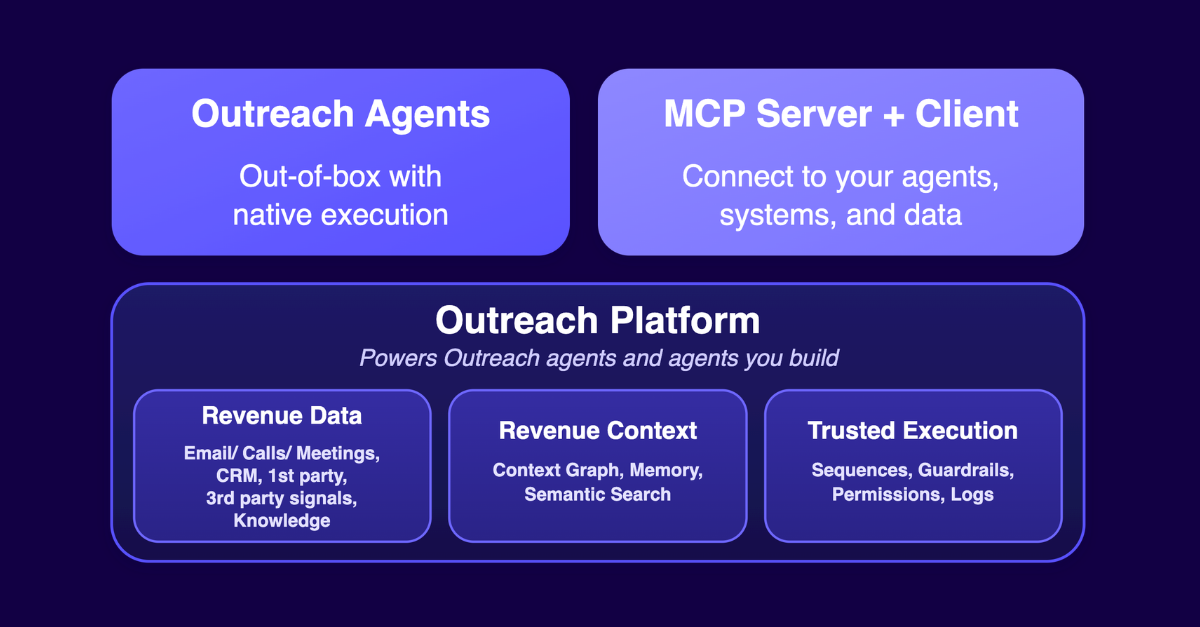
This post is the practical version of that framework: a build and buy AI agents playbook covering where Outreach Agents win natively, where you should build on Outreach, and why each makes the other stronger. If you’re looking to go deeper, check out our Build vs. Buy AI Agents ebook.
Use this table as a quick gut check. The sections that follow explain the reasoning behind each row.
The two aren't mutually exclusive. You can also connect your own systems and data into Outreach agents through the MCP client, where the workflows in Outreach are the best fit for the task.
A general-purpose model pointed at your data can do genuinely useful things. It can summarize a meeting, draft an email, and surface a risk flag. . Now try to run that across your org, and across your pipeline. This is where most in-house builds break down. Outreach Agents ensure reliable agent actions built on these principles: trusted execution, shared intelligence and context, native user experiences, and a total cost of ownership that holds up at scale.
Outreach sits inside the relationship between your sellers and the people who buy from them: real prospects and real customers that take months to build trust with and one bad move to damage. Every agent action touching that relationship needs the right checks.
Human in the loop. Not every action calls for the same amount of oversight, and autonomy is configurable agent by agent in Outreach. An SDR revenue agent runs autonomously on lower-tier accounts where you do not have seller coverage. For strategic accounts and existing customers, the agent drafts engagements for a seller to review before anything goes out. The goal is autonomy matched to the value and risk of the relationship on the other end. As Gartner analyst Shiva Varma put it, "enterprises are treating AI agent governance as binary, either locked down or fully trusted, and that is the root cause of failure."
Permissions. Every agent runs inside the access a seller already has. It only sees the accounts and deals that the seller owns, and it can only send emails at the volume that the seller is allowed to send. An agent cannot reach into the pipeline of another rep. Additional agent permissions limit who can create or run agents.
Sequencing, guardrails, and logs. Agents act inside the same sequencing engine your sellers already run on, so follow-ups are automatic, a reply pauses the next step, and an unsubscribe holds the sequence.Every agent inherits that logic instead of rebuilding it. Outreach also enforces send limits on email and SMS, call limits on voice to conform to TCPA and other channel-specific rules, and throttles on how many accounts or prospects per account and agent can engage each day. Every agent action is logged, and every agent output is evaluated for quality, the same Evals and Metering layer covered in Outreach's revenue architecture, so usage and cost are tracked at the agent level. If an output looks off, you can trace exactly what ran, what it touched, and why.
Wiring a model up to your CRM is easy. Making the intelligence that comes out of it hold up, consistent, current, and grounded in what actually happened in a deal or across deals, is the hard part. Outreach has already done that work: what it already knows about how sales works is built into the platform before you log in, and what it learns specifically about your deals, your customers, and your team keeps compounding over time.
Built-in expertise. Outreach encodes years of sales practice: how to run a multithreaded account, how to sequence and personalize outreach, how to spot deal risks. Outreach Agents act on behalf of sellers or deliver guided actions for them to take, with governance and audit trails attached. Skills keep the answer to a question like deal risk consistent, the same factors checked the same way every time.
Connected to all revenue data and knowledge. Outreach captures activity and integrates with all relevant data sources: emails, calls, and meetings, your CRM, first-party product and renewal data, third-party firmographic and intent signals, and your own uploaded playbooks, all in one connected foundation. Built-in identity resolution finds the right account and the right contact across all of these sources through pre-built integrations, without requiring a custom IT integration.
Persistent context and memory. The data is aggregated into a context layer. A Context Graph captures observations, competitors, objections, sentiment, extracted after every conversation. Semantic Search runs over unstructured material like your own uploaded playbooks and documents. A Memory layer carries user preferences across sessions. For more information, check out the Outreach's revenue architecture blog. The result stays accurate and consistent even when an agent is reasoning across thousands of conversations, deals, and accounts at once.
An agent is only as useful as where it shows up. Most in-house builds land in a chat window or a Slack DM, one step away from where a seller is actually working and without the contextual information to confirm the action. Outreach Agents are built into the surfaces sellers already use every day.
In-context actions. Next best actions on a deal or account are ready the moment a seller opens the record or starts their day. An account plan updates automatically with the latest research, right on the account page. Omni, the conversational agent inside Outreach, already knows the filtered view, the selected rows, the record on screen, so a seller can ask about "this" deal without restating the context every time.
Meet sellers in their tools. Sellers spend most of their time building relationships inside their communication tools. Email Assist and Reply Agent draft emails and replies inside Gmail or Outlook. Meeting Prep Agent delivers meeting briefs inside the Calendar. Meeting summaries and follow-up actions land in shared Slack channels immediately after a meeting. The work happens right there, in the tool a seller already has open.
Continuity. A seller can edit a draft, get pulled into a call, and come back twenty minutes later to find it exactly as they left it, still tied to that specific deal. Chat-based agents lose that state, and since they are not connected to your records in the first place, there is nothing to pick back up.
A tool that adds even one extra step (copy this, paste it there, switch tabs) gets used once and abandoned. Pairing context with agent execution in the same surface is what drives seller adoption.
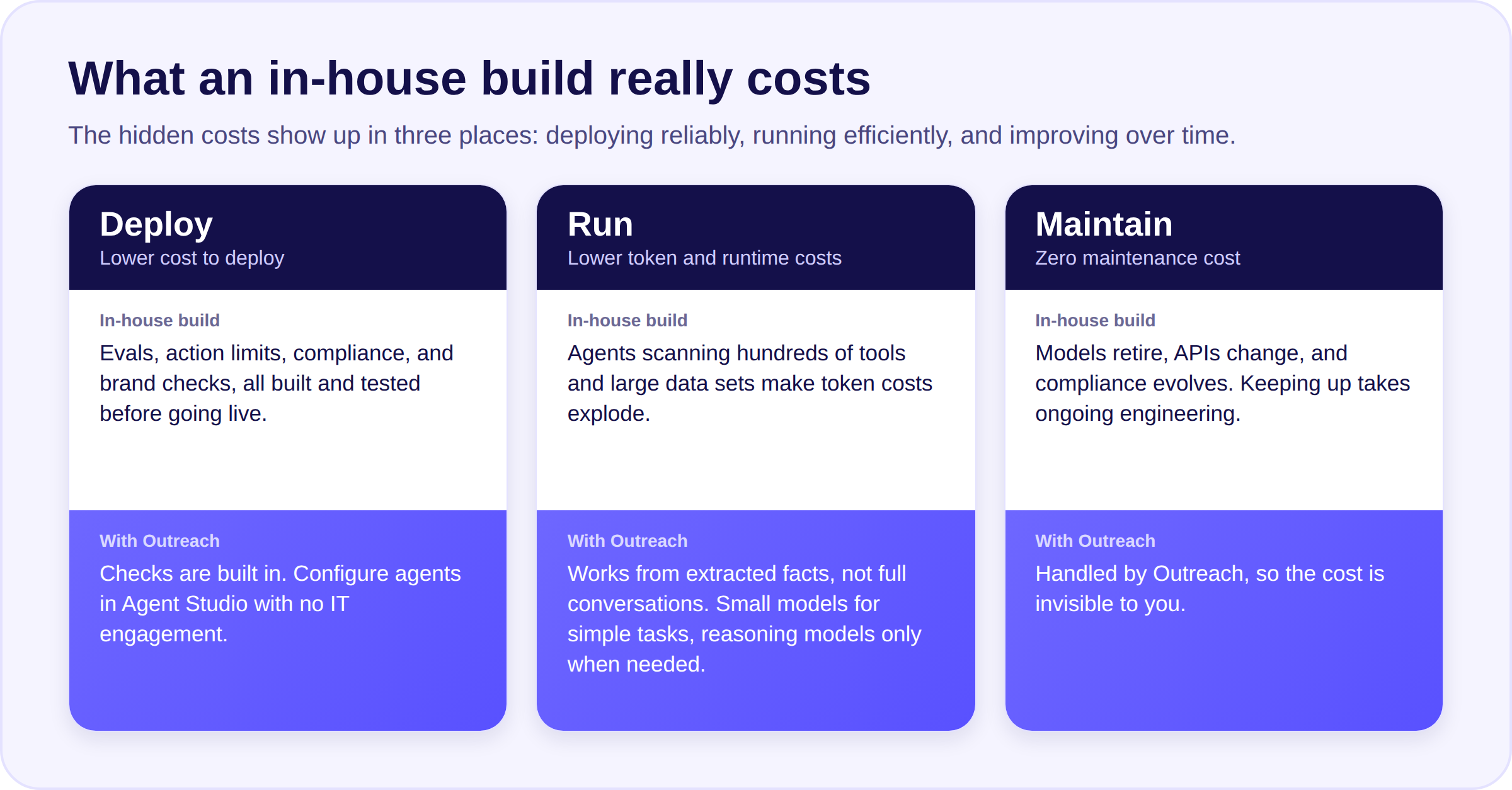
There are many hidden costs to an agent build: deploying it reliably, running it efficiently, and improving it over time.
Lower cost to deploy. An agent that works for one seller in a demo is not ready for the whole org. Getting there takes real work: evals to check output quality, limits on what the agent can do, compliance built into every send, keeping it on brand, and testing all of that before it touches a live account. Most in-house teams underestimate this step. Pre-built agents from Outreach have these checks built in. Custom agents built with simple configurations in Agent Studio get the same checks, so you deploy fast without requiring IT engagement.
Lower token and runtime costs. Tokenmaxxing is real. In-house agents connecting across MCPs, scanning across hundreds of tools and large data sets, explode costs. Outreach agents optimize for token usage by working from extracted observations and facts instead of full conversations, with context compaction built into chat threads and agent invocations. Outreach optimizes for model runtime cost: simple tasks like drafting an email run on a small, cheap model, while advanced tasks like assessing risk across deals run on reasoning models. Every agent action is invoked only when needed.
Zero maintenance cost. Models get retired, APIs change, and new compliance requirements come in. You need to keep tuning the system so it improves from feedback, catching a bad output and fixing it before it happens again. Each of these requires ongoing engineering investment to keep up, and the costs add up. For an Outreach customer, this cost is invisible.
Outreach MCP Server exposes your live Outreach data and context (activity history, deal patterns, buyer signals, seller actions, context graph) as a governed, permissioned interface for any AI tool your team uses: Claude, ChatGPT, Copilot, Gemini, Agentforce, or agents you build yourself. The shared intelligence built for Outreach agents is also available to yours: your agents reason over the same revenue data and context described above.
Executing through MCP means your in-house agents run off the same trusted execution platform in Outreach, including the same permissions and guardrails required for safe, reliable deployments. Build with Outreach MCP when the workflow is uniquely yours, including when you need control over your data, context, or models:
Enterprises have rich customer history and signals spread across multiple platforms. A common use case is building agents that synthesize these first-party insights to inform engagement strategy or deal execution, then using MCP to use that context to drive actions - targeting and sequencing prospects, or generating actions for sellers to progress deals.
Deal reviews in Claude, pipeline analysis within your BI stack: MCP means Outreach context travels to them without data duplication or sync lag. Data stays at source, and every query is governed, permissioned, and auditable.
The most sophisticated enterprises are also building their own models for purpose-built domains and tasks. Connecting to Outreach via MCP for the context and running agents via their models is how they get the benefit of both, a proprietary model doing the reasoning, and Outreach's execution layer powering the agent actions with right guardrails.
Build on MCP Server when the workflow is uniquely yours, including when you need control over your data, context, or proprietary models. An alternate path is to connect your systems and data via MCP client into Outreach agents, where the workflows and agents in Outreach are best suited to that task.
Not every MCP Server gives your agents the same footing. Outreach gives your agents a full set of tools to not just look up accounts, prospects, and opportunities, pull insights from emails and meetings, but also take action - enroll prospects in sequences, create sequences and tasks. Because every action runs through Outreach’s execution platform, your agents follow the same permissions and guardrails your sellers already trust.
Outreach agentic ecosystem includes verified connectors for multiple partners across MCP server and client, to give you the ultimate flexibility in your agent deployments.
Chris Finlayson, GTM Leader at OpenAI, put it plainly at Outreach Unleash: "We tell them not to build...partner with companies like Outreach for the most common agents your teams need. For the custom workflows, the things that are special about your business, you can build agents powered by the context that already lives inside of Outreach using MCP."
Building isn't always the right call. Skip the in-house build when:
If you do build, run customer-facing actions through Outreach MCP Server so your agents inherit the same permissions and guardrails.
Where trusted execution and user experience drive adoption, that’s your cue to buy. Pre-built Outreach Agents get you to market faster, at a much lower cost to run and maintain. Where your data, context, and workflows are uniquely yours, that’s your cue to build, connecting to Outreach via MCP for rich customer context and the sequencing, email, and calling infrastructure you don’t have to build yourself.
The two paths make each other stronger. The more your team runs on Outreach Agents, the smarter the shared context layer gets, and the context your in-house agents pass back feeds the same learning loop. Outreach is the only platform pairing purpose-built AI agents for every seller workflow and for leaders to coach, plan, and forecast, and Outreach MCP is available today as both a Server and a Client.
Buy for speed and reliability. Build for what’s uniquely yours. Connect both with MCP, and your sellers never have to choose between the AI tools they prefer and the platform that runs their pipeline. Doing both compounds. That is the advantage.
Sales effectiveness definition, metrics, and tactics
November 3, 2026
TL;DR: More selling activity can leave revenue flat when the activity never moves deals forward. For RevOps leaders, stage conversion, quota attainment, and call scores show where to look, and a control group shows whether your fix worked.
Say every rep on your team is busier than last quarter, and attainment hasn’t moved. Then someone in the pipeline review asks the obvious question: Is any of that activity working? And nobody in the room can give a straight answer.
Activity numbers only show how hard the whole team worked, and without a measure of sales effectiveness, coaching, hiring, and tooling budgets follow volume.
For RevOps leaders, that measure finally answers the question. It shows which step of the sale is losing deals and which rep needs your coaching first. It also shows whether a fix worked, something you can’t tell when you roll it out to everyone at once.
Sales effectiveness is how well a sales team's selling activity produces its intended results, such as won revenue, quota attainment, and new customers. Effort is what a seller puts in, and effectiveness is what comes out.
Sales force effectiveness applies the same idea to the whole selling organization, meaning how its structure, coverage, and process turn strategy into results.
Measuring effectiveness ties your coaching, forecasting, ramp, and attainment decisions to revenue results.
Sales effectiveness measures results, and sales efficiency measures what each result costs. SiriusDecisions, now part of Forrester, defines sales efficiency as "the amount of revenue generated for every dollar invested in sales." A team can be efficient and still ineffective if it wins cheap deals that miss the plan.
You already have most of what you need to assess a rep. A scorecard, peer groups, call scoring, and a time check will get you there. Give each of the sales metrics on them a data source, an owner, and a review rhythm.
If you only have time for one, start with the calls, because they let you hear how a rep sells. In a Gartner Peer Community survey of 100 sales professionals, the share of reps achieving quota ranked first for measuring sales effectiveness.
Build a one-page scorecard for each rep, and start with the one whose activity is up and whose attainment is flat. Include quota attainment, win rate, stage conversion, average deal size, and sales cycle length. Agree in writing how your team defines win rate and close rate. Read sales cycle length beside deal size, since a shorter cycle with smaller deals isn't progress.
RevOps builds the scorecard from the CRM, and front-line managers walk through it with each rep once a month. Two managers reading the same scorecard should reach the same view of the rep, and if they don't, tighten the definitions. Reps manage to whatever you score, so keep it to five numbers.
Group reps by role, tenure, and segment before you judge anyone. Otherwise, a new hire in a tough segment gets stacked against a veteran with an easy one. Judge ramping reps by stage activity as well as closed deals, since closed deals alone penalize them.
RevOps keeps the groups current and refreshes them each quarter, and every rep should sit in one. Small groups swing on one big deal, so merge two before you read anything into one rep. The lowest performers in each group should leave the review with a coaching plan.
Use conversation intelligence software that records, transcribes, and analyzes sales calls so you can score the call itself. Write a short checklist of things you can hear.
Good candidates balance talking and listening, ask open-ended discovery questions, and explore the consequences of the buyer's biggest problems before presenting the offer.
Front-line managers score a sample of each rep's calls against the same checklist. They rescore at 30 and 60 days after coaching, adjusted to your own sales cycle. If scores rise after coaching on one behavior, the checklist is measuring something you can coach.
Reps may talk differently when they know a scorer is listening, so score a mix of calls and watch the trend over several weeks.
Tag your reps' calendar and CRM activity hour by hour for two typical weeks, with each manager tagging their own team. You'll see how much of each week goes to selling. If reps tag their own hours, expect generous answers, so spot-check a few days against the calendar.
Compare your result with outside selling time benchmarks only when they count the same tasks as selling. Salesforce's 2026 State of Sales report, which surveyed 4,050 sales professionals, puts selling at 40 percent of the average workweek.
Gartner's January and February 2026 survey of 210 sales leaders found AI tools save sellers an average of 4.8 hours per week. Organizations that reinvest moderate to large savings in high-impact activities are 3.1 times more likely to exceed lead-to-opportunity conversion goals than those that reinvest less.
Track where the recovered hours go, and expect next quarter's audit, run with the same task definitions, to show a higher share of hours on selling.
When a number slips, narrow weak sales performance from the whole funnel to one stage and one cause.
Pull stage conversion from CRM stage history, because the current stage field overwrites where a deal has been. Compare each stage with your own trailing baseline for the same segment, since a pooled benchmark from a period of change hides the real movement. Start with the stage that fell furthest.
RevOps builds a one-page stage table with stage, segment, current conversion, trailing four-quarter baseline, and change, and brings it to the weekly pipeline review. You're done when the table points to one stage and one segment to investigate.
Cut the weak stage three ways to see whether the drop belongs to one group or the whole team, and start with the rep split. McKinsey notes that the top 30 percent of reps outperform the bottom 30 percent by as much as a factor of four. Then split by territory and lead source to see whether the drop sits in one patch or one channel. RevOps owns the three-way table, and if no single cut explains most of the drop, you're looking at a team-wide problem.
Pull the lost deals for the weak stage straight from the CRM, so managers don't pick the ones they remember. Read the recordings, emails, and stage history for each deal with your RevOps partner, and ask what killed it. Give each deal one primary cause, since each cause needs a different fix, and sort the deals into these three buckets.
Expect the deals to cluster in one bucket, and that bucket tells you which fix to try first.
Ask the reps who own the weak stage, and their managers, to name the last three deals that stalled there and what happened. Check each answer against the stage history and the lost-deal sample, and dig into any deal where the two disagree. Hold the conversation in a pipeline inspection session, and keep going until the stories and the data point to the same cause.
Start with the stage where deals get stuck, and pick the change that fits its cause. Test it on one group before you roll it out or layer on the next one. If you remember one thing from this guide, keep a control group.
How do you know a change worked? Assign managers or teams at random to a coached group and a control group, record a baseline for stage conversion and attainment, and compare the groups over one to two quarters.
RevOps runs the test, since the control group shows that the change caused the result. You have an answer when the treated group beats the control group on the behavior and the stage metric you named in advance.
Check the lost-deal review first, because coaching only fixes losses caused by skill, and process or data problems need different fixes. Coach from the recording, because a recap leaves out what the seller didn't notice.
Pick one behavior from the call checklist, play the exact moment in the recording, and coach only that behavior until the score moves. Then check whether coaching effectiveness shows up in the stage metric too.
Before you record, confirm the consent rules with counsel for every state and country you sell in. US federal law allows one-party consent, state laws vary, and UK data protection guidance says to tell workers and callers that calls are recorded. Keep recordings as long as needed and no longer.
Choose one sales methodology, such as MEDDIC, SPIN, or Challenger, and write down what a qualified deal looks like in its terms. Twenty reps without a shared definition give you twenty versions of qualified.
MEDDIC qualifies on Metrics, Economic Buyer, Decision Process, Decision Criteria, Identify Pain, and Champion; SPIN structures discovery questions, and Challenger teaches reps to lead the buyer's thinking.
Then write the definition into your CRM stage exit criteria so you can compare conversion data against it and keep deals that should never have entered the pipeline out of it.
Use the time audit to find which of data entry, administrative tasks, and prospect research eats the most selling time on your team. Pick one, and name the activity the recovered hours should go to.
Then cut the drain with the tool or process change that fits, such as AI agents that reclaim selling time by handling research and record updates. Test the payoff on early-pipeline creation and lead-to-opportunity conversion, and check next quarter's time audit to confirm the hours landed on the named activity.
Use one metric per quarter across the comp plan, the coaching checklist, and the training content. Compensation, coaching, and content all tell sellers what matters. Keep the control group in place so you can separate the effect of the alignment from the other changes.
Then compare the two groups and expect the metric to move in the treated group while holding steady in the control group.
Outreach, the agentic AI platform for revenue teams, connects activity, call, and deal records to the same CRM opportunities. That puts stage conversion, call scores, and the time audit in one source.
Agentic AI is software that completes multi-step work toward a goal, such as researching an account or drafting a CRM update, with review steps teams configure.
Corpay's sales development leaders couldn't sit in on every rep's calls, so the team used Outreach Conversation Intelligence call coaching and coaching cards to ramp reps faster. SDR opportunity creation grew 2 to 3 times over about two years alongside standardized sequencing.
Take one stalled opportunity and its call recording to your next review, and name the next action the seller owes. With Outreach, you can connect that conversation to the opportunity, review Deal Agent's recommended CRM updates, and use Outreach Conversation Intelligence to find the coaching moment.
Ask the manager and seller to work it together, including the review and approval steps they would use in practice. Then decide whether this connected workflow fits how your team coaches sellers and keeps deals moving.
There's no single good rate, so look at the distribution as well as the average. The Bridge Group's 2026 benchmark found 48 percent of reps at quota, down from 51 percent in 2024. It also reported fewer companies in the middle attainment range and more in the lowest range. Compare your own distribution with your prior quarters first.
Match the review to how fast each number moves. Review stage conversion and call scores monthly, because they can move within one coaching cycle. Review quota attainment, cycle length, and peer comparisons quarterly, because they need a full period of closed deals.
Sales productivity is output per seller, such as bookings or pipeline per rep. Sales effectiveness asks whether that output produced the result you wanted. A rep who books many meetings has high productivity, and if few of those meetings reach the next stage, effectiveness is low.
RevOps owns the data definitions and the quarterly report, front-line managers own call scoring and coaching, and the head of sales decides which change to test next.

Why read-only AI caps your growth at headcount
November 3, 2026
TL;DR: Read-only AI caps growth at headcount because every insight becomes a task for a rep, and rep hours are fixed. Agents that finish research, call summaries, and follow-up return selling hours, and those hours count as capacity only when reps spend them selling. Time three tasks on a sample of reps, count the hours that go back to selling, and set them against one hire before you approve the next requisition.
Read-only AI tells reps what to do and leaves the doing to them. Every flagged deal, buying signal, and suggested next step lands as a task, and a rep's week doesn't get any longer, so output rises only when you hire more reps.
AI agents for sales break that link by finishing bounded tasks themselves, such as account research, call summaries, and follow-up on accounts nobody has time to work.
For RevOps leaders, the question is how many selling hours those agents return, and how that compares to the cost of one more hire. You can get that number from your own calendar, CRM, and call data.
Read-only AI reads revenue data and returns a score, alert, or recommendation while a person completes the work. AI that executes finishes the task and logs the outcome instead; for a revenue team, that difference counts as rep hours.
A sales AI agent is software that completes a bounded task, such as researching an account or drafting a follow-up, using tools and data within rules your team sets.
Gartner describes agents that can plan and execute tasks like lead qualification, customer engagement, and follow-up, where an assistant responds to prompts.
Insight tools speed up the thinking and leave the doing where it was. Every insight adds work, rep hours don't stretch, and each new hire takes months to pay back, so headcount stays the only lever.
A deal-risk flag, a buying signal, and a suggested next step each arrive as work. Someone still has to open the account, read the history, write the message, update the record, and book the time. More signals mean a longer list of unfinished tasks, and that list can grow faster than one rep can clear it.
Salesforce's seventh State of Sales report found that reps spend 40 percent of an average week selling. More than half their time goes to work like data entry and prospecting. An insight tool adds to that second bucket, because acting on an insight is itself research, writing, and data entry, and the week stays the same length.
A new rep costs money from the start date and doesn't produce revenue until months later. During ramp, that rep draws time from managers, enablement, and the top performers who help with onboarding, so team capacity dips before it rises.
Sandler's white paper makes the alternative case, pitching up to 15 percent revenue growth without additional hires by redeploying time from non-selling tasks.
Each of these tasks starts with a rep reading a signal and then doing the work. Agents take over the ones with a clear start, a clear finish, and rules a person can write down, and three show up on almost every sales team.
Before, the rep opens the CRM, last-call notes, the company website, and a news search, then types a brief. After, an agent gathers the same material from engagement data and public sources, saves it as a brief, and the rep reads it on the way into the meeting.
Research and prep is a good place to reclaim selling time because the task has a clear start and finish. According to the Outreach Insights Group's 2026 Agent Productivity Impact Report, meeting prep dropped from 60 to 23 minutes per meeting.
Today, a rep finishes a call, retypes the notes, picks a next step, and updates the stage, amount, and close date by hand, or leaves them stale until the manager asks. With an agent, the system drafts the summary from the call recording and queues recommended field updates for the rep to approve. It's the admin side of sales process automation. The same report found that active AI users saved 15 to 21 minutes per day on CRM updates and meeting summaries.
Reps work the top accounts in the territory, and the rest wait. Lower-tier accounts, inbound leads that arrived on a busy day, and dormant customers sit untouched because the hours ran out. An agent can work them through sequences your team designs, under rules you set for which accounts qualify and which message goes out.
Your buying signals can decide which accounts qualify, and an agent that handles research and message drafts also cuts prospecting time on the accounts reps do work. These hours come from added coverage, so count them from your own activity data.
The method is a counting exercise. Most sales capacity planning models start with hiring math, so the hours you count here give them an input they usually miss: the selling time your current reps could get back.
Start a task inventory sheet with one row per task. Give it columns for the task, its weekly frequency, what it produces, its owner today, and whether a one-paragraph rule would let an agent finish it. Begin with the three tasks above, then add recurring work such as proposal drafts, lead prioritization, and internal pipeline updates.
Leave out judgment calls like pricing concessions and executive outreach, because those stay with the rep. A RevOps analyst can fill the sheet in with two front-line managers, and it's done when every row ends in a deliverable and has a written rule.
Build a time-study sheet with one row per rep and task, and record minutes per occurrence from calendar entries, CRM activity logs, and call recordings across a few quota tiers. Leave surveys out, because HBR points out that CRM reports and time studies are often self-reported and inherently flawed.
Confirm each meeting against a recording or logged outcome before you count the prep time attached to it, since a calendar entry only proves a meeting was scheduled. A RevOps analyst owns the sheet, and it works when two sources agree on each task's timing.
Keep an hours ledger with one row per rep per week that records the hours returned and where each one went, in calls booked, accounts touched, and proposals sent. Gartner calls the belief that freed-up time will lift results on its own the automatic capacity expansion fallacy.
Track activity sales metrics like those, and count only the hours that show up there. Front-line managers own the ledger, and it works when returned hours show up as customer-facing activity in the pilot quarter.
For example, say meeting prep falls from 60 to 23 minutes. A rep with eight customer meetings a week gets back about 37 minutes per meeting, close to five hours. Add 15 to 21 minutes a day on CRM updates and summaries, roughly an hour and a half a week, and the rep has about six and a half hours back. If the rep puts five of those into calls and prospecting, five is the number that counts.
A new rep selling at that same share delivers about 16 selling hours in a 40-hour week once ramped, and none during ramp. In the example, ten reps who each redirect five hours give the team 50 selling hours a week, about three reps' worth.
Put the 50 hours next to the 16 hours a hire delivers after ramp. Then add the hire's fully loaded cost on a one-page comparison with rows for hours per week, months until those hours exist, and cost. RevOps owns the page with a finance partner, and it works when finance can rebuild it from your source data and reach the same number.
Agents work inside workflows your people control, and how much review an action needs depends on how much damage a wrong result could do.
Research, meeting prep, and call summaries need only a light review. Your team writes the rules, including which sources to use, how often to refresh, and what each brief should contain. When a brief comes back weak, you fix the rule, and the next brief reflects the change.
Those three fields feed the forecast, so an incorrect value in any of them makes it to the board deck. Forrester warns that "A misupdated deal stage skews forecasts" and lists human-in-the-loop approvals and configurable automation thresholds among the controls that make agent actions accountable. Agents surface recommended updates for the rep or manager to approve, which takes less time than retyping them.
An agent stops when it meets something outside its rules, such as a reply it can't classify, a record that conflicts with the call, or a contact who asks for a person. Send each stopped item to one named person with a response time attached.
A sales leader framework for implementing AI agents says rollouts stall when there's no clear owner. In a shared queue, items can age until the account goes cold, and nobody reads the pattern that would fix the rules.
The hours you return change what managers inspect, where they coach, and which skills the next hire needs.
The work that stays with the rep is the relationship and the judgment, so you should see second meetings, executive introductions, and multi-threaded deals on the calendar. Track customer-facing hours per rep per week from the same calendar and call data you used to time the tasks. That number connects returned time to pipeline coverage and conversion.
When summaries and recommended field updates come from the call itself, a manager can run a quick pipeline inspection. That leaves the rest of the one-on-one for the call, such as how the rep handled the pricing objection and what to try next. The same call data lets you measure sales coaching effectiveness by connecting coaching to win rates and deal velocity.
Hire for skills an agent can't supply, like running a complex negotiation, building a multi-year enterprise relationship, or opening a new segment, because each needs an experienced person. Plan headcount after you count the hours, so new roles go where judgment is short and agents cover the hours.
An agent with thin context produces output that reps have to redo, so agents need account history, engagement data, and call records in one place. Outreach, the agentic AI platform for revenue teams, runs its agents on that shared data layer, and each of the tasks above maps to one of them.
SailPoint faced aggressive growth targets without adding headcount. Its sales leaders used Outreach AI agents and Kaia™ to cut manual research, deliver more consistent selling across reps, and raise open rates by more than 50 percent once the motion went live in seven languages.
Outreach Conversation Intelligence, powered by Outreach Kaia™, joins and records live meetings and captures the transcription that the Deal Agent uses as call data. Through Salesforce Headless, which brings Salesforce capabilities to tools such as Claude, ChatGPT, Microsoft Teams, and Slack, Outreach AI agents can execute multi-step workflows like updating records and advancing deals from teams' daily apps.
Before the next planning meeting, agree on the evidence that would change the hiring decision and who will collect it. Set the baseline from your own calendar, CRM, and call records, give the pilot a quarter and a named owner, and bring one workflow to an Outreach evaluation.
Ask to see the source data, the finished output, and the approval step together. Then put the measured selling hours next to the cost and ramp of one hire, so the requisition rests on what you observed.
Pick one bounded task, such as meeting prep or call summaries, and time it on a sample of reps before the agent starts. Name one owner and set the review rules, then run the pilot for a quarter. At the end, compare returned hours, where reps spent them, and how often they accepted recommended updates against your baseline.
Keep judgment calls with the rep, including pricing concessions, executive outreach, complex negotiation, and any decision that changes how a customer relationship works. Agents suit tasks with a clear start, a clear finish, and rules you can write down. If you can't describe the rule in a paragraph, the task isn't ready to hand over.
No, because agents handle repetitive research, data entry, and routine follow-up, while reps keep relationship-building and complex-deal judgment. HBR's analysis of sales teams growing alongside AI finds that complex, high-stakes purchases still depend on human expertise. Your people still set the rules and review output where the stakes are high, so the role changes and hiring shifts toward judgment skills.
Start with the hours that return to selling. Track customer-facing hours per rep, accounts touched, and proposals sent, plus how often reps accept the agent's recommended updates. If saved hours don't show up in those numbers, the capacity went somewhere else, and the agent hasn't added any.

How to budget for AI: 7 best practices for managing AI consumption
November 2, 2026
TL;DR: AI budgeting requires a different approach from traditional software budgeting. As AI agents take on more work, costs depend on consumption rather than seats alone. Revenue teams should forecast usage by workflow, monitor spending against business outcomes, and adjust investments based on what's delivering value.
Seat-based software was easier to budget. Count the licenses, multiply by the price, and you had a number that mostly held. AI budgeting works differently. When agents research accounts, prepare meeting briefs, and update deal records, spend follows what the AI does, not who holds a license, and that shifts as reps find new uses.
For a RevOps leader or CFO, this makes AI budget planning harder. Finance wants a number, and the honest answer is a range that depends on adoption and on how much work agents take on. This guide covers the consumption side of AI cost management and includes a worked example you can adapt.
AI consumption is the amount of AI work your organization uses, measured in tokens, credits, or runs and billed by volume rather than by access alone. Vendors meter it differently, so numbers don't transfer from one to another:
AI agent pricing is where those differences matter most. A step is one thing an agent does, such as pulling account data or drafting a message. A run is one complete execution of a workflow. A single generated email is one step. An agent that reviews an account, checks recent activity, drafts outreach, and logs the result takes several steps in one run. The number of steps per run can vary depending on the workflow and how the agent is configured. Under step- or credit-metered pricing, cost follows runs multiplied by steps per run; per-run and outcome-based pricing may not follow that pattern. Headcount therefore tells you little: two teams of the same size can consume very different amounts, depending on the workflows they run and how those are triggered.
Budget by workflow, not by seat. Choose the outcomes you're accountable for, such as pipeline per SDR or forecast accuracy, and map the workflows that influence them: account research, meeting prep, deal inspection. For each, record an owner, the outcome it should move, how it's triggered, and how often it runs. That record is the unit you'll forecast and judge.
Rank candidate workflows by the value they create if they work, weighed against a rough order-of-magnitude estimate of consumption. A low-cost workflow that changes no behavior is a poor investment at any price, while an expensive multi-step agent that improves how deals progress can be the best spend in the plan. Start with a few workflows where value is plausible and ownership is clear, then expand on usage data.
Multiply users, run frequency, and credits per run, as in the example below, then model scenarios instead of a single figure. How you model depends on the trigger. Rep-triggered workflows follow adoption, which arrives unevenly. System-triggered workflows, such as briefs generated for every scheduled meeting, follow business activity and configuration, so adoption scenarios don't apply to them. If your vendor offers a credit calculator, use it as an input and ask what it assumes about steps per run. Then run a pilot to measure the average and the spread for your own workflows.
Treat governance as financial control. Assign a budget owner to each workflow, decide who can trigger high-consumption agents, and set alert thresholds that prompt a conversation before a surprise invoice does. Any change to an agent's schedule or scope is a spending decision, since adding steps or widening a trigger raises consumption without anyone requesting more budget. Hard caps can shut off a workflow when a team needs it most, such as at quarter-end, so alerts and review thresholds often serve better.
Track consumption by team, workflow, and run against the forecast. When actuals diverge, break the change into its drivers before drawing a conclusion. Consumption is users times runs per user times credits per run, and each driver raises a different question:
For system-triggered workflows, examine triggering events and configuration rather than user adoption. Consumption data can't separate the good readings from the bad. Business outcomes can, so pair every spend review with the outcome the workflow is meant to move. Then make the review a decision: each quarter, move budget from workflows with weak results to those with strong ones. A budget that is never reallocated can mean nobody is learning from it.
Separate three kinds of evidence:
Timing matters. Leading indicators like meetings booked or stage progression can be reviewed monthly, while lagging indicators like win rate and cycle length belong in quarterly reviews. Early adopters usually differ from late ones, so use a staggered rollout or a holdout team where you can, and treat the result as a signal rather than proof.
Put these questions to every vendor before you sign:
Ask for a pilot on one or two workflows to compare the vendor's estimate with actual consumption.
All figures below are hypothetical and illustrative. They are not Outreach pricing, credit rates, or usage benchmarks. Assume one credit costs $0.10 and a month has four weeks. That is a simplification; real forecasts should use about 4.3.
Run volumes come from three workflows. Thirty SDRs each research 15 accounts a week (1,800 rep-triggered runs a month). Twenty AEs each hold 10 meetings a week, and a brief generates automatically for each (800 system-triggered runs). The same AEs each review 15 deals a week with a deal inspection agent (1,200 rep-triggered runs).
The deal inspection agent accounts for 54% of credits while running fewer times than account research. At $1.50 per run it's the costliest workflow in the plan and possibly the best value, if it improves deal progression compared with manual workflows. The $0.50 research runs are the cheapest and could be the weakest investment if reps rewrite every draft. The deal inspection agent's 15 credits is an average; if runs range from 10 to 25, the plan needs that range, which the pilot should supply. Platform fees, implementation, and enablement sit outside this consumption-only example.
Now build scenarios:
Approve the expected case as the plan and treat the high case as a review trigger, not an automatic stop. Then read actuals against outcomes. Suppose month two lands near the high case. If stage progression improved on the inspected deals, extend the agent; if nothing changed, redesign it or switch it off. Meeting prep reads differently. Briefs generate for every scheduled meeting, so credits at half the forecast don't signal poor adoption. Fewer meetings may have been booked, which is a pipeline question, or a trigger setting may have changed. The open rate shows whether the briefs that did run were read.
Outreach is an agentic AI platform built for revenue teams that helps teams improve execution across the revenue lifecycle. Its AI agents are designed to support work such as pipeline generation, deal execution, and retention.
Let’s say you’re looking at improving your deal execution workflow. Outreach AI Agents come together across the workflow to provide recurring account intelligence, automatically update opportunity fields, provide deal summaries, and develop pre-meeting briefs so your sellers focus on closing. Teams can then evaluate whether these workflows contribute to shorter sales cycles, higher win rates, and more deals won.
Outreach uses a credit-based AI consumption model that gives revenue teams flexibility in how they deploy agents. Teams can control which agents run, which users have access, and when agents are triggered. Credit usage is visible at the account level, with historical reporting by date, agent action, and user. These capabilities help teams maintain visibility and control as they scale AI across their revenue workflows.
Not sure where to start? Take the AI Agents Quiz to discover which combination of Outreach AI Agents best aligns with your revenue priorities.
A forecast is a hypothesis about where AI will earn its cost, and consumption data is the first evidence for or against it. Teams that forecast in ranges and review spend alongside outcomes can extend agents across more of the revenue process while keeping visibility and control. Treat the first quarter as a learning period, then move the money toward what worked.
Budget at the workflow level. For each workflow, estimate runs per month and average credits or tokens per run, convert to cost, and build low, expected, and high cases. Add a separate line for costs outside consumption, such as platform fees and enablement.
AI consumption-based pricing charges for the AI work performed rather than for seats, so the bill moves with usage and can rise when a workflow works and spreads. The metering unit varies by vendor: tokens, credits, runs, or outcomes. Many vendors combine consumption with a platform or seat fee, so ask what the base fee includes and what is metered separately.
A credit is a vendor-defined unit of AI usage. Each action draws down credits at a rate the vendor sets, so a simple task costs fewer credits than a multi-step agent run. Terms vary widely, so ask whether credits are prepaid or pay-as-you-go, what overages cost, and how the vendor handles changes to rates.
Start with a pilot to estimate an agent’s steps and cost per run, which can vary by workflow.Record the average and the spread, then multiply by expected runs. Separate rep-triggered workflows, which follow adoption, from scheduled or event-triggered ones, which follow business activity or configuration. Reforecast whenever an agent's scope or schedule changes.
ROI is net gain (outcome gains minus total cost) divided by total cost. Total cost includes platform fees, enablement, and rework such as discarded drafts, not credit spend alone. Judge each workflow separately, since one agent can earn its cost while another doesn't. Count saved time as revenue only if it was redirected to effective selling.
AI sales tools data quality requirements and context
November 2, 2026
TLDR; A call summary can arrive minutes after the meeting, fluent and neatly formatted, yet say little beyond the calendar invite. It may miss that this was the fourth account conversation, that the champion changed roles last month, or that pricing went out two weeks ago without a reply. Transcript-only AI summaries can create false confidence because they miss the deal history behind a call. AI sales tools data quality requirements come down to complete, current, and consistent engagement history, CRM records, deal activity, account signals, and prior conversations. Test your tool by asking what changed since the last call, because a generic answer reveals the context it cannot access.
A call summary can arrive minutes after the meeting, fluent and neatly formatted, yet say little beyond the calendar invite. It may miss that this was the fourth account conversation, that the champion changed roles last month, or that pricing went out two weeks ago without a reply.
AI sales tools' data quality requirements start with context, because context determines whether a summary helps a deal review or misleads it. Gartner reports that 66 percent of sales leaders trust AI-generated insights very little.
For RevOps leaders and sales managers, the missing piece is context, including engagement, customer relationship management, deal, and account records around each conversation.
Revenue context is the set of records and signals around a conversation that tells an AI who the buyer is, what has already happened, and what is changing.
An AI sales tool needs five connected types of context to interpret a call: engagement history, CRM records, deal activity, account signals, and prior conversations.
A tool that reads all five can place a call inside its account and deal, while one that reads only the transcript can describe the call.
Engagement history is the record of every email, sequence step, meeting, reply, and open between your revenue team and the account. It can show that the team sent a case study three weeks ago and the buyer opened it twice without replying.
The rep can then ask why instead of repeating the offer. Without engagement history, the rep may send a duplicate that the buyer reads as inattention.
CRM records are the identities and fields that anchor a summary, including account, segment, contact roles, opportunity owner, stage, amount, close date, and next step.
With these fields in place, the AI attributes an objection to the named economic buyer and interprets a request against the current stage. Without them, it guesses roles from speech patterns and treats every call as if it sits at the same point in the cycle.
Deal activity is the sequence of stage changes, next-step updates, stalls, and stakeholder additions over an opportunity's life. An upbeat call reads differently when the usual warning signs are present.
These signs include a close date that has slipped twice and no new stakeholder joining in weeks. With that history, the AI can show the distance between tone and trajectory instead of mistaking a friendly conversation for momentum.
Account signals are changes on the buyer's side that your team did not cause, including intent data, leadership changes, hiring trends, funding events, and product usage where available. A summary can connect sudden urgency to an executive who arrived last month or read a cooling tone against a hiring freeze. Without those signals, the AI may label a quiet renewal as a messaging problem when a reorganization caused the silence.
Prior conversations are earlier calls and meetings with the account, including commitments, objections, and responses. A good summary can note that the buyer raised today's security objection on call two and the team sent a SOC 2 report in reply.
If the objection returns, the answer did not land, or the audience changed. Without earlier conversations, the AI treats every call as the first and misses changes in stakeholder sentiment.
Transcript-only AI produces shallow summaries because one call carries the words but not the situation around them. The model has no record of the account, where the deal stands, what the team sent, or what everyone agreed earlier, so it falls back on generalities that fit almost any call.
A 2024 Empirical Methods in Natural Language Processing (EMNLP) Industry Track paper on meeting summarization reported about a 9 percent gain in summary relevance from adding supplementary materials such as presentation slides to the transcript.
A transcript tells the AI that someone said, "We need to loop in finance," but it cannot identify whether the speaker is the economic buyer or a junior evaluator. It cannot determine whether the opportunity is in discovery or contract review, or whether the team already emailed finance last Tuesday.
Each fact changes what the sentence means and what should happen next, and a stronger model cannot resolve ambiguity when the transcript lacks those facts.
When a buyer says "send me pricing" on a first discovery call, the request may politely end the conversation, making a qualification question the right follow-up. On a third call after technical validation and security review, the same request may signal commercial negotiation and a proposal due today.
A transcript-only summary writes "buyer requested pricing" in both cases because the opportunity record, not the audio, contains the stage.
A fluent summary gives no visual cue about what it omitted. The version built on full account history and the version built on only the transcript share the same confident tone, structure, and vocabulary, so a reader skimming between meetings cannot tell them apart.
Missing context surfaces later as a follow-up email that repeats an earlier message or a forecast call where "strong interest" turns out to describe a stalled deal.
Authors Kinda El Maarry and Thomas Redman write in MIT Sloan Management Review that "bad data fed to AI models turns into untrustworthy results." ISO/IEC 25012 defines 15 data quality characteristics.
Three map directly to AI use without a universal percentage attached: completeness, currentness, and consistency, and each applies to the five context types above.
The standard defines completeness as the degree to which data has values for all expected attributes in a specific context of use. For AI, the question defines that context, so any field the question needs but the record lacks becomes a guess. The most important fields for each source are:
The standard frames currentness as data of the right age for its use. A stage that still says "negotiation" three weeks after the deal went quiet and a champion who left last quarter but remains the primary contact both look valid in the record.
Add an activity feed that stops at last month's demo, and the AI produces a summary that makes internal sense while misrepresenting the deal. A workable target is stages that reflect the current week and activity that arrives before the summary does.
The standard treats consistency as data free from contradiction and coherent with other data. When an engagement platform shows a stage-four opportunity while the CRM shows stage two, the AI follows the source its configuration prioritizes and cannot resolve the conflict on its own.
Systems can also assign different contact owners, spell duplicate account names differently, or hold activity another system lacks, and that fragmentation makes confident summaries less reliable. Before connecting two systems, choose the authoritative source for each field and reconcile the other source to it, as in any CRM data hygiene program.
Pick a few live deals and spend thirty minutes with them to see which context your current tool can reach and where its answers lose specificity.
Pick an active deal your revenue team knows well, one that has had a discovery call and at least one later conversation, and ask the AI what changed since the last call. A useful answer combines the latest transcript with the earlier conversation, stage history, and the engagement between calls. The expected evidence might include:
If the answer only restates the latest call or gives advice that fits any deal, context is missing. Follow with two more questions: what has this buyer already received from us, and why is this account active now? Each failed question points to a context source that needs attention.
A stalled stage or slipped close date is a classic deal risk a good answer should catch. The deal's account executive runs the test, and the step worked when the answers name specific changes a manager can confirm in the CRM.
Open one recent summary, ideally one used in your last deal review, and have a manager mark each claim as traceable or untraceable.
Every material sentence should map to a record, call, or activity, such as an objection to a timestamp, a next step to an email, and a risk to a stage change. A claim without a source record stays a guess until someone confirms it.
Log the claims in a table with one row per claim and a column for the source record, then fix the entry points behind each untraceable claim. The share of traceable claims gives a quick measure of how much the tool infers.
Compare the summary against the account's history and write one line for each context type the AI never mentioned, such as earlier messages, contact roles, previous meetings, or timing.
Each omission points to one of the five context types the tool cannot reach, and the list becomes a concrete requirement for your RevOps team or vendor.
Until the list closes, treat the summary as a draft that someone familiar with the deal reviews before acting. The step worked when each omitted context type has a named owner and a fix date.
Outreach, the only agentic AI platform for revenue teams, keeps conversation, engagement, and CRM data in one place. Instead of stitching context together from point tools, AI reads the same history a seller sees and returns results for people to review.
Outreach Conversation Intelligence, powered by Outreach Kaia™, records and transcribes meetings and generates summaries, follow-ups, and action items. Multi-step sequences run outreach across email, phone, LinkedIn, and SMS, and Outreach records that activity for pipeline visibility. Each deal's activity timeline then shows buyer and seller activity over time, so each summary sits inside a continuous record.
CRM sync keeps stage, owner, and close date aligned between Outreach and Salesforce or Microsoft Dynamics, so the AI reads current values from the CRM. Admins can mark prospect and account fields as required, so users must complete them when creating or updating records, and new records stay complete. Together, these controls keep the opportunity record and related activity consistent.
Each agent below works from records a team can inspect and draws on the agent data sources the team connects:
Outreach Omni answers plain-language questions such as "Which deals are at risk this quarter?" and "Summarize this account before my meeting." It draws on accounts, deals, prospects, conversations, and activity across Outreach and Slack, and Profiles give admins role-based access control over what each user can see.
An AI sales tool is only as useful as the records behind it. Pick one live deal this week, run the tests above, and write down the context types your current tool cannot reach. Share that list with your admins or vendor, so the next summary is built on the account's full history instead of a single transcript.
Outreach, the only agentic AI platform for revenue teams, keeps that history connected, which gives sellers recommendations they can trust and managers evidence to forecast from.
The AI sales tools data quality requirements start with five connected context types: engagement history, CRM records, deal activity, account signals, and prior conversations. Each must be complete, current, and consistent. Test a known deal by asking what changed, and treat a failed answer as the missing source.
AI call summaries sound generic when the tool interprets the words but cannot place them inside the account's history. The model captures topics and action items while missing whether a request repeats an earlier commitment or whether a new stakeholder changed the buying process. Compare the summary with the CRM, engagement timeline, and previous meeting, then map each omission to a context type the tool cannot reach.
CRM data supports AI when the records a task needs are complete, current, and consistent across connected systems. For deal summaries, inspect stage, amount, close date, owner, next step, and contact roles. A missing amount may not affect a call recap, but it can undermine a forecast question, where forecast categories depend on a current stage and close date.
Transcript-only recaps work when the goal is to capture topics, questions, and explicit action items from one call. They fail when the task requires cross-time comparison, because a transcript can't show that pricing already went out or that a champion changed roles. For risk decisions or next steps, connect conversation intelligence data with CRM records, engagement history, deal activity, and account signals.
A short monthly audit on three to five live deals is usually enough to catch drift. Have a manager trace each claim in a recent summary back to a record, log the missing context types, and send the list to admins. Teams that run the audit after any new system connection catch broken field mappings before the AI learns to work around them.

AI agent governance for revenue teams in the enterprise
November 2, 2026
TL;DR: Governance now decides whether AI reaches production in a revenue team. Four vendor questions about authority, data, records, and control can expose weak answers before a security review stalls the rollout.
A revenue AI pilot can prove its value and still sit in security review for weeks, because IT and security want to know what the agent can read, change, and switch off. While the approved tool waits, frustrated teams can fall back on unsanctioned AI tools that nobody has reviewed.
The delay usually comes from vendors answering questions about AI agents in general when your questions focus on how a sales tool handles CRM records, customer calls, and rep workflows. For RevOps leaders, AI agent governance now decides whether a proven pilot reaches production or stalls for the rest of the quarter.
AI agent governance is the set of decisions, policies, and controls that define what an AI agent may do, on whose authority, with which data, and how anyone can check afterward. It gives each agent an accountable owner and a permission boundary, requires a person to approve consequential actions, and produces records an auditor can review. Teams that already run a wider AI governance program apply the same rules to each agent.
Revenue AI reads CRM records, customer email, and call recordings, which carry personal data and commercial terms. It also runs inside each rep's daily workflow, so one over-permissioned agent repeats its excess access across every seat.
Security protects systems from attack, while governance defines what the AI can do and how you prove it. A vendor can pass a penetration test and still be unable to say which CRM fields its agent writes to.
The first wave of revenue AI summarized calls and drafted emails, and a rep reviewed everything before anything happened. Agents can enroll a prospect in a sequence, update a record, or trigger a workflow, sometimes without a person approving each step. IDC projects that 40% of roles at Global 2000 companies will involve direct engagement with an AI agent by the end of the year.
Once an agent acts, questions about where it is turned on, who can use it, what it can touch, and what record it leaves become the substance of the review. That is why this post treats human approval of record changes and customer messages as a control to verify, not a default to assume. The four questions below test a vendor on each of these points.
Each of these questions fits on a first vendor call and turns a broad governance discussion into a specific evidence request.
The AI should act for a named person or an admin-defined role, inheriting that person's CRM permissions and nothing more. An agent working for a rep can read the accounts and fields that rep can see, so it doesn't reach records the rep couldn't open.
Anything that changes a record or contacts a customer waits for a person to approve it first. If a vendor describes a shared service account instead, the agent's reach is wider than any single rep's, and your reviewer has no clean way to scope it.
Security concerns with sales tools accessing customer data come down to scope, so expect a written list of the objects, fields, call recordings, transcripts, and mailboxes the AI reads, because that list is long by default.
An agent that summarizes a call has read the call, and an agent that drafts a follow-up has read the whole thread. The vendor should also say whether any customer data trains a third-party model, how long it keeps that data, and where it hosts it. The contract should include data privacy checks, including a data processing agreement (DPA), sub-processors, and training exclusions.
Ask whether the vendor keeps an audit trail of what the AI recommended, which inputs it used, and who approved the result, and whether your own admins can read that trail. Someone will eventually challenge a deal risk score in a pipeline review, a forecast adjustment in front of the board, or a customer email that landed wrong. The person who approved the result then has to explain what the AI showed them at the time, and only a reviewable record lets them do that.
Ask who can turn on each AI capability, which teams can use it, and who can pause or revoke an agent when something goes wrong. In a revenue workflow, that means switching capabilities on team by team instead of org-wide, with one central view of what runs and for whom. The pause control should sit in an admin's hands, because waiting on a vendor ticket means the agent keeps running while the incident unfolds.
Outreach's enterprise AI governance framework lists six components, plus auditability and traceability. Each one lands in a question or a checklist row in this post.
The framework tells you what to build. The checklist tells you what to ask a vendor to prove.
Security reviews stall for three reasons, and the team that bought the tool is the one left waiting. You can address each before the formal review begins.
IT and security often join after the revenue team has committed to the tool, which puts the hardest questions at the point of highest momentum and weakest negotiating position. By then the team has promised a launch date, and reps are already using the pilot, so every open question reads as a delay.
A SOC 2 Type II report reliably covers conventional IT controls, but Cloud Security Alliance research notes it covers model-specific properties only when the auditor chose to test them. Whether the auditor tested an agent's reads and writes inside your CRM depends on what the system description put in scope. Ask which product, which period, and which controls the report covered.
The revenue team owns the tool, IT owns the risk, legal owns the contract, and nobody owns the checklist, so each open item gets forwarded instead of closed. Assumptions then fill the space where an owner should be, and everyone believes someone else is accountable.
Use this table as the working agenda for your AI security review. Each row maps to one of the four questions, and a row closes only when the vendor produces a document, a demo, or a written statement.
Four vendor answers give your reviewer a claim and no way to test it, so ask again when you hear any of these.
The controls matter, and so does how you run the review. Every week in the queue is a week reps spend without the capability the pilot proved, so these three steps keep it moving without weakening a single control.
Invite IT and security into the evaluation when the pilot starts, so their questions shape it instead of ambushing it later. Send the vendor's role matrix and data-flow map to the person who will sign the review during the pilot, when there is still time to adjust scope.
Add each open question to the checklist row it belongs to. The step is done when the sign-off reviewer has reviewed those documents and named their open questions.
Email the twelve rows to the vendor and your reviewers before the meeting. For each row, agree in writing what counts as closed, such as a role matrix, a sample log export, or a demo of the pause control.
Vague answers in the meeting then become named follow-ups with an owner and a date, and a row counts as closed once the agreed evidence is attached and its reviewer signs off. The revenue team owns the checklist, one reviewer owns each row, and the vendor owns the evidence.
The twelve rows cover governance only, so pair them with an AI vendor checklist that scores cost, scalability, and vendor support the same way.
Switch capabilities on team by team instead of org-wide, starting with lower-risk ones such as call summaries and account research for a single pilot group. Hold customer-facing drafts until that first wave has met its exit criteria.
Write the exit criteria before each wave starts, for example, no open permission exceptions and the approval step used on every drafted email. The person running the pilot and the sign-off reviewer confirm them together before the next team joins. Choosing a platform over point tools also means fewer reviews to repeat as the rollout widens.
Outreach, the only agentic AI platform for revenue teams, manages access, retention, and AI capability settings through a single admin layer of governance controls. That gives a reviewer a setting to inspect for several checklist rows instead of a slide to read. The sections below show where each control lives.
Outreach manages who can do what through Profiles, the same access layer that governs the rest of the platform. Within a profile, admins allow or deny activity and set record visibility for create, edit, share, and delete actions. That gives a reviewer a role matrix to inspect for the permission rows of the checklist.
Admins set how long Outreach keeps Outreach Voice recordings, meeting recordings, and emails before deletion. For teams that use Outreach Voice, admins can also set automatic deletion schedules for call recordings. Consent to record for Outreach Voice can be customized to match local regulations, and consent for meetings follows your meeting vendor's mechanism. Those settings give the retention row of the checklist something concrete to inspect.
Outreach's connector suite for the Model Context Protocol® (MCP™) connects external AI assistants to Outreach deal context, engagement data, and conversation data. A standard protocol means your security reviewers assess one defined interface instead of a custom integration for each assistant. Ask for the same evidence as the checklist rows above, including which actions the connection supports.
Governance gets a revenue AI tool through review when each answer arrives with evidence attached. Take the four questions and the twelve-row checklist into the first vendor call, and ask for a demo of each control before the formal review is scheduled. Reviewers who can test the approval step, the log export, and the pause control themselves have little reason to forward the question to another team.
Start the demo with the approval step. Outreach AI agents surface recommendations within workflows your team controls, including recommended CRM updates that wait for human approval, so that is the gate to ask to see first.
For the written evidence, Outreach's trust and safety page lists its current security and privacy certifications, including SOC 2 Type II, ISO 27001, and ISO 42001. Your reviewer can start with those documents rather than assurances, then confirm which product and period each report covers.
The business owner of the workflow stays accountable for the outcome, even though IT runs the platform and legal owns the contract. Name that owner for each agent before launch, along with an administrator who controls access and a reviewer who signs off on changes. When someone challenges a recommendation, the log should show who approved it. A vendor can't hold you accountable.
Yes, for any action that changes a record or contacts a customer. Read-only work such as research, summaries, and risk signals can run without approval, because a person still decides what to do with the result. The approver should be the person the agent works for, and only admins should be able to change that setting. Ask the vendor to demonstrate the gate instead of describing it.
Shadow AI is using AI tools that IT and security haven't reviewed. In revenue teams, it often starts when an approved tool is stuck in review, and people turn to whatever is available. MIT CISR research on generative AI governance links slow, restrictive oversight to more unsanctioned use, so a faster review path is part of the control.
Treat each connection as its own integration with its own review. Ask which data the assistant can read, which actions it can take, and whether those actions run under a named user's permissions. Then confirm the activity appears in a log your admins can export. A standard such as MCP™ gives you one interface to review, though it doesn't answer those questions for you.
No single period fits every company. Set it by the longest window in which you might need to explain a decision, such as a forecast review, a customer dispute, or a contract renewal. Then check it against your records policy and any applicable regulations. Whatever you choose, get it in writing from the vendor and confirm admins can export logs before they expire.
A practical framework covers centralized administration, role- and team-based access, data-use controls, visibility into which AI is active, clear ownership, and ongoing oversight, plus auditability of AI activity.

Why sales projections need more than Excel spreadsheets
November 2, 2026
TL;DR: A spreadsheet projection is out of date as soon as the next deal moves, and testing a new scenario means rebuilding the model. Sales projections hold up when they run on live deal, engagement and renewal data, with scenarios that update in minutes and new business, expansion and renewal rolled into one number finance can stand behind.
Finance and revenue leaders own the number the board plans around, and for many teams that number still lives in a spreadsheet built on CRM downloads, a renewal list from customer success and a set of assumptions only one person fully understands. The spreadsheet holds up until someone asks a question it was not built to answer, like what happens if two large deals slip a quarter, or how much of next year depends on renewals.
A projection nobody can trace or update quickly turns every board conversation into a defense of the model. You will see what a good sales projection includes, where Excel projections break as the business grows, and what changes when projections run on live revenue data.
A sales projection is an estimate of future revenue built from current pipeline, historical conversion rates and stated assumptions, used to plan hiring, spend and targets. It usually looks a year or more ahead and runs under several scenarios.
A projection and a forecast answer different questions. A sales forecast calls how the current period will land based on the deals in play. A projection asks where revenue could go under a given set of assumptions, such as a higher win rate, a new hiring plan or a change in renewal rates, so it can explore several possible outcomes at once.
Building both on the same pipeline and renewal data means any gap between them comes from a changed assumption, which is exactly what finance wants to discuss.
Whether it lives in a spreadsheet or a platform, a projection holds up when it has these seven inputs.
Each input answers a question the board will eventually ask, so a projection that includes all seven can explain its number as well as produce it.
Excel has earned its place in finance teams, and any honest case for moving projections elsewhere starts with what it does well:
For a young company with one product, a small team and a single revenue stream, that combination is often enough, and a well-built spreadsheet covers what an early-stage team needs before it is ready for dedicated sales forecasting software.
The trouble starts as the business adds reps, segments, products and renewal revenue. Each addition means another export to paste in, another tab to link and another person editing the file, until the spreadsheet is carrying more than it was designed for.
Spreadsheet projections tend to break in five predictable places, and each one gets worse as the business grows.
A projection built from Monday's CRM export misses every deal that moved on Tuesday. Teams refresh weekly or monthly, so the model always describes a pipeline that no longer exists, and the people closest to the deals stop trusting it. The same staleness problem drives most of the cost of spreadsheet forecasting.
Spreadsheets mix data, logic and presentation in one file, so a single bad cell reference or pasted range can change the total without anyone noticing. A familiar version: this week's export has more rows than last week's, the SUM range still stops at the old last row, and the newest deals never reach the projection.
Nothing looks broken, the number is simply lower than it should be, and it goes to the board that way. Sales projections carry that exposure every time someone pastes in a new export.
Finance has one version, sales leadership has another, and the board deck has a third. Reconciling them takes a meeting, and nobody can say with certainty which assumptions changed between the version reviewed last month and the one presented today.
Corpay saw the same pattern before it consolidated on one platform: some sellers tracked activity in Excel, some in email and some in notes, and leaders could not make data-driven decisions from any of it.
Asking what happens if win rates drop five points, or if two large deals slip a quarter, should take minutes. In a spreadsheet, each scenario means copying tabs, re-linking formulas and checking that nothing broke, so teams run fewer scenarios than they should.
New-logo pipeline usually sits in the CRM export, while renewals and expansion live in a customer success tracker or a finance system. Stitching them together by hand makes it hard to see how much of next year depends on retention, which is often the biggest number in the projection.
Moving a projection onto a platform keeps the discipline that makes a good spreadsheet useful, and fixes the five breaks above.
Stages, close dates and deal values update as reps work the deal, and engagement signals show which opportunities have an active buyer behind them. When AI recommends CRM updates from calls and emails and reps approve them, the data feeding the projection stays current without a weekly export.
An AI projection estimates where the period will land based on won business, remaining pipeline and deals likely to pull in. Leaders compare it with the rep and manager commit, and the gap between the two becomes the conversation in the forecast call.
Changing a win rate or a deal amount shows the bear case, the most likely case and the bull case in one view. Finance can answer the board's "what if" in the meeting, instead of promising a revised spreadsheet next week.
For example, a team with $40 million in weighted pipeline and a 25 percent win rate projects $10 million in bookings. Drop the win rate five points and the projection falls to $8 million, and the platform shows which segments and deals account for the difference, so the conversation moves straight to what to do about it.
When every revenue stream sits on the same data, the projection shows how much of the year depends on new business versus the existing base. That view supports retention and expansion planning as much as new-logo targets.
Moving a sales projection off a spreadsheet usually takes one or two quarters, because the old and new versions need to run side by side until finance trusts the new number.
The steps below cover that overlap, from agreeing on definitions before the first comparison to retiring the spreadsheet once the two numbers line up.
Finance will still build budgets, headcount plans and cash models in spreadsheets after the move. What changes is the revenue line feeding those models: it comes from the platform's projection, so it reflects the latest deal data instead of whatever export was pasted in last month.
Outreach, the agentic AI platform for revenue teams, builds projections on the same engagement, conversation and deal data reps work in every day, so finance and revenue leaders plan from one source.
AI Projection estimates where the period will finish based on business already won, the pipeline still open and the deals most likely to pull in from later quarters. That gives finance a number built from deal activity before anyone submits a call, and a check on how optimistic or cautious the team's own forecast is.
Forecast Rollup collects the calls reps, managers and leaders submit and rolls them up the hierarchy. With the AI projection and the rolled-up commit side by side, the gap between them sets the agenda for the forecast meeting: which deals explain the difference, and which assumptions need to change before the number goes to the board.
Scenario Planner models the bear case, the most likely case and the bull case by adjusting inputs like win rate and deal amount. When the board asks what happens if two large deals slip or win rates drop a few points, finance can show the answer in the same meeting, with the deals behind each case visible.
Parallel Forecasting and Multiple Forecasting Goals let teams project new logo, expansion and individual product lines as separate numbers, then see them together. That separation shows how much of the year depends on keeping and growing existing customers, which a single blended spreadsheet total tends to hide.
Line Item Forecasting projects revenue by product, so a quarter that looks healthy overall can still show one product line falling behind plan. Multi-Currency handles deals in different currencies for global teams, and Opportunity Splits credit shared deals correctly across owners.
As the business adds products, regions and team structures, those details keep the projection accurate without new tabs or manual reconciliation.
Spreadsheets will stay useful for modeling; the inputs are what need to move. Start with the number most likely to be challenged at the next board meeting, often the renewal base or next quarter's expansion target, and rebuild it on live deal and engagement data.
Pick that number because it is where the spreadsheet struggles most. A renewal base built from a customer success list cannot show which accounts have gone quiet, and an expansion target built from last year's rates cannot show which customers are already in active buying conversations.
Rebuilt on live data, the same number arrives with the accounts and deals behind it, along with the engagement signals that put it at risk.
Once finance can trace that one number back to the deals behind it, the case for moving the rest of the projection is easy to make. Add the next line the board questions, run each one alongside the spreadsheet until the variance is explained, and within a few quarters the projection that goes to the board is built on the same data the whole revenue team works from.
Start from current recurring revenue or the bookings run rate, add open pipeline by stage weighted by historical conversion rates, then layer in renewals and expansion. Keep assumptions on their own tab with an owner for each, and build base, upside and downside scenarios from the same inputs.
A sales forecast predicts how the current period will land from the deals in play. A sales projection models revenue further out under stated assumptions and scenarios, and it is used to plan hiring, spend and targets. Both should start from the same pipeline data.
Track the variance between projection and actuals every quarter and trace each gap to a deal, an input or an assumption. Accuracy improves fastest when inputs refresh from live data, assumptions are documented, and the team picks forecasting methods that fit its sales cycle and deal volume.
Start with renewals coming due, then apply historical gross retention and expansion rates by segment. Adjust for account signals such as product usage, support activity and stakeholder engagement, since they show renewal risk earlier than the contract date does.
Consider it when several people update the model every week, when the projection covers more than one revenue stream, when it goes into board reporting, or when running a new scenario takes longer than the meeting where someone asks for it.

Conversation intelligence software is table stakes: The value is what happens next
November 2, 2026
TL;DR: The value of a sales call depends on two things: how well the rep handles it while the buyer is on the line, and whether the next steps happen once it ends. The conversation intelligence software worth choosing guides reps during the call, then turns each conversation into drafted follow-ups and current deal records, with a person approving every step.
If you lead a sales team and you are evaluating conversation intelligence software, every demo you sit through will open the same way: a recorded call, a transcript and an AI summary. Those features are useful, and they are also everywhere, which makes them a poor way to choose between products.
What separates one product from another is what it does with the conversation: guidance that helps the rep while the buyer is still talking, and the work it takes off reps afterward, from the recap email to the CRM update and the next step. For sales leaders, that is where the return comes from.
You will see what conversation intelligence software does, which capabilities have become table stakes, and how to judge a product by how it improves calls and the follow-through after them.
Conversation intelligence software is AI that records, transcribes and analyzes sales calls and video meetings, then turns what was said into insight and next steps a revenue team can act on. It uses speech recognition and natural language processing to identify objections, competitor mentions, buyer sentiment and the commitments both sides made.
It goes further than basic call recording, which stores the audio and leaves the analysis to whoever has time to listen. A recording archive tells a manager what happened on one call. Conversation intelligence reads across every call to show which objections stall deals, which talk tracks move them forward, and which commitments never reached the CRM.
That view across every rep and every deal is what turns conversation intelligence from a review tool into something a whole revenue team can plan around.
Most products in the category cover five core capabilities, but not to the same depth. Recording, transcription and search are close to standard, while analysis, scoring and coaching are where products still differ
The software joins calls on the video and phone tools a team already uses and produces a time-stamped transcript, so capture does not depend on a rep remembering to press record. Coverage stays consistent across reps, segments and deal stages.
The software flags key moments as they happen: a competitor's name, a pricing objection, a buying signal, a change in tone. A manager can jump to the point in a 40-minute call where a buyer raised a concern, and see whether the rep's response to the objection landed.
Talk-to-listen ratio, question rate, monologue length and confirmed next steps show how reps run conversations, and which patterns show up in deals that close. Those patterns are how teams learn what a strong discovery call sounds like.
A searchable call library lets teams find every conversation where a topic came up, build example sets for onboarding, and share the moments that show a winning talk track.
Scorecards grade calls against the team's sales methodology, so managers can focus on the calls and skills that need attention instead of sampling recordings at random.
Scoring built on your own methodology, such as MEDDPICC, tells a manager far more than a generic checklist, and it is one of the clearest differences between products.
Recording, transcription, search and basic summaries are now close to standard across vendors. Analysis across every conversation and coaching scored against your own methodology are where products still differ most, so test those hardest.
Recording and transcription now ship as standard features across meeting, calling and sales tools, so most revenue teams can capture a call without buying anything new. Most products on a shortlist now share the same baseline:
When every option records, transcribes and summarizes, those features stop telling you which platform will change results.
Capture has also stopped being the bottleneck. A team running hundreds of calls a week produces more transcripts than any manager can read, and each call still ends with the same manual work: a recap to write, fields to update, a next step to confirm. The more calls a team records, the more of that work lands on reps, and the less of what buyers said reaches the deal record.
What still varies is what a platform does with the conversation, both while it is happening and once it ends. One tool hands a manager a transcript and a summary. Another prompts the rep with the right battle card when a competitor comes up, drafts the follow-up from the action items on the call, recommends the CRM update for the rep to approve, and flags the deal whose next step nobody confirmed.
Both count as conversation intelligence, yet only the second shortens the distance between what the buyer said and what the team does next.
That distance is where revenue leaks. A commitment that never reaches the CRM drops out of the forecast, and an objection nobody follows up on can cost the deal without anyone noticing. For a sales leader, the useful question moves from "does it record?" to "what does it do with what it hears"
In most teams, the work that follows a sales call still runs through the rep's memory and spare time. Four jobs carry most of the value, and each one slips when it waits.
A buyer expects a recap that matches what was agreed. When a rep writes it hours later from memory, details drift: a date moves, a stakeholder's name goes missing, an objection gets softened. The momentum the call created starts to fade before the buyer even opens the email.
Stage, close date, next step and decision makers all change on calls. If those fields wait until the end of the week, pipeline reviews run on last week's version of the deal, and the forecast inherits the gap. Outreach's 2026 Agent Productivity Impact Report found reps saved 15 to 21 minutes per day on CRM updates and meeting summaries alone, time that otherwise goes to retyping what already happened.
A manager who spots a weak objection response in a recording a week later is coaching a deal that has already moved on. Feedback lands best while the rep still remembers the call, and it helps most when it arrives during the conversation itself.
A missing next step, a single-threaded deal or a long pause after pricing often shows up on a call days before it shows up in the pipeline. When nobody flags it, the risk surfaces at the forecast call, with little time left to act.
Side by side, the gap between recording-only tools and software that acts after the call looks like this:
The platforms that close the gap handle each of those four jobs inside the workflow reps already use, with a person approving anything that changes a record or reaches a buyer.
Real-time guidance changes the call itself. Prompts and battle cards appear when a competitor or objection comes up, and managers can monitor a live call and step in when a deal needs them. After the call, auto-scored coaching moments give managers a short list to review in place of hours of recordings, which makes sales coaching consistent across a growing team.
The software detects commitments as they are made, such as a security review to schedule or a pricing question to answer, and turns them into a draft recap the rep edits and sends. The buyer gets an accurate summary while the call is fresh, and the rep spends a few minutes reviewing a draft instead of half an hour writing one.
Changes heard on the call, like a new decision maker or a later close date, become recommended updates to the opportunity. The rep accepts, edits or rejects each one, so the CRM stays current while people keep control of the record. Pipeline reviews and the forecast then start from the deal as it stands today.
Signals from the call combine with email, meeting and pipeline activity to flag deals drifting off track: no confirmed next step, one engaged stakeholder, a stalled timeline. Alerts reach the seller with a suggested action, so the team handles the risk in the week it appears and keeps it out of the end-of-quarter scramble. This is where conversation data starts to feed deal insights and the forecast.
You can test most of what matters in a single demo or pilot. Ask each vendor to show these five things on a real call.
Reps live in the tools they sell from every day. When follow-ups, deal updates and coaching prompts appear in that same platform, adoption follows. Adding another point tool with its own login tends to produce a dashboard a few managers check, and most reps ignore.
Ask how call insights reach Salesforce or Dynamics. Look for recommended updates the rep can approve, edit or reject, with a record of what changed. Updates that skip review create a different problem: fields nobody trusts.
Post-call summaries help managers review. Real-time guidance helps the rep handle the objection while the buyer is still on the line. Ask to see both, on a live call if the vendor can arrange one.
A conversation is one touch in a longer deal. Platforms that combine call signals with engagement history and pipeline data can tell a manager which deals are at risk, while call-only tools can only tell them which calls went badly. The connection matters most when the same signals feed sales forecasting.
Recording customer conversations carries real obligations, especially in regulated industries like healthcare and financial services. Look for documented data protections, consent settings, retention controls, and permissions that decide who can see, share or download a recording.
Outreach, the agentic AI platform for revenue teams, runs conversation intelligence in the same platform reps use for engagement, deal management and forecasting. The signals from one call do not stop at a summary: the same moments inform coaching during and after the call, the follow-up email, the updates on the opportunity and what managers see in the forecast. AI agents surface recommendations, and reps and managers decide what to act on.
That continuity shows up in Forrester’s evaluation too. Outreach was named a Leader in The Forrester Wave™: Revenue Orchestration Platforms for B2B, Q3 2026, earning the highest possible score in 15 of 22 criteria, including Revenue Context & Continuity, Conversation Intelligence, Sales Forecasting, Revenue Orchestration, Innovation, Roadmap, and Adoption.
Kaia™, Outreach’s Conversation Intelligence, joins calls on Zoom, Microsoft Teams, Google Meet and Webex, transcribes in more than 20 languages, and surfaces Live Content Cards when a topic, objection or competitor comes up. It detects action items for the follow-up email, and Smart Kaia™ Coach scores calls and links managers straight to the moments worth coaching. According to Outreach, real-time guidance raises the likelihood of booking a follow-up meeting by up to 36 percent.
Customers see that in their numbers. Resi has logged more than 1.4 million Kaia™ recordings and lifted its win rate to 35 percent for mid-market account executives.
Deal Agent reviews the conversation history Kaia™ captures and surfaces recommended CRM updates for the seller to approve, including in Slack, where reps can accept, edit or reject each change. Deal Alerts and Deal Health Scores then flag risk in the deal management views managers already use for pipeline reviews.
Corpay uses Outreach’s deal scoring the same way: its team scores opportunities on activity and prospect feedback, so reps can spot a deal at risk quickly and act while it can still be kept in the pipeline.
Outreach forecasting combines engagement data, conversation intelligence and CRM activity into pipeline insights, so the risk and sentiment picked up on calls inform the forecast alongside the numbers reps enter. Custom AI Deal Summaries give managers the context behind each deal in forecast reviews, so nobody has to rebuild the conversation from memory.
Start with the four jobs every call creates: the coaching in the moment, the recap, the CRM update and the next step. Ask each vendor to show all four on one of your own calls, with a rep approving every change, and compare how much of that work still lands on the rep afterward.
Then set a baseline before you roll anything out: how long follow-ups take, how current your opportunity fields are, and how many calls managers review each week. Those three numbers will show within a quarter whether the software is improving calls and doing the work that follows, or only recording them.
Call recording software stores the audio of a call. Conversation intelligence software transcribes and analyzes it, flags topics, objections and sentiment, and turns what was said into next steps, coaching and recommended CRM updates. Recording is one input; the analysis and follow-through are the product.
Conversation intelligence focuses on what happens in calls and meetings. Revenue intelligence combines those signals with email, engagement, CRM and pipeline data to judge deal health and forecast outcomes. Platforms that hold both in one place can connect a buyer's words on a call to the number in the forecast.
It can prepare the updates, and a person should approve them. In Outreach, Deal Agent surfaces recommended CRM updates from conversation history, and the seller accepts, edits or rejects each one before it changes the record. That keeps opportunity data current without giving up control of it.
Real-time sales coaching is guidance a rep receives during a live call, such as a prompt when a competitor comes up or a battle card for a pricing objection. Managers can also monitor live calls and step in. It complements post-call review, which helps managers spot patterns across many calls.
Sales reps and managers use it most, for follow-ups, deal updates and coaching. Enablement teams build onboarding and talk-track libraries from real calls, customer success teams track renewal and expansion signals, and revenue operations teams feed conversation data into forecasting. The Kaia™ guide covers how it works in Outreach.

How to calculate ROI on a sales engagement platform
November 2, 2026
TL;DR: Proving the ROI of a sales engagement platform means showing finance where the return comes from and when it arrives. Returns come from several sources and appear in stages, which is why ROI on AI investments for sales and revenue often stays unclear. A financial impact analysis of revenue AI tools and a clear business case for sales AI investment give finance a decision it can approve.
Most sales engagement platform vendors lead with ROI claims. When operations or finance tries to build a defensible business case, the methodology falls apart: no agreed-upon baseline, murky attribution, and activity metrics dressed up as revenue outcomes.
The problem sharpens with AI sales agents, where unclear ROI on AI investments for sales and revenue means saved hours rarely trace to a profit and loss line. To stand behind a number, finance needs documented baselines, realistic improvement ranges, and a clear line from platform activity to gross profit.
For RevOps leaders working with finance, this guide shows how to calculate the ROI of a sales engagement platform and extend the method to a sales AI business case.
Sales engagement platforms touch the most expensive part of the business: the sales team. License costs are visible and easy to challenge.
The harder question is whether the platform generates enough incremental revenue and cost savings to justify the full investment, including integration, training, and ongoing administration. ROI answers that question in terms finance recognizes and gives operations and finance a shared framework that activity metrics alone cannot provide.
Emails sent and sales sequences enrolled tell you the platform is being used. ROI tells you whether it is working.
AI returns often hit the financial statements well after they show up in workflow measures. In Gartner's survey of 227 senior sales leaders, 31% cited difficulty proving the ROI of AI-driven tools as a top challenge for 2026. Deloitte's 2025 survey of 1,854 executives in Europe and the Middle East found most expect a typical AI use case to take two to four years to reach satisfactory ROI.
Time saved becomes revenue only when the business puts it to work. Gartner found AI saves sellers nearly five hours a week, yet 72% of sales organizations fail to reinvest that time in high-value activities.
Four distinct categories drive the return. Separating them makes it easier to assign ownership and validate assumptions in a model finance will interrogate.
This is the category vendors emphasize most, and where claims and evidence diverge most widely. McKinsey reports that early adopters of sales automation see 10 to 15 percent efficiency gains. Its analysis of 315 reps found top performers spend 22 percent more time on external interactions than their peers.
A well-adopted sales engagement platform helps average reps close that gap with structured sequences, multi-channel engagement, and visibility into deal progression. That means more consistent outbound execution, higher conversion from better follow-up discipline, and shorter cycles because deals stay active.
Salesforce's State of Sales report finds reps spend only about 28 to 30 percent of their time selling, with the rest lost to activities like data entry, prospecting, and internal meetings. Sales engagement platforms compress admin work by automating routine tasks like logging activities, queuing follow-ups, and surfacing the next best action. According to the Outreach Insights Group's 2026 Agent Productivity Impact Report, AI cut meeting prep time by 50 percent, from 60 to 23 minutes per meeting.
License savings are the most visible component of consolidation ROI but rarely the largest. The bigger cost pool sits underneath: integration maintenance, IT overhead, and lost rep productivity from context-switching between disconnected tools. When you audit the full cost of running five separate point solutions, the license line is often a fraction of the integration and coordination overhead.
Poor data quality costs organizations an average of $12.9 million per year, according to Gartner's research, cited by IBM. In a KPMG and Economist Intelligence Unit study, firms whose forecasts landed within 5 percent of actual results saw share prices rise 46 percent over three years, compared with 34 percent for less-accurate forecasters. A platform that captures activity data and syncs it to the customer relationship management (CRM) system reduces the manual logging that creates stale pipeline records. That strengthens sales forecasts.
This framework creates a defensible ROI model that finance can interrogate, and operations can validate. The same five-step model carries the business case for an AI investment, so finance reviews one method instead of two.
ROI is a delta calculation. Without a documented pre-launch baseline, you have no denominator, and any post-launch "improvement" remains a claim until someone measures it.
Teams often start by capturing at least 180 days of data. Cover activity metrics (touches per opportunity, follow-up consistency), pipeline metrics (sales qualified leads (SQLs) per rep, win rate, cycle length, pipeline velocity), and efficiency metrics (revenue per rep, cost per SQL, ramp time).
This is where most business cases lose credibility: vendors lead with best-case figures from self-selected successful customers, and projections built on them rarely survive scrutiny.
A more defensible approach builds three scenarios on the same baseline, each tied to a specific condition:
The spread gives finance a range, not a single figure, to push back on.
Pipeline velocity = (qualified opportunities × win rate × average contract value) ÷ sales cycle length. Win rate is the share of opportunities that close, contract value is the typical closed-won amount, and cycle length is the days from creation to close.
Apply your improvement assumptions from step two to each variable independently, then calculate the incremental revenue.
For example, if your baseline pipeline velocity produces $10 million per quarter, a 5 percent relative improvement in win rate and a 10 percent shorter cycle would generate approximately $1.7 million in incremental quarterly revenue. Apply gross margin to convert that to profit impact.
Measure three cost pools, each requiring a different calculation.
The first is tool consolidation. List every software product the platform replaces and pull its usage data, because unused licenses are a common source of hidden savings.
The second is integration and IT overhead. Multiply the annual maintenance hours for each retired integration by the loaded hourly cost of whoever manages it. This is often the largest pool and the one finance least expects to see quantified.
The third is rep productivity. Multiply the weekly admin hours saved per rep by average revenue per selling hour to convert time savings into revenue-generating capacity.
Net ROI = (incremental revenue impact + efficiency savings − total cost of ownership) ÷ total cost of ownership. Total cost of ownership (TCO) includes license fees, training, integration build, ongoing administration, and annual escalation clauses, and most business cases understate it by stopping at the subscription line.
Apply a risk discount to each category based on your confidence in the adoption conditions. Present the gross and risk-adjusted figures side by side. Include the payback period in months, the months until cumulative net gain equals total investment, so timing and magnitude sit in the same model.
Sales engagement platforms now include AI agents and AI-assisted drafting, so the ROI case has to cover them.
When a sales or RevOps leader asks finance to fund that AI, finance asks which P&L line it moves, how much of the value is cash, and what it costs to run.
AI tools produce some gains that reach the P&L directly and others that only free up time, so each gain needs its own classification and cost.
Every gain from the main AI use cases lands on revenue, gross margin, operating expense, or capacity, and a gain with no line stays out of the total. AI-assisted prospecting that books meetings counts as revenue once those meetings convert into pipeline. An AI agent that recommends CRM updates protects stage data but stays capacity until delayed hiring turns it into operating expense.
Treat hours saved as capacity until selling activity per rep rises. Count a license, integration, or hire as cash only when the contract ends or the requisition closes.
AI adds integration, data readiness, draft-review training, and recommendation-tuning costs, so put them in total cost beside the license. Compare against a do-nothing baseline that includes current integrations, admin hours, and license uplifts.
Outcomes show up at different stages, and AI payback often takes longer than a year. Early movement in adoption or reply rates can look like return before revenue moves, so report different metrics at each stage.
Revenue outcomes take time, so look first at rep behavior:
If adoption stalls after day 60, the ROI model is at risk, whatever the spreadsheet projects.
This is where pipeline-level outcomes become visible, as sequence enrollment converts into meetings and meetings into SQLs:
A working platform should move at least one of these variables meaningfully within this window.
The full financial case closes here, with the metrics a board or finance review will use:
Outreach's commissioned Forrester Total Economic Impact study reports a 244 percent three-year ROI and payback in under six months for a composite organization. Treat figures like that, from any vendor, as upside scenarios until your own annual results replace them.
Four practices separate teams that prove returns from teams that only project them.
Most ROI models fail for the same reason most go-to-market execution breaks down: fragmented data. When engagement data, CRM activity, and pipeline signals live in separate systems, teams spend more time reconciling numbers than acting on them.
Outreach, the only agentic AI platform for revenue teams, addresses this at the platform level. It unifies engagement activity, CRM sync, and third-party intelligence in a single data layer, so operations and finance draw from the same source.
A focused pilot gates expansion on real data instead of vendor projections. Tag platform-assisted deals from day one to compare win rates against a control group, and use pilot results as gate criteria for rollout.
Create a joint RevOps and finance measurement charter at launch that defines approved metrics, their P&L mapping, and the attribution model before results are reviewed. Run each quarterly review in two tracks: a data integrity audit first, then a business performance review once data quality is confirmed.
Refresh TCO with updated integration costs, admin hours, and training events, and document the root cause of any material metric movement before it enters the calculation.
Lead with the decision the results support, such as moving from pilot to full rollout, and show conservative, mid-range, and optimistic cases built on realized pilot data, with gross and risk-adjusted ROI and payback.
Name each assumption's owner and confirmation date, and compare the request with the alternatives finance already weighs: new headcount, a point-tool renewal, or doing nothing while renewals rise.
Outreach, the only agentic AI platform for revenue teams, addresses the root cause of fragmented data through Outreach Engage, which records sequence, call, and meeting activity in a unified data layer.
Pipeline management and revenue intelligence give operations and finance the same view, so the ROI conversation rests on data both trust.
AI value crosses several stages before it reaches a financial statement. Faster tasks create capacity first, and capacity pays off only when the team converts it into conversations, pipeline, or avoided hiring.
Start with the decision the investment supports, such as funding a pilot or replacing point tools. Build conservative, mid-range, and optimistic cases from one baseline, give each gain a P&L category and owner, and count integration, data, training, and renewal costs.
Classify each gain as revenue, margin, operating expense, or capacity. Revenue gains need a traceable link to meetings, opportunities, or cycle time, and expense savings need a contract reduction or avoided hire. Compare the total with the full cost of running AI, then apply a risk discount.
Behavioral changes, such as sequence use and automatic CRM capture, show within 30 to 60 days, and pipeline improvements within three to six months. Win rate and revenue outcomes need at least two full sales cycles, so most B2B teams see conclusive signal at six to nine months.
It depends more on rollout than on the vendor's promise. Organizations with strong adoption, structured training, and executive sponsorship tend to outperform those that treat the platform as self-service.
Agree on the measurement framework before launch: which metrics count, how they map to P&L lines, and who owns attribution. Capture a baseline with those same metrics, then review quarterly, starting with a data-integrity check, because finance trusts a model it helped design.
A point tool delivers ROI in one category while adding integration maintenance, IT overhead, and context-switching costs. A consolidated platform can return value across all four categories and remove those hidden costs.
Agent Studio: Deploy custom AI workflows without the build complexity
October 29, 2026
TL;DR: Prebuilt AI agents handle common revenue tasks, but every team has workflows unique to its business. Outreach Agent Studio lets sales and RevOps teams deploy customizable AI automation for sales without coding or engineering resources.With a visual builder, pre-curated templates, and existing Outreach agents, teams can automate everything from inbound lead qualification and closed-lost re-engagement to deal risk monitoring and outreach to underserved accounts.
Every revenue team has a process that falls between the cracks. Inbound leads wait in a queue until someone has time to research them. Closed-lost opportunities go quiet. Managers learn a deal has stalled during pipeline review, weeks after the signals appeared.
Outreach’s prebuilt agents already cover many core motions: Revenue Agent, Research Agent, Deal Agent, Personalization Agent, and Meeting Prep Agent. But every organization also runs workflows built around its own rules, such as its definition of a good-fit lead, its territories, and the accounts nobody has capacity to work.
Outreach Agent Studio is built for that gap. It’s a visual, no-code AI workflow builder that lets sales leaders and RevOps teams create and deploy custom workflows without waiting on engineering.
When a workflow falls outside the capabilities of prebuilt agents, revenue teams face a familiar choice: develop their own automation or find a solution they can configure to fit their needs.
Building carries a cost that shows up after launch. A custom agent needs dedicated developer time and ongoing maintenance, and it can break when the business changes. A new segment, a revised territory model, or a different qualification threshold can send you back into the code. Workflow automation software that requires custom code becomes technical debt. For teams being asked to do more with less headcount, that's a hard trade. Our build vs. buy ebook walks through it in more detail.
Agent Studio takes the other route. Pre-curated templates and a visual editor mean you start from a working workflow rather than a blank page. It also sits in a different category from the AI assistants and copilots many teams already know. An assistant waits for a rep to ask a question. Agent Studio is a background automation engine that delivers sales automation without coding—running the workflows you define on its own. It’s built for sales leaders, RevOps teams, and anyone managing a multi-step revenue process.
A workflow in Agent Studio is a sequence you lay out on a visual canvas. You connect blocks instead of writing code, and those blocks come in a few kinds that work together: triggers that start the workflow, actions that carry it out, and the Outreach agents you already use.
That last piece is what keeps this practical. You don’t build research or alerting capabilities from scratch. A workflow can call on what’s already in Outreach: trigger Research Agent, add a prospect to a sequence, create a deal alert, or update a record. The workflow is the connective logic, and the capabilities are already in place.
Agent Studio includes 11 pre-curated templates, with options for workflows such as:
In practice, you pick the template closest to your need, then adjust the settings inside each block to match how your team works. Research scores, time windows, and target sequences are all configurable at the block level. The template supplies the structure, and your settings supply the specifics.
Some revenue workflows are too time-consuming to execute consistently, while others fall down the priority list as teams focus on immediate opportunities. Here are four ways Agent Studio can help.
New leads arrive continuously, and researching each one takes time reps rarely have. Without that research, prioritizing a queue is mostly guesswork, and promising leads can sit while someone works through the backlog in order.
An Agent Studio workflow researches new prospects automatically and routes high-fit leads into fast-track sequences. Reps can focus their attention on leads that meet the team's qualification criteria.
Closed-lost accounts get revisited far less often than they could, because doing it properly means re-researching each account by hand. That work rarely makes the priority list.
The Re-Engage Closed Lost template pairs re-research with automated outreach. The aim is to surface accounts that may be ready for a second conversation without a rep doing the digging.
Stalled deals are easy to miss in a full pipeline. Deals go quiet, key stakeholders drop off, next steps slip, and unless someone is watching closely, the first sign is a missed forecast.
The Deal Alerts templates monitor for risk across eight conditions and alert managers daily when opportunities go quiet, lose key stakeholders, or miss next steps. Managers gain earlier visibility into opportunities that may need attention.
Getting a first workflow live follows the same path every time:
So what should this replace: Revenue teams shouldn't have to choose between the convenience of prebuilt AI agents and the complexity of custom development. With Agent Studio, they can build on Outreach's existing AI capabilities to automate the workflows unique to their business. The result is a more flexible approach to revenue automation, one that adapts to how teams work rather than forcing teams to adapt to the technology.
Most teams deploy their first workflow in 30 minutes or less. You choose a pre-built template, customize the settings (research scores, time windows, target sequences), and activate—no setup required.
AI assistants wait for you to ask a question. Agent Studio is a background automation engine that runs workflows 24/7 on its own, monitoring deals, researching prospects, and triggering actions without human input.
Absolutely. Agent Studio builds on top of Outreach's existing agents (Revenue Agent, Research Agent, Deal Agent, etc.). Your custom workflows can call on these capabilities and combine them in ways unique to your business.
You can edit settings at any time without redeploying. Unlike custom-built agents that require developer time to modify, Agent Studio lets RevOps teams adjust research scores, time windows, and sequences on the fly —no technical debt.
Yes. Whether you're managing 5 territories or 50, Agent Studio automates workflows that fall through the cracks. It's particularly valuable for teams with underserved accounts or limited capacity.
See our build vs. buy guide for a detailed comparison. In short: custom development requires 6–12 weeks and ongoing maintenance. Agent Studio deploys in hours with zero engineering overhead.

Why your AI agents should know your business: The Org Context advantage
October 28, 2026
TL;DR: AI agents that lack business context create more work for sellers, who must correct product details, refine messaging, and add competitive insights by hand. Outreach Org Context gives agents a shared understanding of your company, products, and positioning so they can deliver more accurate, relevant outputs from the start. The result: less time spent editing AI-generated content, more consistent messaging across the sales team, faster preparation for customer conversations, and more time focused on advancing deals.
An AI agent can write a follow-up, summarize a call, or help a seller prepare for a customer conversation. At first glance, the output may read well. Then the seller looks closer and finds the gaps.
The agent didn’t recognize your product name. It missed how the team positions against your competitor. It used language that does not sound like your company.
Sellers then close those gaps by hand. They edit the draft, paste in background, and correct terminology. For RevOps and enablement teams, the problem compounds. When every seller supplies context differently, messaging drifts across the team, and the time AI was meant to save goes into rework.
The issue is not that the agent cannot complete the task. It’s that it cannot infer facts it has never received.
Org Context moves the company knowledge agents need out of individual prompts and into a shared source. It gives Outreach agents an always-on foundation: the company, product, competitive, and sales context they should have before they respond.
Put a call transcript into an AI tool and you can get a polished follow-up. That is useful. But sales work rarely stops at, “What did the buyer say?”
Precise agent outcomes depend on understanding your company value — what your company sells, how you position it, which competitors matter, and how your team moves deals forward.
The trick is to establish that information only once, keep it in a shared source, and require every agent to reference the context before it produces an output.. Sellers can then spend their time on what only they can judge: the customer, the relationship, and the moment.
Org Context gives Outreach admins a dedicated way to define and manage the core company information agents should reference before producing an output.
It starts with three pre-built blocks:
Admins can edit those blocks, add their own, and choose which ones are active. Active blocks are referenced by the Outreach agent experiences that use Org Context, giving each response the business context your team considers essential.
Admins do not have to build every block from scratch. They can populate blocks from web sources, review the suggested content and sources, then accept, reject, or edit it before it is used by agents.
Say a user asks Outreach Omni to help create a success plan.
Without context, “success plan” can sound like a generic strategy document. With Org Context, you can use a Products block that establishes “Success Plan” as one of your product offerings. Omni can then recognize the business-specific meaning behind the request and start from the right interpretation.
If it needs more detail, it can turn to Knowledge. Org Context holds the curated, broadly applicable information an agent should always know. Knowledge holds the deeper material it can reference when a question calls for it, such as technical documentation, detailed competitive research, positioning briefs, or customer case studies.
The two work together. Org Context provides the company-level frame. Knowledge adds depth when needed.
Now consider a seller preparing for a competitive call.
They need more than a generic list of discovery questions. They need to understand how their product fits the customer’s priorities, what the competitor is likely to claim, and how their company should respond.
With Org Context, the agent brings the relevant company context. The seller brings the judgment about the customer, relationship, and moment. Together, they can shape a response that is both consistent with how your company sells and relevant to the deal in front of them.
That shared context helps teams stay aligned while giving individual sellers room to do what strong sellers do best: listen, diagnose, and adapt their approach to each customer's needs.
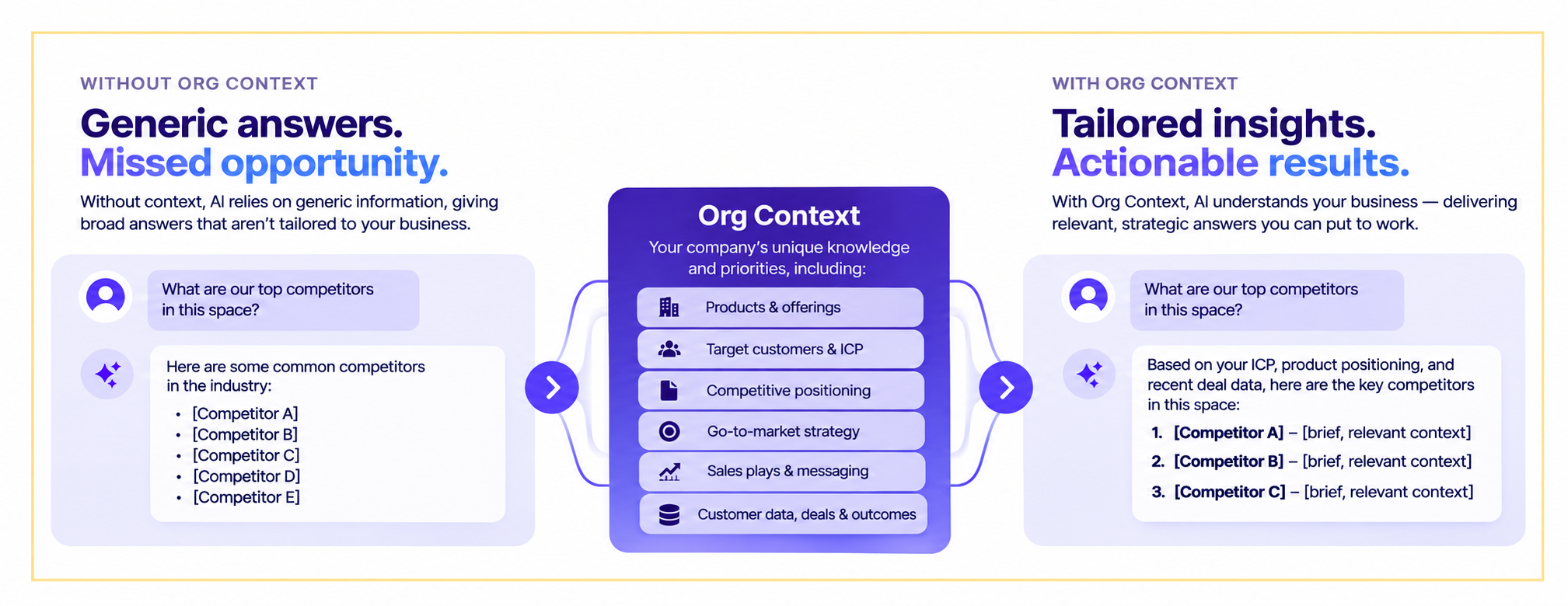
Org Context delivers measurable improvements across three dimensions:
The value compounds: every agent that uses Org Context brings the same company perspective, turning company knowledge into a flywheel for revenue execution.
The value of Org Context grows with every agent that can use it.
Establish what is true about your business once, then make that shared context available wherever Outreach agents help teams prepare, analyze, and act. Each experience starts with a better understanding of the company it represents, while admins retain control over the information behind it.
Your company context should not get lost between the conversation and the next action. Give every agent a stronger starting point with Org Context.
Org Context is an Outreach platform feature that gives admins a centralized way to define and manage company knowledge — including company overview, products, and competitors—that Outreach agents reference before producing outputs. This ensures every agent-generated response reflects your company’s value, positioning, and business language.
Without Org Context, AI agents produce generic responses that sellers must edit by hand, adding your product names, competitive positioning, and brand voice. With Org Context, agents start with your company’s business context built in, reducing rework and keeping team messaging aligned. Sellers spend less time editing and more time on what matters: understanding customers and closing deals.
Org Context holds the core company information every agent should always reference — company overview, products, competitors, and sales context. It’s broad and universally applicable.
Knowledge is deeper, detailed material agents can reference when a question calls for it — technical documentation, case studies, competitive research, pricing information, and process documentation. Org Context provides the frame; Knowledge adds depth when needed.
Org Context currently powers Outreach Omni. The roadmap includes extending Org Context to more agents across the platform, so every agent experience starts with the same understanding of your business.
To set up Org Context, navigate to your Outreach admin settings, find the Org Context section, and populate the pre-built blocks with your company overview, products, and competitor information. You can use web sources to auto-populate content, then review, edit, and approve before activation. See the full setup guide for step-by-step instructions.

Sales engagement data in Snowflake: Bring Outreach activity next to the rest of your GTM data
October 28, 2026
TL;DR: Outreach Data Sharing gives you a live, read-only view of your Outreach sales engagement data inside your own Snowflake account. Query emails, meetings, and sequences with SQL, with no APIs or ETL to build.
Your revenue team's activity is some of the most useful data in your business. Every sequence step, email reply, and booked meeting tells you something about what's working. But for many RevOps and data teams, getting that activity into the warehouse where analysis happens is a project in itself.
Usually that means building an API pipeline, managing rate limits, and maintaining it as things change. One Outreach beta customer spent more than three months and roughly $25K a year in engineering time just to extract their data.
Outreach Data Sharing is available on the Snowflake Marketplace and runs on Snowflake Secure Data Sharing. It gives you a live, read-only view of your Outreach data inside your own Snowflake account. Nothing is copied or exported, and there are no API calls, rate limits, or ETL jobs to maintain.
The data is granular. You can query record-level email engagement (sent, opened, replied), meeting activity (booked, completed), and rep task activity, alongside sequence and pipeline data. Because it arrives as SQL-ready tables, you can join it with Salesforce, Marketo, and product data you already store there.
Beta customers had usable data in under a day, with no engineers required.
What can you do with Outreach engagement data alongside the rest of your GTM data? Here are two ways teams can use Outreach Data Sharing in Snowflake to improve lead scoring and connect sales activity to revenue outcomes.
Rules-based lead scoring goes stale quickly. When scores refresh once a day, a prospect who turns hot at 9 a.m. may not reach a rep until the next morning, when they may have already missed out on the potential opportunity to a competitor who reached out immediately.
Snowflake's own SDR team ran into this. With Outreach engagement data flowing into Snowflake, they feed it into their scoring models and push updated scores back to Salesforce and Outreach for reps to act on. They moved from once-daily score refreshes to updates every two hours. A lead that heats up in the morning can now reach a rep by lunch. That gives reps a better chance to engage buyers while their interest is high and turn those conversations into pipeline opportunities.
If your team is already scoring in Snowflake, this closes a common gap: your model can now see what reps and prospects are actually doing, not just firmographics.
Marketing hands leads to sales, and visibility often stops there. Without shared data, it's hard to say which campaigns lead to revenue.
With Outreach engagement data (sequences, replies, meetings booked) in the same place as Marketo, Salesforce, and web and product data, you can build one account-level view from first touch to closed-won. Customers who unified this data reported richer attribution models, along with higher prospect response rates and more pipeline generated.
It also gives revenue leaders a way to answer a question that's hard to answer in-app: how do rep and sequence activity connect to revenue? Armed with this data, teams can do more of what works (and spend less time on what doesn’t) to grow revenue faster.
Your team already has valuable sales engagement data in Outreach. Bringing it together with the rest of your GTM data in Snowflake gives you a clearer picture of what's driving results — and where to focus next.
With Outreach Data Sharing, you can sharpen lead scoring so reps act on buying signals sooner, connect sales and marketing activity to closed-won revenue, and identify which sequences and interactions contribute to pipeline. And because the data is available directly in Snowflake, you can get those insights without building and maintaining custom API integrations or ETL pipelines..
The result is less time spent managing data and more time using it to make better decisions, prioritize opportunities, and drive revenue growth.

AI transparency in sales tools that your team can test
October 27, 2026
TL;DR: Trust decides whether reps use AI recommendations at all. Test a sales tool by checking the evidence behind one recommendation, what changes when you change an input, what the explanation reveals, whether you can override it, and whether the audit trail records the result.
Pick a deal your AI tool flagged as at risk and ask it why. If the answer is a score with nothing behind it, you've found the problem with AI transparency in sales tools. Your reps probably found it first, because a flag they can't check is a flag they can't act on.
Gartner's data points to the same conclusion: 66% of sales leaders report low trust in AI-generated insights, and sellers ignore advice that looks generic or wrong for their deals. A bare score also gives managers nothing to coach from and finance nothing to defend.
For RevOps leaders, finding out where your tool stands takes an afternoon and your own deals, starting with the flag you just asked about.
AI transparency in a sales tool is the ability to see why the AI recommended or did something, in terms a seller can check. A recommendation might be a risk flag, a suggested next step, or a forecast change, and an action might be a CRM field update or a drafted email.
Agentic AI does both, so transparency must cover what the AI did and what it said. Two things make that testable: the explanation behind an output and the record of what happened next.
An explanation names the evidence behind an output, such as the call, email, or CRM field that produced a risk flag. A score of 42 out of 100 provides no evidence. NISTIR 8312 sets the standard in two parts.
The system "delivers or contains accompanying evidence or reason(s) for outputs and/or processes," and the explanation "correctly reflects the reason for generating the output."
Buyers often miss the second part because a tool can give a convincing explanation that doesn't match what drove the answer, so you have to test for both.
An audit trail records what happened. It shows what changed, why it changed, who approved it, and when. When an AI agent updates a field or sends a message, a good audit trail records the agent's decision, why it made it, and who approved the change.
The explanation tells you why the AI said something, and the audit trail tells you what happened next. You need both, because a manager can't coach from a log, and a finance team can't defend an explanation that nobody recorded.
AI adoption depends on trust, and Gartner finds that 66% of sales leaders report low trust in AI-generated insights. Sellers ignore tools whose advice looks generic or wrong for their deals, so if reps don't trust a recommendation, they don't use it and tech adoption stalls.
An MIT SMR survey of 1,741 people found that those who could interpret AI outcomes were 2.8 times more likely to trust the technology. Reps, managers, and the finance team each need a different reason to trust it.
Would you act on a risk flag you couldn't check? A rep follows a recommendation when they can check it fast. Give them a source that opens in seconds, like a call moment, an email, or a field history, and the recommendation becomes something they can act on or argue with.
In a fact-checking study at NAACL 2024, people given model explanations reached 0.74 accuracy, compared with 0.59 without them.
The same study found people leaned too hard on explanations when they were wrong. That's why the evaluation checks whether an explanation matches what drove the output, and not only whether it exists.
A deal review that opens with a health score turns into an argument about the score. Open the call on the moment or the field change behind it instead, and the manager and rep can talk about what to do next.
Share the moment before the meeting, ask the rep what they'd do, then compare that with the AI's suggestion. Make "What evidence is this based on?" the first question in every review.
Conversation intelligence software makes this possible because it records and transcribes calls so the moment is there to open. Coaching models already depend on specific moments, so the habit fits your deal management routine.
A forecast that moves budget has to survive a board question. Gartner says leaders trust forecasts more when they understand what changed and why, and when outputs link to recognizable business drivers and transparent assumptions.
Confidence is thin right now: only 43% of the 200 North American finance chiefs in Deloitte's second-quarter 2026 survey said they feel confident in their current AI governance.
That's why a finance team needs three things on the screen.
Showing those three things pays off, since in a sales-forecasting experiment with 1,330 forecasts, factual explanations improved forecasting performance by letting people overrule the algorithm more successfully. AI forecasting earns trust the same way, and transparent forecasts are one of seven tactics for improving its accuracy.
To evaluate AI transparency in a sales tool, run five checks on your own data, in a demo or a pilot. Each check tests a different promise, starting with where a recommendation comes from and ending with whether the explanations hold up against real outcomes. Run them on one real deal, ideally the flag your rep disputed last quarter, and keep one test sheet. If you only have time for one, run the first.
Pick the flagged deal, or a field the AI updated, and ask the vendor to trace it to a call, an email, or a CRM field. Then pick one the AI got right and one it got wrong, so you see how the explanation behaves in both cases.
Ask whether every recommendation carries a source or only some, and what the tool shows when no evidence exists. A transcript excerpt with a timestamp beats a fluent paragraph because, in a lab study of 30 people, explanations with no real information can build trust as much as real ones.
Listen for answers that give the game away, like "the model looks at hundreds of signals" or "that's proprietary." Each one means there's nothing you can check. RevOps writes down the answer for the test sheet, and the tool passes when a rep can open the source in a few clicks. It can pass on the demo deal and fail on yours, so use a deal your team picked.
Change one field on that deal, like the close date or the number of contacts engaged, hold everything else constant, and rerun. Write down what the explanation implies will happen before you rerun, then compare. A good explanation changes when the input that drove it changes. If the vendor won't let you change a field in a pilot, that's an answer too.
If the output moves and the explanation never mentions the field you changed, the explanation may not reflect what drove the output, and research shows that does happen. In one set of tests, researchers reviewed 426 explanations supporting biased predictions, and only 1 of 426 mentioned the bias.
Neither that study nor the 30-person study tested a sales tool, so treat them as reasons to check. Treat a pass as a floor, because a tool can survive one test and still mislead on the next, so repeat it with a second field.
Log in as a rep with limited permissions and ask about a deal that rep can't see. Then ask about a deal the rep can see and look at the citations for any record outside the rep's access.
Ask whether the system checks permissions before it retrieves or after, because a 2026 workshop paper found that pipelines that retrieve first and filter later exposed unauthorized context in 86.1% of queries.
Your security reviewer owns this step, and you're done when no citation comes from a record the rep can't open. Ask the vendor to put its answer on permission checks in writing. Data handling and training terms are a separate review, and AI data privacy checklists cover them.
Accept one recommendation, edit another, and reject a third, and confirm the reasoning stays visible after each. Then ask your admin to open the audit trail and check that it shows what changed, who approved it, and when. A log that shows only the final value hides the suggestion the rep rejected, and that's where disagreement shows up.
For high-risk systems, Article 14 of the EU AI Act says human overseers must be able to "disregard, override or reverse" the output, and whether your tool counts as high-risk is a question for counsel.
Override also helps adoption, since people who could override AI were 2.1 times as likely to use it regularly. Many teams start in a copilot setup and set risk-based approval gates, so routine logging runs on its own while stage, amount, and close-date changes wait for a person.
Across the pilot, track which recommendations carried a source, which people accepted, edited, or rejected, and which proved right at close. Compare acceptance, edit, and override rates, but condition them on whether the AI was right. A raw acceptance rate can't tell a rep who checked the evidence from one who agreed with the tool.
Set the window before the pilot starts and make it long enough to cover a full quarter of forecast calls. Acceptance can rise because reps stopped checking, so watch edits and reasoned overrides too. Rising acceptance with steady accuracy and a steady share of reasoned overrides is the pattern to look for. Have one person review the sheet weekly, so patterns show up while the pilot can still change.
Outreach, the agentic AI platform for revenue teams, puts recommendations inside human-controlled workflows, so teams decide which changes a seller reviews before they land. Each capability below maps to one of the five checks, so you can test every claim on your own deals.
Forrester wrote in The Forrester Wave™: Revenue Orchestration Platforms for B2B, Q3 2026 that "Outreach demonstrated strong autonomy controls, monitoring, usage management, and outcome reporting for revenue-focused AI agents in production."
Put finance, revenue, and security in one room and run the five checks on your own deals. Bring a flagged deal, a changed field, a limited-permission login, and the record of what the AI did. If you want a focus for the session, ask Outreach to walk through how Deal Agent traces an update to the call that produced it.
Keep the results as your baseline, and put the review on your GTM cadence. A tool that passes today still needs a second look after its next big release.
The Act sets human-oversight duties for high-risk AI systems, and whether a given sales tool counts as high-risk is a question for counsel. Even when it doesn't, the standard is a fair bar for any vendor review. Overseers should understand the system's limits, interpret its output correctly, and be able to override it. Put those three on your checklist, and ask the vendor to show each one on your own deal.
Ask for the source record behind it, and if there isn't one, treat the output as unverified. Keep the tool to low-risk tasks, require a person to approve anything that changes a stage, amount, or close date, and add the missing explanation to the renewal agenda. A vendor that can't trace one deal today probably can't trace a hundred next quarter.
It should record what changed, why it changed, who approved it, and when. For an AI agent, that includes the recommendation it acted on and a link back to the evidence behind it. Check that rejected and edited suggestions are logged too, since those show where reps disagree with the tool. Finance and security will both ask for that history sooner or later.
Re-run the five checks when the vendor ships a major release, when permissions or roles change, and before each renewal. In between, track acceptance, edit, and override rates, so a drop in reasoned overrides or a jump in blind acceptance shows up before the next formal test. Assign one owner, usually RevOps, so the re-test doesn't get lost.
How to roll out AI workflows with confidence: Predictable credit use by design
October 22, 2026
You’ve been asked to roll out a new AI workflow. The upside is easy to see: less manual research, faster follow-up, cleaner data. The worry is quieter, and it tends to show up right after the excitement. What if the agent uses credits on something that isn’t driving value? What if it’s running without the right guardrails?
If you’re the RevOps leader who owns the rollout, often the only one, those questions aren’t abstract. You’re the person who’ll be asked where the credits went.
Let’s be clear about the goal. It isn’t to use fewer credits. Credits are what power your AI workflows, and a team that uses more of them on the right work is usually a team that’s getting results. The goal is to make sure each credit goes toward something worth doing.
That’s where the worry comes from, and it comes in two forms:
The right agentic platform addresses both, and neither means slowing down. Here are five steps to take to ensure you’re getting the most value about of AI credits.
The way we see it is simple: every agent should have a defined action within a defined workflow. When you can say “this agent does this, in this workflow, for this team,” you know exactly what’s driving value, and you know where to look if something changes.
Outreach gives you controls to set that up. The AI Control Hub lists each AI feature and its status in one view, so you can enable or disable features individually. Open a feature and you can see which models it uses and how it’s charged. Deal Agent, for example, is usage based, charged per use. Profile assignment then lets you decide which teams get access, from SDRs to AEs to to CSMs, or all of your teams.
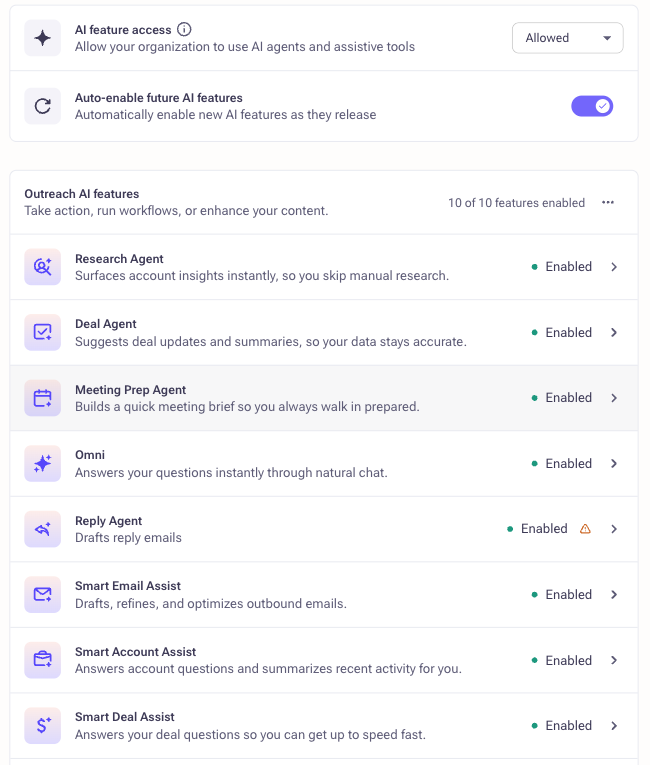
Outreach Features page listing AI agents and assistants with their status and an auto-enable setting for new features
Put together, that’s what we mean by predictability by design. You decide what’s on, for whom, and what it’s for before anything runs.
Start with the revenue workflow you want to automate. Then, before you turn anything on, work out what it’s likely to consume. Which agent or agents will handle it? What action will they take? How often will that happen, and across how many people?
Keep the first use case specific. You might start with Research Agent for one SDR team, or Deal Agent for a single group of AEs. A narrow scope makes your estimate easier to build and easier to check.
Your estimate doesn’t need to be perfect. It just needs to give you something to compare against.
Resist the urge to launch for everyone at once. Pick one use case or one team, and use profile assignment to limit access to that group. Let it run for a while. Then compare actual usage to your estimate.
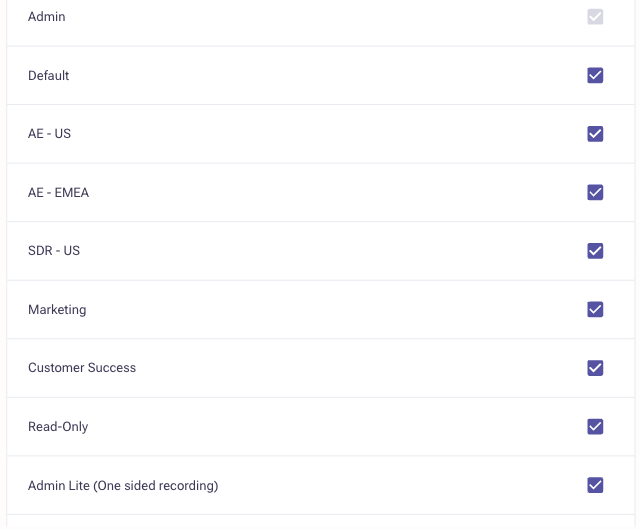
If the two are close, you have a model you can repeat. If they aren’t, you’ve learned something early, when it’s easy to adjust, instead of after the rollout is everywhere.
Rollout isn’t a one-time event, so keep an eye on how things are going. The AI Metering Dashboard shows your credit summary with remaining and used credits, plus three views that help you dig in:

A monthly check-in is usually enough to notice what’s driving value, catch anything unexpected, and plan your next rollout.
Once usage matches what you expected, expand to more teams and more workflows. As adoption grows, you may need more credits, and that’s a good sign. When you’re ready to expand usage or add more agentic workflows, requesting more credits is a click away from the same page where you track consumption.
Scaling is where the value tends to show up. SailPoint, an enterprise identity security company, had aggressive growth targets and no additional headcount to meet them. Its sales leaders invested in Outreach agents and Kaia to cut manual research and make selling more consistent across reps. They’ve since rolled the motion out in seven languages and report open rates more than 50% higher with agentic AI. A rollout like that is a good example of why it pays to start with a clear picture of what each agent is doing.
Before you switch on your next AI workflow, make sure you can answer these:
Governance isn’t there to hold AI back. It’s what lets you say yes to the next workflow without wondering where the credits are going. When every agent has a defined job, you’ve estimated before launch, and you can see usage as it happens, you’re free to focus on the part that matters: putting AI to work where it moves revenue.
Outreach Agents follow a usage-based pricing model. Total costs depend on your usage model and which agents you deploy. For example, if your team of 10 AEs uses Deal Agent 5 times per week, you're looking at roughly 200 uses monthly. Research Agent and other workflow automation agents follow similar usage-based pricing.
The best approach is to estimate your use case upfront (which our guide covers in Step 2: "Estimate before you launch") and then pilot with one team to compare actual usage to your projection. Most teams find their estimate is close, and they can confidently scale from there.
With Outreach's AI credit model, you stay in control. You decide upfront how many credits to budget for overall. Then, with the AI Control Hub, you decide what agents are enabled and who has access. The AI Metering dashboard gives you real-time visibility into credit usage—you can see consumption over time, spot trends early, and adjust before you hit any limit. If you're approaching your budget and want to scale further, requesting more credits is just a click away from the same dashboard where you track usage.
Absolutely—and we recommend it. In fact, our research shows the most successful rollouts start small: pick one team (like your SDR or AE team) and one use case (like account research or opportunity field updates), then pilot for a few weeks.
Why? Because small pilots let you test your estimate against real usage, catch any workflow issues early, and build internal confidence in the AI before expanding. Profile assignment in Outreach makes this simple—you can grant access to specific teams and gradually expand as adoption grows. Starting small isn't a constraint; it's the fastest path to confident scaling.
Define success metrics upfront. In your pre-launch checklist, ask: "How will we know it's working?" Common metrics include deal velocity (% faster), response rates (% higher), ramp time for new reps, and data quality improvements.
Then use the AI Metering Dashboard to track adoption (credit usage by user, usage distribution by action) and cross-reference that with your sales metrics. A monthly check-in is usually enough to spot trends. The SailPoint case study in our guide is a good example: they tracked open rates and saw a 50% lift with agentic AI deployment.
Draft Answer: Yes. Outreach integrates natively with Salesforce, Microsoft Dynamics, and 85+ other tools. AI agents sit on top of those integrations, so they work seamlessly with your existing CRM and revenue operations stack.
When you deploy agents like Deal Agent or Research Agent, they pull data from your CRM, enrich it, and push updates back—all without requiring new tools or manual data entry. This is one reason the platform consolidation approach works: instead of juggling separate point solutions, your agents operate across your unified revenue data.
AI Agent Interoperability: How Connected Agents Align Sales and Marketing
October 22, 2026
TL;DR: Sales and marketing alignment is coordinating both teams around shared data, goals, and metrics. Traditional tactics (shared KPIs, integrated tech stacks, regular cross-functional meetings) have improved alignment but still leave manual gaps at every handoff point, including mismatched definitions of a qualified lead, a closed deal, or an at-risk account. The next step is agent interoperability: AI agents across Salesforce, Outreach, and Slack share context at the agent layer, removing the manual coordination that has long eroded alignment once sales, marketing, and customer success agree on what the shared data actually means.
The Outreach Insights Group's (OIG) Agent Productivity Impact Report found that AI cuts meeting prep by 50%, and customers see a 44% reduction in forecast prep time. The path to agent-driven alignment starts with clean data and shared definitions, then enables cross-platform agent interoperability, and ends by redirecting human attention to the strategic work agents can't do.
Sales and marketing alignment is coordinating both teams around shared data, goals, and metrics; traditional tactics like shared KPIs and integrated tech stacks help, but still leave manual gaps between systems.
Shared dashboards, unified KPIs, and cross-functional meetings have all improved sales and marketing alignment over the past decade. Yet for most CROs, the gap between these two teams still costs real revenue.
Manual handoffs lose context, CRM data goes stale within hours, and sellers spend more time coordinating admin than talking to customers. The next breakthrough comes from a different direction entirely. At Unleash 2026, during the Salesforce and Outreach partner spotlight, Abhijit Mitra, CEO of Outreach, put it simply: "We're moving beyond connected systems to connected agents."
AI agent interoperability, the ability for agents across platforms to share context and coordinate actions, gives revenue leaders a new way to close operational gaps that have undermined alignment for years.
AI agent interoperability is the ability for AI agents operating on different platforms, such as a CRM, a revenue orchestration tool, and a communication platform, to share context and coordinate actions without a person relaying information between them. It's a new layer on top of the data and workflow integrations that have connected software systems for years.
Those older layers still required a human to interpret and pass along information (a rep copying a call summary into a CRM, a marketer flagging an engaged account in a chat tool), but agent interoperability lets agents exchange that context directly.
An agent that observes a signal in one system can hand a fully formed briefing to an agent working in a different system, with no manual step in between.
It's a new capability, not just a faster version of the old one: for it to work, the agents on each platform need shared definitions of what they're looking at (an "opportunity," a "handoff," an "at-risk account") as well as shared data. Interoperability without that shared vocabulary just moves inconsistent information faster.
One of the clearest places to see agent interoperability at work is sales and marketing alignment, the strategic coordination of sales and marketing teams around shared goals, processes, and metrics to drive unified revenue outcomes.
When both teams operate from the same data, pursue the same accounts with consistent messaging, and measure success against the same targets, revenue organizations move faster and close more deals.
Traditional alignment approaches include shared KPIs, integrated tech stacks, regular cross-functional meetings, and unified customer data platforms. These practices have moved the needle, but they haven't solved the underlying problem. Humans still manually bridge the gaps between systems.
Someone has to update the CRM after a call, relay marketing engagement signals to the sales team, and reconcile conflicting data between platforms before a pipeline review. Each manual step introduces lag, inconsistency, and risk.
Agent interoperability finally closes that gap, not as a new tactic alongside the old ones, but as a different layer underneath them.
As Lisa Eisenberg, SVP at Salesforce, explained, true alignment requires connected agents: agents that ensure platforms are "interoperable at the agent layer" so they can share context, coordinate actions, and execute work on users' behalf. Instead of a marketer manually flagging a hot lead in a chat tool or a rep updating a CRM field after a call, agents on each platform pass that context to each other directly, the moment it happens.
Agent interoperability is what finally closes that gap: not a new tactic alongside the old ones, but a different layer underneath them.
Misalignment between sales and marketing creates compounding costs across every revenue metric. Teams duplicate outreach to the same accounts. Customers receive inconsistent messaging depending on which team they interact with. Qualified leads sit untouched because marketing engagement context doesn't transfer cleanly to the seller.
For CROs, this misalignment directly affects pipeline velocity and forecast accuracy. Revenue teams need unified context to execute well, and that context lives scattered across Salesforce, Outreach, Slack, and several other platforms. Manual updates create lag. By the time a seller logs a call summary or updates an opportunity record, the data is already stale.
Eisenberg highlighted this during her conversation with Mitra: sellers carry "enormous responsibility" to find opportunities, advance deals, close business, and grow accounts. But "a significant portion of their time is spent doing administrative work," including "updating forecasts, updating opportunity records, managing notes, preparing for meetings." Every hour spent on administrative coordination is an hour not spent with customers.
The cost compounds across teams. Marketing can't accurately score or target accounts when CRM data reflects yesterday's reality. Sales can't prioritize when marketing engagement signals arrive late or are incomplete. Revenue operations can't trust pipeline reports built on manually entered data.
Customer success inherits the same fragmentation at renewal time: an account that looks healthy in one system can look at risk in another because the two teams score health differently.
As Eisenberg explained, "Agents have access to Salesforce data. They have access to Slack conversations. They have access to Outreach insights. They can bring all of that information together automatically."
Agent interoperability creates alignment at a layer that didn't previously exist. For years, Salesforce and Outreach connected their platforms at two layers. The agentic era adds a third:
The first two layers improved coordination, but agents still operated in isolation within each platform. As Eisenberg described the shift: "We need to make sure our platforms are interoperable at the agent layer so agents working on the Outreach platform can interoperate with agents working across Salesforce and Slack."
Here's what that looks like in practice. Outreach agents access Salesforce data to inform their actions. The outcomes those agents generate flow back into Salesforce, where Salesforce agents can then act on the new information. Mitra called this "truly agent-to-agent collaboration," and it changes how alignment works day to day.
Consider a practical revenue workflow: context about a prospect's engagement automatically flows to agents who prepare an account briefing for the account executive. After the seller's first conversation, updates flow back to inform targeting for related accounts. The result: no manual data entry, no context lost in handoffs, and no stale CRM records undermining the next touchpoint.
The operational work, updating opportunity records, maintaining forecast data, transcribing conversations and creating briefing documents, happens in the background. Eisenberg painted the picture directly: "Imagine having a team of agents working in the background doing all the mundane work." The result, she said, is that "account executives can spend more time with customers, advance deals faster, and focus on growing opportunities."
Agent-driven alignment produces three operational gains that manual coordination between teams could never sustain day after day.
Revenue teams today lose significant time to operational tasks that don't directly advance deals. Updating opportunity records, maintaining forecast information, transcribing notes and creating briefing documents: together, these tasks consume hours every week. Outreach customers report that sellers using AI-powered workflows see a 44% reduction in forecast preparation time.
The Outreach Insights Group's Agent Productivity Impact Report found that AI cuts meeting prep time by 50%, saving sellers roughly 23 to 26 minutes per meeting compared to a one-hour baseline. When agents handle this work across platforms, sellers and marketers both gain time to focus on customer-facing activities and strategic planning.
When agents share information across Salesforce, Outreach, and Slack, revenue teams operate from the same complete picture of each account. Customer data becomes more actionable because it reflects the full history of engagement, not just the slice visible in one tool. Preparation for calls, pipeline reviews, and account planning happens automatically rather than manually.
The "context gap," where marketing insights don't fully transfer when leads move to sales, has always undermined alignment efforts. Agent interoperability closes that gap by keeping data synchronized across platforms in real time. Marketing and sales work from the same current data, and neither team waits for the other to manually update records before taking action.
Most alignment problems trace back to the manual work that bridges disconnected systems, or the mismatched definitions underneath. Here is how agents address the five that cost revenue teams the most.
Even when data flows freely between systems, teams often don't agree on what that data means. Marketing may count a "qualified lead" the moment a prospect downloads a report; sales may not consider that lead qualified until it clears BANT criteria. A deal marked "closed-won" in Salesforce might not match customer success's definition of an "onboarded," revenue-generating account. Renewal risk also looks different depending on whether you're measuring product usage, support ticket volume, or contract dates.
These definitional gaps compound the technical ones. Interoperable agents can move accurate data instantly across Salesforce, Outreach, and support platforms, but if each team's agents are still scoring, tagging, or reporting against different definitions of a "qualified lead," an "engaged account," or "renewal risk," the result is fast, well-synchronized, but still inconsistent decision-making.
Standardizing definitions has to happen before, or alongside, turning on agent interoperability. That means agreeing cross-functionally on a shared glossary for the handful of terms that drive handoffs: what counts as a marketing qualified lead, what stage triggers a sales-to-CS handoff, and how account health is scored. RevOps typically owns this definition work, translating it into the shared data layer's fields and workflows so agents across every platform reason from the same vocabulary, not just the same records.
ChurnZero's 6th Annual Customer Revenue Leadership Study found that customer success teams with strong sales enablement post 99% net revenue retention, compared to 94% without it: a gap that starts with the two teams agreeing on what "healthy" and "at risk" actually mean for a shared account.
Sellers spend significant time updating CRM records and maintaining forecast notes. AI agents operating across platforms can surface recommended updates and maintain data accuracy, reducing the lag between customer interactions and current system records.
Marketing engagement signals often arrive incomplete or late when leads transition to sales. Agents operating across the data, workflow, and agent layers automatically bring all of that information together, preserving the full context that helps sellers personalize their outreach.
When data lives separately in your CRM, sales engagement platform, and communication tools, no single team has a complete view. Agent interoperability helps break down data silos, enabling agents on the Outreach platform to interoperate with those across Salesforce and Slack, creating a unified operating environment without requiring a single monolithic system.
As Eisenberg noted: "Reading through documents, gathering context, all of that takes time." When a team of agents handles operational work in the background, account executives arrive at every customer interaction prepared, with briefing documents, account summaries, and deal context assembled automatically. Conversation intelligence also helps keep customer interactions connected to the broader revenue record.
Moving to agent-driven alignment is a phased shift, not a switch you flip. These four steps sequence them without disrupting the teams already hitting their numbers.
Evaluate the existing connections between your revenue platforms at the data and workflow layers. Identify the specific points where manual work still bridges system disconnects. Map the administrative tasks consuming your team's time, and quantify how many hours per week go toward CRM updates, forecast preparation, and meeting prep.
Clean, connected data across your revenue tech stack is the prerequisite for effective sales AI. Before turning on agent interoperability, align sales, marketing, and customer success on shared definitions for the handful of terms that drive handoffs (a qualified lead, a sales-to-CS handoff, an at-risk account) and assign RevOps to own that glossary going forward. Identify the highest-value use cases for agent automation, starting with the handoff points where context loss incurs the greatest revenue loss.
Launch agents that can access data across platforms, including Salesforce, Outreach, and Slack. Purpose-built agents such as Revenue Agent, Research Agent, and Deal Agent show how agentic work can support prospecting, research, and deal execution.
Build bidirectional data flows between agent ecosystems so that insights generated on one platform inform actions taken on another. Focus on creating the kind of agentic enterprise that Eisenberg described: "organizations where humans and AI agents work together to deliver business outcomes."
With agents handling operational tasks, redirect sellers' and marketers' time toward customer conversations, relationship-building, and creative strategy. Measure success by engagement quality and deal progression rather than activity volume alone.
Traditional alignment metrics like lead-to-opportunity conversion rates, sales cycle length, and revenue attribution accuracy remain relevant. Agent-driven alignment adds new dimensions worth tracking: time saved on administrative tasks per rep, data accuracy and freshness across your CRM, context completeness at handoff points, and customer-facing time per account executive.
Customer outcomes can help translate alignment into operating impact. Look for evidence that teams are reducing administrative work, improving data freshness at handoff points, increasing customer-facing time, and creating more reliable pipeline and forecast visibility.
The most meaningful measure ties directly to revenue outcomes. When agents handle operational work, revenue teams spend more time on the activities that close deals and grow accounts. Track the shift from administrative tasks to revenue-generating activities as your primary indicator of progress toward alignment.
Sales and marketing alignment has always been limited by the manual effort required to keep two teams operating from the same data, and by the fact that "the same data" doesn't always mean the same thing to both teams. Connected agents change that equation by handling the operational coordination humans have never had time to maintain day after day, once sales, marketing, and customer success agree on the definitions underneath it.
For CROs, the path forward is clear: alignment is now about building an agentic enterprise where AI agents collaborate across your revenue stack, keeping data current, context intact, and sellers focused on the conversations that generate revenue.
Sales and marketing alignment is the strategic coordination of both teams around shared goals, processes, and metrics to drive unified revenue outcomes. When both teams operate from the same data, pursue the same accounts with consistent messaging, and measure success against the same targets, revenue organizations move faster and close more deals.
Misalignment between sales and marketing creates compounding costs across every revenue metric: duplicated outreach, inconsistent messaging, and qualified leads that sit untouched because context didn't transfer cleanly at handoff. For CROs, misalignment directly affects pipeline velocity and forecast accuracy.
Agent interoperability is the ability for AI agents operating across different platforms (such as Salesforce, Outreach, and Slack) to share context and coordinate actions without human intervention. Where traditional alignment required people to manually bridge system gaps, agent interoperability handles that coordination automatically at the agent layer.
AI agents improve alignment by eliminating manual handoffs that cause context loss across teams. Agents operating across your CRM, sales engagement platform, and communication tools automatically exchange information, keeping data current and ensuring both teams work from the same complete picture of each account.
Each team optimizes for a different stage of the customer lifecycle, so they naturally track different signals: marketing defines success around lead engagement, sales around deal progression, and customer success around product usage and renewal risk. Without a shared glossary, the same account can look "qualified" to marketing, "stalled" to sales, and "healthy" to customer success at the same time. Standardizing definitions (typically owned by RevOps) for the handful of terms that trigger handoffs, like a qualified lead, a closed-won deal, or an at-risk account, keeps all three teams reasoning from the same picture, whether or not their platforms are fully interoperable yet.
Traditional metrics include lead-to-opportunity conversion rates, sales cycle length, and revenue attribution accuracy. Agent-driven alignment adds new dimensions: time saved on administrative tasks per rep, data accuracy and freshness across your CRM, context completeness at handoff points, and customer-facing time per account executive.

How to build frontline trust in AI agents (and why coaching beats prospecting as the starting point)
October 21, 2026
Overview: Resi’s AI adoption started with coaching rather than prospecting because the first priority was building frontline trust. Positioning AI as a “coach in your pocket” helped frame it as a source of value rather than surveillance, while continuous rep feedback strengthened trust over time. From there, a human-in-the-loop model kept empathy and intuition with people while shifting tedious work such as account research and first-pass personalization to agents. Centralized workflows and clear safeguards then made it easier to scale adoption without adding friction.
In a recent conversation with GeekWire, I shared how we approached AI adoption at Resi and why we deliberately started with coaching instead of prospecting. For us, the question wasn’t simply where AI could automate the most work. It was where we could create enough value to earn trust from the frontline reps who would use it every day.
Most teams assume the first place to deploy AI agents is prospecting: write more emails, build more lists, push more activity. I’ve found a different starting point can unlock everything that comes after it.
At Resi, our entry point for AI agents was coaching.
That choice wasn’t accidental, and it wasn’t about chasing a quick productivity spike. It was about earning trust from the people who would have to live with these tools every day — frontline reps — and giving them something they could actually believe in long-term.
When I think about sellers, across roles, segments, and experience levels, one pattern shows up again and again: reps are usually their own harshest critic and their worst cheerleader.
They’ll replay one bad call all day and miss the things they’re genuinely great at.
That’s where AI coaching becomes powerful. Its biggest value isn’t that it’s new or flashy — it’s that it’s objective. It can give a rep a true read on their calls and “do both the job of the critic and the cheerleader at the same time.”
Just as importantly, coaching was something our reps could grab onto and believe in. We weren’t trying to win a race to automate the most; we were trying to build durable adoption. Coaching let us lead with a clear rep benefit, then expand the agent footprint from a foundation of credibility.
If you’ve ever rolled out call recording or conversation intelligence, you know the immediate reaction many reps have:
This is surveillance. This is big brother.
So we got very intentional about positioning. When we introduced call recording (back in 2022), we anchored it to a rep-first value story: we want to give you a coach in your pocket.
Why? Because enablement teams can’t be on every call. A manager can’t sit beside every SDR. But an agentic model can.
That framing matters. It turns AI from something happening to reps into something working for them. And without that shift, even good technology will struggle to earn the right to stay.
Frontline trust doesn’t appear because you bought a tool. It’s built through repeated cycles of value delivery.
In my experience, adoption comes down to two things: trust and value, and “those both compound over time.”
We’re now years into this journey, and the reason trust exists is simple: we didn’t ship something once and walk away. We refined it continuously based on rep feedback. Over time, that consistency signals something important to the field:
This isn’t a flash in the pan. This is part of how we work.
And when reps believe you’ll keep improving the system with them (not at them), they’ll keep leaning in.
I’m a big believer in human-in-the-loop. We hire people for a reason. Reps bring two things that are core to how we sell:
Those aren’t side quests in a sales motion; they’re the point. So, I don’t want to designate those activities to an agent.
What I do want is to shift the tedious parts of the process — the work that doesn’t require empathy or intuition — over to agents so humans can spend more time doing what they were hired to do.
In practice, that’s looked like deploying agents to support prospecting prep, including:
The goal isn’t to remove the rep from the narrative. It’s to give them a stronger starting point, so their human touch is more effective.
This matters even more in niche markets where standard enrichment breaks down. In segments like house of worship, you can’t assume the information you need is neatly packaged in the usual places, “Pastor Steve’s probably not on LinkedIn.”
Before agents, an SDR might spend an hour or two digging through a website to find basic context. Now, we can prepare a brief that reduces that time drastically. The payoff isn’t just efficiency, it’s role integrity. Reps can spend more of the day calling, booking meetings, and building relationships, instead of being “pigeonholed into a data analyst role for two hours a day.”
The human/agent split isn’t a one-time design decision. It’s a system you’ll keep tuning.
One principle I repeat constantly is: transparency builds trust. If reps don’t understand why you’re rolling something out, the what feels ambiguous — and ambiguity is where skepticism grows.
So as new capabilities come online, I focus on sourcing organic feedback:
And I try to keep that feedback grounded in outcomes, not vibes. I joke with my team: I don’t really care how you feel about my agents, I want to know what my agents did for you. If we need to adjust them, that’s fine. The point is to keep tuning the system around what helps reps execute.
That loop — transparent intent, real usage, honest feedback, visible iteration — is what keeps adoption healthy without turning every rollout into a culture battle.
Another trust killer is friction.
If a rep has to bounce from tool to tool all day: research in one place, sequences in another, coaching somewhere else, you’ll feel it in adoption. It’s cognitive load, it breaks focus, and it makes the agent experience feel bolted-on rather than integrated.
We centralized our execution model in Outreach back in 2022. That’s allowed us to run research agents there, then have agents take action on the resulting insights (like placing what they found into the sequence for the rep) while keeping the rep in a single environment for day-to-day execution and coaching.
I strongly dislike “swivel chairs.” If I can eliminate the need for a rep to go system to system in a normal day, that’s my goal. The more cohesive the workflow, the more likely reps are to use it, and the more likely the agent becomes a real teammate instead of another tab.
If you’re scaling AI agents in a GTM org, here’s the biggest mindset shift I’d recommend:
Failing is okay as long as you’re moving forward.
The way I think about it is the bowling bumpers analogy. When you put the guardrails up, a kid can throw the ball as hard as he wants inside the safeguards. He can also roll it gently. Either way, the system is designed to keep experimentation from turning into catastrophe.
That’s the play: set safeguards, then get after it. Within guardrails, you’re likely to “fail forward” because every outcome teaches you something:
And don’t design those guardrails in a vacuum. Talk to the reps doing the day-to-day work. I never want to be in a place where I’m the smartest person in the room for every decision. I’m not on every call. I’m not making every cold call. The people in the motion can tell you what would make the most meaningful change in their day, then you can prioritize what will have the most impact.
No. At Resi, we started with AI-powered coaching on purpose. Coaching created a low-friction, high-value entry point that helped reps build trust in the tool first—before asking them to rely on agents for higher-stakes parts of the revenue motion.
Start by positioning it as value, not surveillance. For us, reframing AI coaching as a “coach in your pocket” helped avoid the immediate “big brother” reaction that often comes with call recording. Then reinforce trust by being transparent about the why, and refining the system over time with organic rep feedback.
Here’s a breakdown:
A “swivel chair” workflow is when reps have to rotate between multiple systems all day to do one motion — research in one tool, execution in another, coaching somewhere else. It creates friction and reduces adoption. Centralizing workflows into a single pane of glass helps agents feel integrated into rep reality instead of added overhead.
Set clear safeguards, then let teams experiment within them. Expect some failure — and treat it as learning. Combine that with continuous, sourced feedback from the people doing the work so you’re adjusting agents based on real day-to-day impact, not top-down assumptions.

Building the business case for AI sales tools in revenue
October 21, 2026
TL;DR: AI sales tools often stall in approval because the case can't survive finance's questions. A strong case covers full cost, outcomes adjusted for adoption and shown as ranges, a recorded baseline, and a staged request, so finance can check the results after rollout.
Most leaders are sure AI sales tools will help. Getting a number finance will sign off on is the hard part. Proving ROI is a top 2026 challenge for 31% of chief sales officers, according to a Gartner survey announced in May 2026.
Finance tends to push back when costs are missing, outcomes can't be checked, or nobody recorded where the team started. If you're a finance, revenue, or RevOps leader weighing a purchase, your case needs full cost, claimed outcomes, a comparison baseline, and a staged decision; a weak spot in any one weakens approval before the tool gets a fair look.
Finance won't believe a return claim until the cost side is complete. Most teams underestimate what a tool costs to run because they anchor on the license fee and treat everything else as overhead. Walk through the cost in the order it arrives, from buying the tool to setting it up, getting reps to use it, running it, and subtracting what it replaces, and give each step its own line and assumptions.
The subscription fee is the number the vendor quotes, so annualize it over the same horizon as your outcomes. Add the renewal uplifts, seat growth, and add-on modules that a first-year quote leaves out. Treat the license as the starting line, because the next four categories add cost on top of it.
CRM integration costs more than the connector fee because RevOps must keep the tool in sync with the CRM. Budget for field mapping, permission setup, sync-error monitoring, and retesting every time the CRM changes. Each system the tool connects to adds setup and review work, so count admin hours as a recurring line.
AI sales tools score deals, draft messages, and project forecasts from CRM data, so data quality caps every outcome. Gartner predicts organizations will abandon 60% of AI projects by 2026 if they lack AI-ready data. Budget for deduplication, required fields, stage definitions, and an owner for ongoing hygiene before you buy.
Training and reinforcement cost more than most teams expect, and McKinsey's rule of thumb is about $3 on change management per $1 of model development. Budget for onboarding sessions, manager coaching time, and follow-up reinforcement over the first few quarters, because reps who skip training usually skip the tool too.
Running the tool keeps costing money after rollout, mainly RevOps admin time for permissions, field changes, and user support. Add the time managers and reps spend reviewing AI outputs before acting on them. Recommendations stay inside human-controlled workflows, so that review is a real cost, and it belongs here as a recurring line.
Doing nothing has its own cost line, made up of overlapping subscriptions, integration upkeep, and seller time lost to switching between tools. Subtract only what the new tool retires, count a saving only when a subscription or workflow is switched off, and note when it ends.
Finance approves numbers it already tracks and will discount your estimates either way, so discount them first, as Forrester does with risk adjustments in its Total Economic Impact studies. The six outcomes below create value in three ways. The first two add capacity, the next two turn capacity into revenue, and the last two improve decisions, so claim each dollar once, in the outcome that created it.
Finance already knows what each new rep costs and what quota that rep carries, so ramp is the easiest outcome to check. Every month a new rep spends below full attainment is capacity the company paid for and hasn't received.
Bridge Group's 2024 SaaS AE benchmark reports a median annual ACV quota of $800K, or roughly $66,667 a month. For example, a six-month ramp at 50% attainment costs about $200,000 in quota capacity per hire. Estimate how many weeks the tool could take off that ramp.
Conversation intelligence can support that estimate. For example, in Outreach, the only agentic AI platform for revenue teams, Conversation Intelligence surfaces conversation insights and coaching signals from real selling moments, so you can test whether managers spend less time on call review or new hires reach readiness sooner.
Finance won't count sales productivity gains until the hours saved turn into something in the budget. Show the conversion one of two ways, either as extra pipeline the team wouldn't otherwise create or as hires the team no longer needs, and keep the two separate so neither gets counted twice.
Start from hours saved, where the Outreach Insights Group's 2026 Agent Productivity Impact Report reports 7 to 8 hours of free time saved weekly with AI. Reps won't spend all of that time selling, so count only a share of it. Call that share your capture rate, and test 25%, 50%, and 75% to get a low, middle, and high case.
A small lift on a large pipeline produces a large number, which is why this claim needs the most care. Tie the win-rate improvement to qualified pipeline that finance already counts, and state it in percentage points. A 5-point lift from a 30% win rate reaches 35%, while a 5% relative increase only reaches 31.5%.
Keep the number of qualified opportunities fixed in the model, so the extra revenue comes only from closing a larger share of them and doesn't double-count new pipeline the tool might also create. Then show the break-even lift, meaning the point gain at which the tool pays for itself. If a 1-point lift already covers the cost, the case doesn't depend on a big claim.
A shorter cycle raises sales velocity, which means the same reps close more deals in the same period. Count those extra deals, then cap the number at what your pipeline coverage and win rate can realistically supply, so the claim never assumes deals the pipeline can't deliver. Skip any deals you already claimed under saved time. Keep cash on its own line, since closing a deal sooner only brings cash in sooner if you invoice and collect sooner too.
Forecast accuracy matters to finance through planning variance, which shows up as over-hires, under-hires, and misallocated marketing spend. Name the decision your forecast feeds and estimate what a miss of a given size costs there. Current forecasts are rarely accurate enough to plan against: only 7% of teams reach 90% accuracy or more, and median accuracy sits between 70% and 79%, according to Gartner's sales AI research.
For example, Outreach's AI Projection surfaces a recommended forecast number with the deal-level signals behind it, so leaders can own the commit with visibility into the underlying evidence. Human review stays in the workflow, and its time is already counted in the running cost above.
A pipeline visibility claim earns finance's trust only when it names the deals or segment where an earlier warning would have changed an outcome. Start from the pipeline that slipped last quarter, identify which signals were visible early, and estimate the revenue an earlier intervention would have kept in the period.
Keep a separate deal slippage assumption, and assign late-stage pipeline to the quarter it's expected to close. For example, Outreach's Deal Agent surfaces recommended CRM updates for human approval, and its Deal Health Scores flag at-risk deals so managers can act before slippage shows up in the number.
Every outcome above assumes reps use the tool, and usage usually drops after rollout day. Adjust each projected outcome for adoption before you show it to finance.
AI use in Microsoft's sales organization fell from 22% to 5% within a month. Apply each outcome only to the reps still using the tool at that point, and show adoption as its own line in the model, with a low, middle, and high case. Finance can then see how much of the projected return depends on usage holding up.
Outcomes rarely arrive on day one. Bring each one in over the months it takes for data quality and adoption to catch up, and give forecast accuracy the slowest ramp, since forecasts only sharpen once both are in place. Start the benefit clock when reps begin using the tool, and show finance the month each outcome first appears.
Each of the six outcomes above needs a recorded starting value before the tool arrives. The baseline is the starting value for every metric the case expects the purchase to change; without it, finance can't check whether the projected win-rate lift happened.
Pick only the metrics tied to what the outcomes section projected, and leave the rest out. If the case claims win rate and ramp time, baseline those two, because a 20-metric dashboard invites cherry-picking later. Then write the definitions down, covering what counts as a qualified opportunity, how the team calculates ramp attainment, and which stages sit in the win-rate denominator.
Set the window at 60 to 90 days so it holds enough closed deals to compare each rate reliably. Include at least one month-end and a quarter-end where the calendar allows, so end-of-period rushes are part of the baseline instead of a surprise after rollout. For forecast accuracy, snapshot the number at set points during the quarter and compare each snapshot with the final result.
Keep every baseline in one benefits register that finance and the team can both open. For each outcome, record who owns it, how it's measured, the baseline value, the target, and the date you expect to see results. Then ask finance to sign off on the register before rollout, so everyone agrees on the starting numbers.
Bring finance in early, so the case reflects goals finance already has before anyone gets attached to a specific tool.
A single ROI number invites a single objection, so show a best, base, and worst case. FP&A Trends sets three scenarios as the minimum for a model. Put them on one page with the assumptions behind them, including capture rate, adoption curve, win-rate points, and discount rate.
Show a payback range as well, and check it against an outside reference. In Deloitte's 2025 survey of senior executives in Europe and the Middle East, most respondents reached satisfactory ROI on a typical AI use case within two to four years, compared with the seven to 12 months typically expected of technology investments. Then show which of your assumptions move that range most.
Start the presentation with the decision you need from finance, such as a first tranche for a scoped pilot with clear go or no-go thresholds. Then stage the request: start with a feasibility tranche, followed by tranches to design the business, reach a minimum viable product, and scale.
Prepare answers to two concerns that tend to surface late in the review. The first is whether finance can trust the AI outputs. Before signing, check what share of AI outputs reference your CRM data correctly without human correction, and name which outputs still need human review, since that time is already in your running cost.
The second is regret, since 60% of finance buyers have experienced post-purchase regret from recent software purchases, according to Gartner. A range, a signed baseline, and a staged request show finance how spending stops if results fall short.
Bring finance the cost model first, then the outcome ranges with their assumptions, then the recorded baseline, and share the model in a form finance can adjust. Ask for a first tranche tied to a scoped pilot, and write down the thresholds that would lead you to adjust, expand, or stop. Assign an owner for adoption, cost, and each outcome before rollout begins, and put the first review on the calendar before you sign the contract.
Ask whether the cost model covers operating work beyond licenses, whether outcomes appear as ranges with stated assumptions, whether each outcome has an owner and an agreed measurement method, and whether funding releases in stages. Also ask what happens if the pilot misses its thresholds.
Treat them as a hypothesis to test against your own baseline. Ask for the assumptions behind each figure, such as team size, adoption rate, and time frame, then rebuild the claim with your numbers. Show finance the low, middle, and high case, with the vendor's figure as one reference point.
Justification estimates what might happen, and ROI measurement tests what did. The pre-purchase case sets expected costs, outcome ranges, assumptions, owners, and decision thresholds. After rollout, the same formulas apply to observed performance, and attribution analysis separates the tool's effect from market conditions and other initiatives.
Lead with the outcome finance can check against numbers it already tracks, usually ramp or saved time converted to capacity. Keep forecast accuracy and pipeline visibility as supporting claims. Finance trusts a modest claim it can verify more than a large claim it can't, and a first win earns trust.
Start with a reference class of similar past cases and use the outside view to test your projection. For example, a study of customer support agents found AI assistance raised issues resolved per hour by 14%. Treat that as context and build your range from your baseline.
Outreach named as a Leader in the 2026 Gartner® Magic Quadrant™ for Revenue Action Orchestration
October 20, 2026
Revenue teams are moving from experimenting with AI to operationalizing it across the business, and that changes what they need. They don’t need another dashboard of insights. They need AI that orchestrates action across countless signals and touchpoints, not another, disconnected tool in the stack.
That’s the problem we’ve built Outreach to solve, and it’s why we’re so pleased to share that Outreach has been named a Leader in the 2026 Gartner® Magic Quadrant™ for Revenue Action Orchestration for the second consecutive year.
CSOs and sales operations leaders can use this revenue action orchestration vendor analysis to evaluate and select the right partner to improve frontline sales productivity, pipeline and forecast visibility, and seller coaching. When each of those lives in a separate tool, context gets lost between them.
That’s the problem we built Outreach to solve. It unifies sales engagement, conversation intelligence, deal management, forecasting and coaching in a single platform, so every team works from shared context across the revenue lifecycle.
The 2026 Gartner® Critical Capabilities for Revenue Action Orchestration evaluates vendors across specific revenue Use Cases.
In that report, Outreach ranked across all four Use Cases:
We believe these results reinforce the breadth of the Outreach platform across the revenue lifecycle: from creating pipeline, to expanding accounts, to managing deals and forecasting, to coaching teams.
Our AI agents are designed to work as teammates, executing governed workflows on behalf of sellers. A few of the ways that shows up:
Outreach is built on shared revenue context from customer conversations, CRM data, 3rd party signals from data providers and 1st party data from data warehouses. And your business context from company knowledge and organizational context. This context powers all agents whether you deploy agents within Outreach or build external agents using Outreach.
There are two rankings we’re especially excited about:
For teams focused on acquiring new customers, Outreach ranked 1st in the use case. Outreach helps reps spend time on the right accounts through AI-guided targeting and configurable automation that helps teams focus, engage buyers and move opportunities forward.
For Retain and Grow Accounts, Outreach ranked 2nd highest. For teams focused on expansion, Outreach maps stakeholder intelligence to help surface opportunities within existing accounts.
No single ranking should make your decision for you. Every revenue team has a different priority this year, whether that’s building pipeline, expanding accounts, tightening the forecast, or coaching at scale. In our opinion, the Critical Capabilities report lets you compare how vendors performed across those use cases and weigh the results against what matters most to your team.
This recognition also follows Outreach’s Leader placement in The Forrester Wave™: Revenue Orchestration Platforms for B2B, Q3 2026, where Outreach received the highest Current Offering score among the 12 vendors evaluated.
As you plan for the year ahead, look past feature checklists. Ask how well a platform connects your revenue motion, and whether its AI can take governed action instead of just offering advice.
Gartner, Magic Quadrant for Revenue Action Orchestration, Steve Rietberg, Alyssa Cruz, Dan Gottlieb, 13 October 2026
Gartner, Critical Capabilities for Revenue Action Orchestration, Dan Gottlieb, Steve Rietberg, Alyssa Cruz, 14 October 2026. GARTNER is a trademark of Gartner, Inc. and/or its affiliates.
Gartner does not endorse any company, vendor, product or service depicted in its publications, and does not advise technology users to select only those vendors with the highest ratings or other designation. Gartner publications consist of the opinions of Gartner’s business and technology insights organization and should not be construed as statements of fact. Gartner disclaims all warranties, expressed or implied, with respect to this publication, including any warranties of merchantability or fitness for a particular purpose.
This graphic was published by Gartner, Inc. as part of a larger research document and should be evaluated in the context of the entire document. The Gartner document is available upon request from OUTREACH –WA.
Best competitive intelligence tools for sales teams
October 20, 2026
TL;DR: Competitive intelligence tools fill four different jobs: monitoring, enablement, conversation-derived insight, and account-level research. Pick the tool for the job your team is missing, then check that its output reaches reps inside the CRM, on calls, and in sequences.
Competitor information helps a deal only when the rep sees it before the buyer raises it. Competitive intelligence tools collect that information from different places, including competitor websites, sales calls, account data, and filings, and each tool is built around one of them.
A team that buys around the wrong source ends up with insight that arrives late or never reaches a rep, and the deal moves on without it. This guide helps sales leaders and VPs of revenue operations name the job their team is missing, then compare eight platforms against it.
Judge any competitive intelligence tool on whether its output reaches a rep before the deal moves, not on how much data it collects.
Effective sales battlecards with low usage point to an activation problem, while missing competitor data points to a monitoring problem. Name which one you have before you compare vendors.
List the sources your reps ask about most, such as pricing pages, reviews, filings, and sales calls, and confirm the tool covers each one natively.
A feed of every competitor tweet buries the one pricing change, so summarization and filtering count more than feed size, and AI summaries should reach reps only after human review.
Intelligence helps only if it reaches reps inside the CRM, on calls, and in sequences. Ask each vendor to show where an insight appears in a rep's day.
In an April 2026 Wynter survey of 101 B2B SaaS product marketers, 47% said battlecards go stale within three months, so choose tools that show who reviewed each card and when.
A Forrester survey of 21 organizations found just over one-third track win rates. Test a tool by comparing sales win rates for reps who used competitive content against reps who did not.
Crayon and Klue monitor competitors and write battlecards. Avoma, Cognism, Clay, and AlphaSense supply raw signal from calls, accounts, and filings, while Outreach and Salesforce put that signal in front of reps inside deal workflows.
Test your shortlist on real deals before you commit. Take the last three competitive deals your team lost, and ask each vendor to show what its tool would have told a rep and how early. Move forward with the one that would have surfaced the right insight soonest, inside the place your reps already work.
Outreach, the only agentic AI platform for revenue teams, puts competitive intelligence inside the workflows reps already run, with native Salesforce sync, rather than in a separate tool they must remember to check. Managers get early signals for sales coaching while the opportunity is open.
Key features:
What to consider:
Best for: Revenue teams that want competitive intelligence embedded in live deal execution.
Avoma is a conversation intelligence platform that records and analyzes sales calls, including competitor mentions. It suits sales-led teams that want competitive evidence from their own conversations, not a separate monitoring program.
Key features:
What to consider:
Best for: Sales-led teams that want competitive intelligence from real buyer conversations.
Cognism is a B2B sales intelligence platform that pairs contact and company data with buyer intent. Outbound teams use it to spot accounts researching or running a competitor before first contact.
Key features:
What to consider:
Best for: RevOps and outbound teams that need account-level intent data before first contact.
Clay is a GTM engineering platform that combines data from many providers with AI research agents in one workflow table. RevOps teams use it to build custom competitive research instead of buying a pre-built tool.
Key features:
What to consider:
Best for: RevOps and GTM engineering teams building custom competitive research workflows.
Salesforce Sales Cloud is a CRM with embedded Agentforce AI agents that store competitor context on opportunities. It suits Salesforce-centric teams that want competitive reporting inside the system reps already use.
Key features:
What to consider:
Build the stack in the order a rep experiences it, with owner first, data second, and delivery third.
A team with no formal program can start with tier-one competitors, CRM win/loss data, and buyer interviews, then automate competitive intelligence collection from calls. Larger programs can run CI, conversation intelligence, and execution layers together, each with a named owner.
Write down the five competitors that appear most in lost deals, one owner for each competitor's content, and a monthly review date. The program is working when reps open current content before competitive calls.
Battlecard software without usable competitor data produces polished cards nobody can trust. First check that every opportunity has a required competitor picklist, that call recordings capture competitor mentions, and that reps fill in a win/loss reason field at close. A free-text CRM competitor field will not create intelligence on its own.
Before adding a platform, name where its output lands for a rep (a CRM tile, an in-call card, a deal briefing, or a sequence step) and who keeps it current. The point tool vs. platform question comes down to whether layers share data, because a signal that stays in one tool never reaches the rep.
Start with the job your team is missing, then test every candidate by asking what a rep does differently on the next call, email, or stage update. A tool that cannot answer in a live deal is a reference library.
Outreach covers the call evidence and deal risk layers inside the workflow reps already use, and monitoring or research tools earn a place only where something is still missing. Pilot the stack on one competitor and one team before rolling it out.
A competitive intelligence tool collects and analyzes competitor information from websites, filings, reviews, and calls. A sales enablement platform manages the content, training, and coaching reps use. The CI tool produces the insight and the battlecard, and enablement delivers them to reps in their workflow.
Many teams can cover call-based and CRM-based intelligence in tools they already own, such as Outreach Conversation Intelligence and Salesforce competitor reports. Ongoing monitoring of competitor sites, pricing, and filings usually needs a dedicated platform. Teams with a named CI owner can usually justify one.
Pick one named owner who can retire stale claims, such as a product marketing lead or an enablement or RevOps manager. Give that owner a monthly review date, a shared channel where sellers report what buyers say about competitors, and the authority to remove cards nobody uses.
Review each battlecard on a set cadence, and again whenever a competitor changes pricing, packaging, or releases a major feature. Show the last-reviewed date on every card, retire any card that no rep has opened in a quarter, and log each retirement so the owner can see what changed.
Call logging software vs. built-in activity tracking for revenue teams
October 19, 2026
TL;DR: When calls stay in standalone logs, managers lose the context they need for reviews, coaching, forecasting, and customer success. A call log program timestamps each call, but it cannot connect that call to revenue; integrated activity tracking attaches each interaction to the deal, account, or forecast it affects.
A team member can log every call this week, and the manager can still have no idea what anyone said. For revenue operations leaders running Monday's pipeline review, the log might show 47 dials, 12 connects, and a disposition on each.
Meanwhile, the quiet champion on the largest commit deal and the competitor named on a renewal call stay invisible, and neither surfaces again until the deal slips in a forecast review. Call logging software records that a call happened, but it does not connect that call to the deal, account, or forecast it affects.
A call log program records the fact, time, and basic metadata of a call: who called whom, when, for how long, in which direction, and often a one-line disposition such as "left voicemail." The label covers four product types:
These are four different purchase decisions under one label; telephony vendors built the last one for billing and network diagnostics. Automated activity logging goes further: software detects a buyer interaction, records it, and attaches it to the correct CRM record without manual entry. That attachment step is what breaks when the record stays in the phone system.
A call log program solves the recording problem and creates a visibility problem: the record never reaches the people who need it.
When the log lives in a dialer export or a spreadsheet, the manager's only route to what happened on a call is the seller who handled it. The manager reconstructs the call from memory in a one-on-one or during a pipeline review recap.
In a Forrester snap poll, 91 percent of respondents said companies "could not generate valuable insights by relying solely on sellers to log interactions." The manager sees activity counts; the buyer's comments stay with the seller who handled the call.
With a disconnected log, a manager learns that a discovery call went badly when the deal slips in a forecast review, often weeks later. By then, the team member may have run a dozen more calls the same way. A manager's coaching time is limited, and it pays off only when they can quickly reach the right call, which a timestamp and a disposition code don't allow.
A no-show or stalled procurement conversation that stays in the call log never moves the close date, stage, or forecast category. In its research on AI's role in sales, Gartner found that only 7 percent of sales teams achieve 90 percent or more forecast accuracy, with a median of 70 to 79 percent, a gap manual, disconnected logging does nothing to close.
In practice, much of the revenue intelligence from existing customers surfaces on customer success calls. When those calls sit in a separate log, or a CSM's notes app, the account executive who owns expansion hears about them at the next account review, if at all. Coordinated visibility depends on both teams' calls landing on the same account record with the same fields.
Confusing a call log program with integrated activity tracking is why standalone tools disappoint revenue teams. A call log program does one thing well: it produces a timestamped, accurate record that a call took place, with duration, direction, and participants, usually straight from the phone system.
For billing, dialing-volume reports, and compliance archiving, that record is enough. Dedicated call tracking and recording platforms solve a different problem- marketing attribution and campaign-level call data- and sit outside the comparison below.
On its own, it cannot link that call to the deal record or feed a coaching workflow without someone exporting and joining data by hand. Providing a cross-rep view requires the same manual work.
Integrated activity tracking within a revenue platform captures the same call and writes it as a linked record attached to the contact and opportunity.
It also makes the call visible in the manager's pipeline view. Coaching and forecasting workflows can use it as soon as the recording finishes processing.
A standalone log has no relational key to the account or opportunity, so a manager has to rebuild those connections by hand, call by call. Teams that avoid that rebuild make the connection part of their logging configuration from the start.
Building the right-hand column above takes five steps, done in order, that connect logging to the deal record and put the fields, governance, and review habits in place around it. If you skip ahead to automation before setting the earlier steps, most rollouts stall.
Start by mapping every place a call gets logged: the dialer, the CRM, the conferencing tool, spreadsheets, and personal notes apps. List each one and who owns it, since shadow tools that never made it into an IT inventory usually hide the biggest gaps.
At Corpay, team members logged activity across Excel, email, and notes, and a disconnected dialer returned no analytics to Salesforce, so meetings got booked and held with no record of what happened. A list like that shows exactly which systems the rest of this process needs to touch.
Make the deal or account record the destination for every call, not a side effect of team discipline. CRMs model a logged call as an activity record with a relational key to the account or opportunity, so set up that linkage as a configuration choice rather than leaving it to whoever remembers to update the record afterward.
Automating this capture reclaims 15 to 21 minutes a day that would otherwise go to manual CRM updates and meeting summaries, and it means a manager can open the opportunity right after a call ends and see it there without asking.
Define the same fields and terms for every team that touches an account, not just for sales. Set "connected," "next step," and "risk flagged" once, then apply those definitions to renewal calls and discovery calls alike, so a CSM and an account executive read the same history.
Skipping this has a real cost: McKinsey's research on a global logistics company, published in "Starting the analytics journey," found that teams logged 20 percent of sales opportunities in the CRM without ever defining a sales stage.
Set governance before scaling, since automated capture quickly multiplies recording and transcript volume. Decide who can access recordings by role, and set retention periods for both recordings and transcripts.
Define how deletion runs, then document the retention schedule before switching on capture. Check that schedule against the tool inventory from step one, since it needs to cover every system on that list.
Build weekly, monthly, and quarterly pipeline, forecast, and business reviews around what changed on the record, not what someone recalls in the room. Once calls land on opportunities, open each review with the record itself.
Flag a commit deal with no logged buyer conversation in 14 days as a visible question in the Tuesday review, not a surprise at quarter end, and expect review time to shift from status updates toward actually removing blockers.
Once the process is live, the work shifts to operating discipline. Without it, captured activity accumulates faster than anyone reviews it, and the volume itself becomes the problem.
Volume shows someone is busy; outcomes show which behaviors to reinforce. Calibrate by checking coach scores against what actually happened to the deal, not just whether the call sounded good.
Pull scores for deals that closed and deals that stalled, then check whether the behaviors a card flagged as strong predicted the outcome, using the deal insights a team already tracks.
This capability lives in Smart Coach Cards (Kaia), part of Outreach Conversation Intelligence, which scores calls and lets a manager confirm or adjust the read before it factors into a review.
Sequence the customer success rollout after sales usage has held steady for a full quarter, so the field definitions get validated before a second team inherits them. Do this so renewal and discovery conversations start landing on the same account record, with handoffs that carry conversation history, and so a CSM doesn't spend the first month reconciling sloppy definitions instead of using them.
Treat AI recommendations as suggestions a person confirms, not actions a system takes on its own. Have a manager edit a suggested coach card answer before sharing it, and require a person's acceptance before a recommended opportunity update changes the forecast. Pair this with governance controls that log who approved what, so the process stays accountable as usage scales across more teams.
Set a fixed cadence, such as every six months, to revisit what counts as a meaningful conversation, because the definition drifts as the business changes. A territory realignment or a new product line can redefine it, and so does a shift to renewals-led growth, where a meaningful conversation looks more like a proactive check-in than a discovery call.
When definitions lag, dashboards fill with last year's activity and managers quietly stop using them. Put the definitions review on the same calendar as territory planning so it does not get skipped.
Track activity trends against both leading indicators, like interaction quality and sales cycle time, and lagging indicators, like win rate. Build coaching on the leading tier and use the lagging tier to confirm it worked. Rising call counts with a flat win rate point to a conversation-quality problem; flat counts with shorter cycles point to a behavior worth spreading across the revenue team.
When you are ready to replace separate logs with connected activity tracking, consider a workflow that can:
Outreach, the only agentic AI platform for revenue teams, writes each call directly to the affected account and opportunity, so the record a manager needs is already there, not buried in a separate log. Revenue Agent and Outreach Conversation Intelligence turn that connected record into a coaching and forecasting tool a manager can act on without exporting anything by hand.
Through Salesforce Headless, Outreach AI agents can execute multi-step revenue workflows, such as updating records and coordinating actions across systems, from the interfaces teams already use, including Slack and Microsoft Teams, with every surfaced update still waiting on a person's approval. A rep can also ask Omni to pull up a call's outcome or a rep's activity trend without leaving that workflow.
No. Call logging software records that a call happened and stores its metadata: time, duration, direction, and disposition, usually as an activity on a contact or deal record. Call tracking software is a marketing attribution function that assigns phone numbers to campaigns so marketers see which channel generated a call. The two serve different data consumers.
Usually not. The CRM already contains the record a call should update, so the real question is whether calls reach it without manual entry. A standalone log creates a second place for activity and often never syncs back. Dialing from the CRM or an integrated revenue platform gets the timestamp and deal linkage in one write.
It gives managers the conversation itself, attached to the deal, instead of a team member's summary, so a manager can jump straight to the moment pricing or a competitor came up. Outreach Conversation Intelligence, including Smart Coach Cards (Kaia), records and transcribes calls, letting managers review and edit AI-suggested coaching feedback before sharing it with the team.
Yes. Shared activity logging creates coordinated visibility: if renewal and discovery calls land on the same account record with the same outcome, next step, and risk fields, an account executive and a CSM read the same history. That requires standardizing capture fields before the customer success rollout, then sequencing it after sales adoption holds.
An automated activity logging platform detects calls, emails, and meetings as they happen and attaches them to the right CRM record without manual entry. Evaluate four areas before choosing one:
Together, these criteria show whether the platform reduces reconciliation and fits reviews across sales and customer success teams without adding another disconnected log.

How to build an outbound engine that actually converts
October 15, 2026
TL;DR: Strong outbound starts with relevance rather than volume. The best teams focus their effort on the right accounts, the right signals, and the right moments to engage. Sellers can improve results by investing more in their highest-value accounts, combining personalization with empathy and clear value, finding warm paths into accounts, and using the phone to create genuine conversations. At the same time, AI and buying signals can help teams identify the right people and the right moments to engage, while sales leaders focus coaching on the behaviors that have the greatest impact.
Buyers are harder to reach. Their inboxes are full, and AI is filling them faster. Nobody is even writing emails anymore, and buyers can tell.
So the answer isn't more outbound. It's getting better at the moments that matter.
I recently sat down with Chris Bussing, founder and CEO of Bussing Ventures, to talk about what separates outbound teams that consistently create pipeline from teams that just create activity. Chris has prospected his way into some of the most competitive enterprise accounts in tech, cracked accounts other sellers wrote off, and now trains sales teams at startups and large enterprises to do the same.
We covered everything from research and personalization to cold calling, coaching, AI agents, and the mindset it takes to create something from nothing. I brought the questions I hear from revenue leaders every week. Here's what Chris said, and what I'd add.
Sales teams have spent years trying to make outbound more scalable. But here's the thing: not every account should get the same level of effort.
For the accounts that can meaningfully change your quarter, or your year, Chris argues that sellers should deliberately slow down. That means investing more time in understanding the person and the business before making contact. And it's not personalization for personalization's sake. It's finding something that shows the buyer you actually understand who they are, what's happening in their business, and why a conversation could be worth their time.
I love how Chris describes this: every thoughtful interaction is a deposit into a prospect's "familiarity and trust bank account." Each useful email, call, voicemail, or interaction adds another deposit.
That's the distinction most teams miss. Great outbound isn't about getting the first message exactly right. It's about building enough relevance and trust that eventually one of those moments connects.
Here's where I see sellers and sales leaders get stuck. They spend real time on research, and they look at the wrong things. Most don't know what good research looks like. So I asked Chris how you know you're doing the right kind. His answer: three ingredients that go into every message that converts. Memorize them.
Together, those three things communicate something far more important than the words themselves: I care. I understand your situation. And I'm not going to waste your time.
That also gives sellers a better framework for research.Before you spend another minute collecting random facts about a prospect, ask yourself:
Then I pushed on the hard part. Most executives think they already know everything about their business. How does a seller with no name recognition prove value in one email?
Chris's answer: benchmark, and put it up front. Don't bury the lead. Name companies their size going through the same changes, and say what you believe you can do for them.
I hear the same thing on every customer call I'm on. We talk AI transformation and go-to-market motions, and the question underneath is always the same: what does good look like? What is someone else in my industry doing? A seller who can answer that has earned the meeting.
Agents can research accounts, find signals, draft emails, and personalize them. So I asked Chris the question every seller should be asking right now: when an agent can do the research and the personalization, what do you bring that it can't?
Chris shared several examples of finding warm paths into accounts through personal networks, company relationships, ecosystem partners, and connections that would never appear in a standard automated prospecting workflow. Not every seller will find out their mom was childhood friends with the spouse of the executive they're trying to reach, the way Chris did. But it's a small world. Everyone is separated by so few degrees, and you'd be shocked how often you find a connection when you look.
Before going cold, look for a warmer path. Who inside your company already knows someone at the account? Which partner might make an introduction? Who in your own network is connected? Is there a customer, investor, technology partner, or colleague who can help?
AI can make prospecting dramatically more efficient. That doesn't eliminate creativity, resourcefulness, or human connection. If anything, it makes those qualities more valuable.
Next I asked the question I get from every sales leader: how do you coach someone to do this instinctively? To keep going, find the warm path, and do the research that matters?
Chris started with hiring. You need people who are coachable, hungry, and take ownership. He quoted Kyle Coleman, who hired hundreds of SDRs at Looker: you can teach the skill, but you can't teach the will.
That's where I shared the question I ask in every interview. First: if I called your best friend and asked them to describe you in three words, what would they say? Then: if I called someone who doesn't like you, what three words would they use?
Chris gave me intense, encouraging, and goofy. Then people-pleaser, intense, and arrogant. I want an arrogant seller.
Here's what I'm listening for. Can this person think critically and connect the dots? Do they have empathy? Seeing yourself the way someone else sees you is the same muscle as thinking like your prospect. And do they have ownership? My three are arrogant, competitive as hell, and money hungry. Whatever yours are, know who you are, and we can coach to it.
You'd be shocked how many candidates can't come up with the three bad ones and ask if they can get back to me. I need someone who can be self-reflective in the moment.
Chris told me he's done 200 podcasts with sales leaders and never heard that question. Steal it.
Once you have the right people, coach one thing at a time. Chris pointed to John Wooden, who said one of the biggest coaching mistakes is giving players too much at once. A session might be nothing but one objection, "I'm not interested," practiced 20 to 30 times until the rep owns it. Or one level of personalization. Or targeting. Or cold calling.
Then find the 80/20, the few skills that make the biggest difference in hitting the number. For a prospecting rep, Chris starts with targeting, mindset, and cold calling, even though he loves email, LinkedIn, and multithreading. Coach the needle movers first.
I asked Chris one more coaching question. A lot of enterprise teams have a farmer mentality. They grow the install base, and they're good at it. Outbound asks them to hunt. How do you turn farmers into hunters without losing what makes them great farmers?
He started with hunger. Outbound means rejection and grind, and people need a reason to push through it. As a leader, your job is to know each person's reasons and tap into them.
Then he named the obstacle behind most outbound reluctance: sellers don't want to bother people. That changes when a rep believes in the value they bring. A cold call feels very different when the story in your head goes from I'm interrupting this person to I can solve something important for this person.
His fix for building that belief: make customer stories part of the culture. Most companies have a treasure trove of win stories locked in the heads of their leaders and top performers. Get them out. Share them. Teach them.
That one landed on me. I don't think I'm telling enough good stories. I'm on the calls, so I see it click with customers, and I internalize the wins. My team doesn't get that belief unless I bring it back to them. As a sales leader, I have to take that on as a charter: spread the good word internally.
Your customer stories aren't only marketing assets. They're how your sellers learn to believe.
Then I asked Chris where sales leaders get outbound wrong. His first answer: messaging that's all about you. "We're so great." Buyers don't care. Make it about them.
His second answer was teams that stopped calling. He recently talked to a seller whose company doesn't cold call. His reaction was mine too. Selling is having conversations. There's no better place to find a problem worth solving, run discovery, and handle objections than a live conversation.
I'm always shocked when I'm on a call with a revenue leader and they tell me, "We don't really call. We don't put calls in our sequences." Here's what I think happened. A few years ago, teams got fat and happy. Email booked enough meetings, so they let the phone go.
That world is gone. AI has made it incredibly easy to create email, and buyers are buried in it. If you think you're going to write a silver bullet email and book the meeting: no. The human connection Chris describes matters more now than it ever has.
Chris has the proof. One of his biggest deals at Google Cloud, $10 million over three years, started with a cold call to the CTO. Not every cold call turns into a $10 million deal. But the channel works, and as AI takes over the work around the conversation, the conversation is what's left for the seller to win.
Near the end, Chris flipped the interview on me. He wanted to hear about the work we've done at Outreach pairing AI agents with sellers making calls.
Here's how we built it. I took our last full fiscal year of data: every deal that became a qualified opportunity, and every deal that closed. My BI team pulled the through lines. Then we layered our ZoomInfo signals and scoops on top. A new sales leader hired. These personas. This situation.
The patterns were clear. Specific combinations of signal and persona were 2x to nearly 5x more likely to produce a qualified opportunity and a closed-won deal. We built five plays on them.
Then the agents went to work. They watch for the signals, find the right person, do the research, and write the message. By the time a seller dials, the signal has already preheated the oven. Every call becomes a warm call.
On these plays, our correct connect rate doubled compared with our cold outbound.
Think about what that means. Twice as many people pick up. That's twice as many moments a seller can win or lose. Everything else is done for them. There's nothing more important than the moment they connect with that person.
Chris told me to stay in the strike zone. On the phone, that comes down to two numbers: correct connect rate and meeting booked rate. The signals and the agents move the first one. The seller owns the second.
So if you're not a good seller and you don't want to get on the phone, good luck in this AI world.
There's no email template, call script, or AI agent that makes outbound easy. The teams that win combine better signals with better sellers.
Let the data and the agents find the moment. Research the person behind it. Give them a real reason to talk to you. Look for the warm path before you go cold. Hire for coachability and ownership, then coach one skill at a time. And when someone picks up, be ready to have a conversation worth their time.
Chris and I covered more than fits here, including how to create warm inroads into accounts that seem unreachable, why pleasant persistence works, and the one piece of advice Chris gives every seller and leader: work harder on yourself than on your job.
Pick up the phone.
An outbound sales engine is the combination of people, processes, technology, data, and sales activities a team uses to proactively identify and engage potential buyers. A strong outbound engine helps sellers consistently create conversations and pipeline rather than simply generate more activity.
Teams can improve outbound prospecting by prioritizing the right accounts, researching prospects more thoughtfully, creating relevant messaging, looking for warm paths into accounts, and combining multiple channels such as email, phone, and LinkedIn.
Chris Bussing recommends combining three elements: personalization, empathy, and value. The message should show that it was created for the individual, demonstrate an understanding of their situation, and give them a clear reason why a conversation is worth their time.
AI can help sellers research accounts, identify relevant signals, personalize outreach, prioritize prospects, and automate portions of the outbound workflow. This can give sellers more context and help them focus their time on conversations where there is a stronger reason to engage.
Cold calling remains an important outbound channel because it creates an opportunity for a real-time conversation. Sellers can ask questions, respond to objections, establish credibility, and build rapport in ways that are difficult to replicate through automated outreach alone.
Rather than trying to improve every skill at once, sales leaders can identify the behaviors most likely to affect performance and coach them individually. That might mean concentrating one session on targeting, objection handling, personalization, or cold calling and practicing that skill until the seller can apply it consistently.
AI can help identify the right prospects, surface relevant signals, and prepare context before outreach. The seller then brings judgment, creativity, empathy, and communication skills to the actual conversation. In other words, AI can help create the opportunity, while the seller still has to make the interaction valuable.
Sales automation impact on customer acquisition cost
October 12, 2026
TL;DR: Sales automation shows up on the cost side of the CAC formula before it shows up on the results side, so the same rollout can lower CAC on one team and quietly raise it on another. What follows breaks down the CAC mechanism sales automation touches, what has to be true for it to lower CAC instead of raising it, and how to roll it out so the cost shows up with the results attached.
Sales automation is software that takes over repeatable selling work such as sequencing follow-up, logging activity, researching accounts and drafting messages. For CFOs, CROs, and RevOps leaders, it creates a timing problem before it creates a savings problem.
Approve it this quarter, and you start paying the subscription right away. The payoff is faster follow-up, cleaner qualification and more consistent execution, which doesn't show up until prospects have moved all the way through a full sales cycle. Sales automation only lowers CAC once that later payoff outpaces the cost it added on day one.
This guide walks through what has to be true for that to happen, and how a team can tell before a full year has passed whether it will.
Customer acquisition cost is what you spend to acquire customers in a period, divided by how many customers you acquired in that period. Most investments to reduce that cost move only one side of the equation.
More marketing spend usually only changes how many customers you get. Cutting headcount usually only changes what you spend. Sales automation is one of the few line items that can move both sides at once, in the same rollout.
That double effect matters for revenue leaders in a few concrete ways.
That is why the same tool produces opposite outcomes at different companies. Direction depends on how you use it, not on the tool itself.
The cost side moves first, because subscription and setup costs hit what you're spending before any acquisition-side change shows up.
Time reps spend logging calls, entering data, and scheduling follow-up never shows up as its own line item, but it still eats into capacity. That capacity is part of what you pay for in a fully loaded rep salary.
Automation that removes this work only lowers cost per opportunity if a manager reassigns the freed-up hours to selling work, qualifying accounts or working live opportunities.
Outreach's own 2026 Agent Productivity Impact Report found sellers using AI reclaim seven to eight hours a week. Left unassigned, those hours disappear back into the same mix of tasks, and you still pay for the automation subscription with nothing to show for it.
Every opportunity a rep works costs hours whether it closes or not, so a rep's time is well spent only when the opportunities that reach full-cost work are the ones likely to close.
Manual qualification varies by rep and by day. A rep having a busy week waves through borderline leads that a careful rep would screen out on a slower day, and that inconsistency is what drives cost per opportunity up over time.
Automating early-stage qualification against a fixed set of criteria removes the variance. The same standard applies whether a rep is having their best week or their worst one, so fewer low-fit opportunities reach the stage where they consume real selling time.
Adding automation to an already fragmented stack adds a cost layer instead of replacing one. Every additional standalone tool brings its own subscription, integration work, and maintenance burden. That cost shows up as general overhead that nobody traces back to automation on a line-item review.
The math only works when automation replaces an existing cost. A new sequencing tool that duplicates what the CRM already does adds a second subscription for one job instead of removing the first.
For a budget review, ask which existing tool or manual process the automation is meant to replace before approving it as an addition.
The acquisition side is where automation earns back its cost, depending entirely on execution quality, not deployment alone.
A shorter cycle means less rep time and fewer touches per closed deal, both of which directly lower cost per acquisition. Response speed drives most of that compression. A prospect who is still comparing options responds differently to a same-day follow-up than to one that arrives a week later, once their attention has moved elsewhere. Automation makes that fast inbound response happen by default, regardless of which rep is free that day.
Automated sequencing and follow-up cut the drop-off caused by manual inconsistency, without changing who the buyer is or how good the pipeline is to begin with. The same deal, the same buyer, and the same product close at very different rates depending on whether every touch in the sequence happens on schedule.
McKinsey found that in one client case, reps using an AI coaching tool achieved a 4.5 percentage point increase in conversion, simply by executing the same playbook more reliably than before. For that reason, win rate on comparable pipeline is the cleanest acquisition-side number to track, since it isolates execution from pipeline quality.
More qualified pipeline coverage per rep is an acquisition-side gain that doesn't add cost at the same rate hiring would. Covering more accounts by adding reps means paying a new full rep salary for every bit of extra coverage.
Covering more accounts with the reps you already have, using capacity that automated logging and consistent qualification free up, adds coverage without adding that cost. The catch is that this only works once a team can show the freed-up time is genuinely going toward working more accounts, rather than getting absorbed back into the workload it came from.
Sales automation raises CAC when it adds to what you're spending without producing the acquisition gains you’re looking for.
Automating a broken sequence just makes it faster. If the qualification step already lets the wrong leads through, or a handoff between marketing and sales already loses context, automation runs that same flawed process faster and more consistently.
Subscription costs still hit your spending right away. The flawed step underneath it keeps the number of customers you acquire flat, since the same leads that were never going to close still make it through the funnel, only faster.
Higher-volume outreach at lower relevance increases the number of opportunities worked without increasing the number won, which directly hits cost per acquisition.
Gartner's survey of 632 B2B buyers found 73% actively avoid suppliers who send irrelevant outreach. Gartner VP analyst Robert Blaisdell put it plainly: "bad prospecting actively damages relationships with potential customers."
Scaling automated volume without scaling the relevance behind it means the same rep hours and the same tool cost buy fewer real conversations, so cost per closed deal rises even as activity volume looks higher.
When stale or fragmented account and contact data powers automation, the system runs faster against the wrong list instead of a cheaper version of the right one. A contact who left the company eighteen months ago still gets sequenced.
An account already working with a competitor still gets targeted with a generic pitch. Rep time and tool cost both go toward prospects who were never going to convert, and every automated touch against that bad data adds to the cost side of the formula without adding anything to how many customers you win.
Each failure pattern above has a fix, and the order you apply them in matters.
Capture fully burdened sales cost divided by opportunities worked, broken out by segment, for at least one full sales cycle before the automation goes live. That number becomes your audit trail for the business case. Without a defensible before number, you can't prove an after number improved, and a CFO reviewing the renewal six months later is left comparing the tool's cost against a guess instead of a baseline.
Automate the highest-cost manual work first: activity capture, follow-up scheduling, and early qualification, before expanding into outbound volume or messaging automation.
Scaling acquisition-side automation before the underlying process is sound adds cost without adding customers, since a faster version of a broken qualification step is still a broken qualification step. Fix what the cost-side sections above describe, confirm cost per opportunity has moved, then expand.
Qualification and personalization are exactly the judgment calls where inconsistent human execution created the problem in the first place. The fix keeps a rep or manager reviewing every recommendation before it acts, whether that is a lead score, a qualification call, or a drafted message, rather than automating that judgment away.
In Outreach, Research Agent surfaces account and contact research for a rep to confirm before outreach goes out, and Personalization Agent drafts message variants for a rep to review and send.
Report CAC by segment, channel, and acquisition cohort instead of relying on one blended number. A blended figure can look flat while automation quietly lowers CAC in one segment and raises it in another; cost falls where qualification improved, and cost rises where personalization quality slipped.
In Outreach, Deal Agent supports this kind of reporting by surfacing AI-recommended opportunity-field updates from call and meeting signals, which a rep reviews and accepts before they apply, so segment-level activity data stays current enough to report against.
Admins can also set agent autonomy per segment, tightening a rollout in one while expanding it in another.
The tool cost was never the whole story. Whether CAC falls depends on the acquisition side catching up to the cost automation adds on day one, and the only way to know is to measure both. Start with one segment and one full sales cycle.
Record cost per opportunity, win rate, cycle time, and CAC before changing the workflow, then expand only where the after number improved.
Outreach, the only agentic AI platform for revenue teams, gives revenue teams the human-reviewed automation and segment-level reporting this guide describes, in one connected system instead of several disconnected tools, each adding its own cost.
Customer acquisition cost is the sales and marketing expense required to add one customer during a defined period. Calculate it by dividing total acquisition spending by the number of new customers acquired in that period. A fully burdened view also includes compensation, overhead, software, and setup. Compare channel, segment, and cohort views alongside the company-wide number to catch a mix shift a blended figure would hide.
No. Sales automation lowers CAC only when customer gains or usable capacity exceed the subscription, setup, and operating costs it adds. Judge that balance over a full sales cycle, since spending shows up before outcomes do. Test it by checking whether customer-facing time rose, pipeline converted better, and coverage grew without proportional hiring. Without those changes, CAC can stay flat or rise.
Yes. CAC rises when automation adds expense without enough additional customers. Key leading indicators to watch include:
Track these against cost per opportunity and segment-level CAC, and set correction thresholds in advance so leaders can act quickly.
Choose workflows with measurable labor or conversion costs, and follow a phased rollout approach:
Continuously measure cost per opportunity, win rate, and CAC by segment throughout the rollout.
A CFO should ask which financial result the investment must change, and by when. Key questions to cover include:
Governance: What are the set reporting dates and decision thresholds for expansion, consolidation, or pausing spend?
